Choose one multi-port USB-C Power Delivery (PD) charger for a laptop, tablet and phone only if its output with the planned ports occupied meets the laptop’s charging requirement and your cables have suitable connectors and power ratings. If the shared output falls short, keep a separate laptop charger; for trips abroad, also check the charger’s input-voltage rating and plug adaptor, which does not convert voltage.
Who needs which setup?
The devices you carry and the sockets available on your journey determine whether one wall charger can replace several.
Travellers carrying a laptop, tablet and phone
If your laptop charges through USB-C, compare its required wattage with the power it would receive while the tablet and phone are connected. One charger’s maximum output does not tell you the allocation across occupied ports.
Travellers taking UK charging gear abroad
Check the destination socket, the charger’s input-voltage label and any adaptor you plan to use. Electrical Safety First notes that a travel adaptor changes plug fit but does not convert voltage or frequency.
Travellers sorting out mixed cables
Check the connector at each end of every cable, then its stated power rating where laptop charging is involved. A USB-C connector alone does not establish a cable’s high-power capability.
What should you check before buying?
Start with the laptop’s charging requirement, then check the complete setup: occupied ports, cables and destination power.
| Priority | What to check | Your needs |
|---|
| Shared output |
Find your laptop model’s charging requirement and the charger’s output table for the exact ports you will occupy. Compare the laptop’s allocated share with that requirement; do not add together single-port maximums. |
I want to charge my laptop while my tablet and phone are plugged in, rather than depend on a wattage figure that applies only when fewer ports are used. |
| Cables and connectors |
Match both cable ends to the charger and device. For USB-C PD laptop charging, check a stated cable power rating against the planned charging power; the USB Implementers Forum distinguishes 60W and 240W cable-rating logos. |
The cable I pack needs to fit my devices and carry the power my laptop-charging setup requires. |
| Destination power |
Compare the charger’s input-voltage label with the destination supply, then check plug fit and the adaptor’s load rating. Electrical Safety First says travel adaptors do not convert voltage or frequency. |
When travelling abroad, I need a plug arrangement that fits the socket without assuming an adaptor makes an unsuitable charger compatible with the supply. |
| Condition and placement |
Follow the charger maker’s instructions. Inspect the charger and cables for damage, and keep the equipment away from liquids, excessive heat and covering while in use. |
I need charging gear I can use in accordance with its instructions, not damaged equipment that I continue to pack out of convenience. |
Charging mistakes to avoid
-
Assuming headline wattage reaches every port
A multi-port charger divides its available output among connected devices, and some models prioritise a particular port. The laptop’s share may be below the level needed for the charging behaviour you expect.
Read the exact model’s output table for your planned port combination and compare the laptop’s share with its manufacturer’s charging requirement.
-
Judging a cable by its USB-C connector
The connector shape does not establish the cable’s power rating. The USB Implementers Forum identifies distinct 60W and 240W cable ratings.
Check the connectors at both ends and choose a cable with a stated rating sufficient for the power your setup requires.
-
Treating a travel adaptor as a voltage converter
Electrical Safety First states that travel adaptors do not convert voltage or frequency. Plug fit therefore does not establish that the charger suits the destination supply.
Compare the charger’s input label with the destination supply, and check the adaptor’s socket fit and load rating before departure.
-
Continuing to use damaged or poorly placed equipment
Damage, liquid exposure or covering can make a charging setup unsuitable for continued use.
Follow the manufacturer’s instructions, keep the charger uncovered and away from liquids and heat, and stop using damaged equipment.
Relevant charger ranges
These manufacturer-listed ranges illustrate port arrangements to compare; a range name does not establish the output or travel compatibility of every model in it.
Anker
Anker UK lists a 100W three-port charger with two USB-C ports and one USB-A port.
- Anker says its listed model prioritises USB-C1 during three-port charging, a detail to consider when assigning the laptop’s port.
- Check that model’s full output allocation, plug and input rating against your devices and journey.
UGREEN
UGREEN UK lists a Nexode 100W four-port charger with three USB-C ports and one USB-A port.
- The stated port arrangement provides connections for a laptop and several smaller devices from one charger.
- UGREEN’s multi-device description does not establish the power available to your particular laptop with the other ports occupied; check the model’s allocation table.
Belkin
Belkin UK lists a BoostCharge Pro 100W three-port charger and travel-adaptor kit with two USB-C PD ports and one USB-A port.
- Belkin presents the kit for charging a laptop and two additional devices.
- Check the simultaneous output, charger input rating and included adaptor heads against your devices and destinations.
Joybuy charger options
These multi-port wall chargers are options for carrying one charger for several devices. Check the output available with your planned ports occupied before relying on either for laptop charging, and confirm plug and input-voltage suitability for each destination.
 No image available
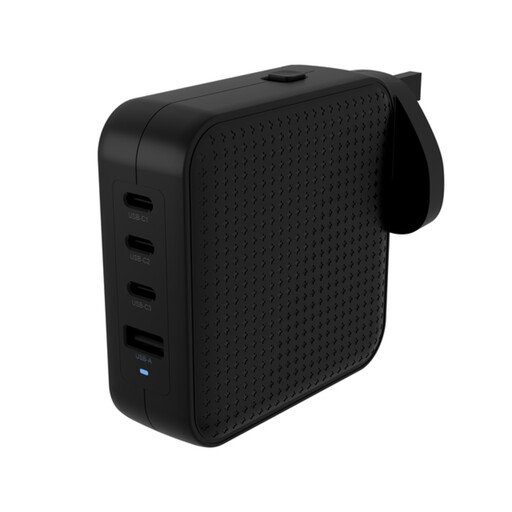
Hyper HyperJuice 100W USB-C GaN Travel Charger (3C+1A), Black
The 3C+1A port arrangement is relevant if you want connections for several devices from one wall charger. Before using it for a laptop alongside other devices, check the output allocation for the ports you will occupy, your cables’ ratings and the plug and input-voltage requirements of your destination.
View on Joybuy
 No image available
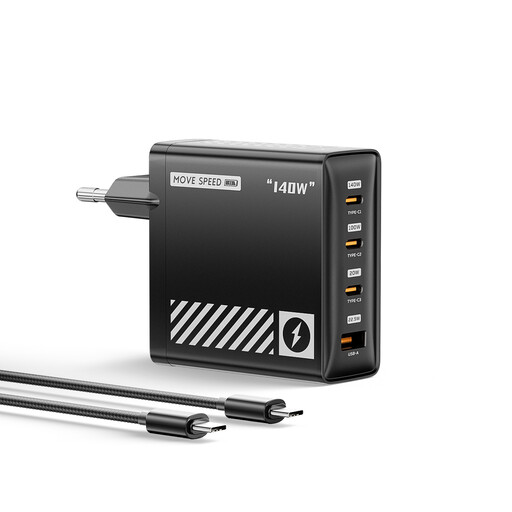
MOVESPEED HC-TR271A-EU 140W PD 3.1 4-Port EU Charger, Black
This four-port charger is an option for connecting several devices, but its 140W figure does not establish the laptop’s share during simultaneous charging. Its EU plug also calls for a plug-fit check for UK sockets and each destination; check the occupied-port output and cable ratings before packing it as your only charger.
View on Joybuy
Questions about travel charging
Can a 100W multi-port charger charge my laptop, tablet and phone together?
It can do so only if the output allocated with all three devices connected meets their charging requirements. Apple lists a 30W minimum for the MacBook Air covered by its current specifications, while Microsoft lists different minimums for different Surface Laptop models. Check your exact laptop and the charger’s occupied-port output table rather than treating 100W as the output of every port.
Does a travel adaptor convert voltage for a USB charger?
No. Electrical Safety First says a travel adaptor changes the plug connection but does not convert voltage or frequency. Compare the charger’s input-voltage label with the destination supply before using it.
Which cable should I pack for a USB-C laptop?
Pack a cable whose connectors fit the laptop and charger and whose stated power rating meets your planned charging power. The USB Implementers Forum identifies separate 60W and 240W cable-rating logos; a USB-C connector by itself does not tell you which rating a cable supports.
What should I check on a travel adaptor?
Check that its plug fits the destination socket, that its load rating suits the connected charger and that the adaptor is in sound condition. Electrical Safety First notes that the adaptor will not convert voltage or frequency, so check the charger’s input rating separately.


