
24/7 Customer Support

Free returns

Same-day & Next-day Delivery

Quality Guaranteed

Unlock Your Welcome Offers: FREE Delivery | Up to 80% OFF | Free 30-day JoyPlus trial
Download the APP
Buying one of the many USB-C chargers UK shoppers see online can appear straightforward, but the headline wattage often tells only part of the story. A charger may advertise fast charging yet lack the right protocol, include an unsuitable plug or deliver less power when several devices are connected.
This guide explains the practical specifications to check before buying a USB-C wall charger, with product suggestions matched to different needs.
A charger marked 65W, 100W or 140W does not necessarily deliver that amount to every connected device. With a multi-port USB-C charger, the total output may be divided between ports. A 40W dual-port model, for example, may provide up to 20W per port when two devices are connected.
Check whether the listing states:
USB-C describes the connector shape, not the charging speed. A fast USB-C charger should list its supported output profiles and protocols. USB-C PD is widely used by modern phones, tablets and laptops, while some devices may also rely on other charging standards.
The cable matters too. A 100W USB-C charger connected to a low-rated or damaged cable may not provide the expected performance. Some compact adapters, including the Apple 20W USB-C Power Adapter, are supplied without a charging cable.
A charger with an EU plug is not a direct fit for a standard UK wall socket. For everyday use in Britain, look for a UK plug charger with a three-pin design, or confirm that the package includes a suitable UK power cord.
Travellers should also check input voltage. Chargers supporting a broad AC input range can be useful abroad, but a plug adapter may still be needed. A compact design is helpful, although very small chargers may have lower output and fewer ports.
Match the charger to the device rather than simply choosing the largest number.
A USB-C laptop charger should meet or exceed the laptop’s required wattage. Using a charger with insufficient output may result in slow charging or continued battery drain during intensive use.
A USB-C Power Delivery charger negotiates an appropriate voltage and current with a compatible device. This is different from forcing a fixed output. Check that both the charger and cable support the required PD profile.
Charging speed can also vary according to device temperature, battery level, software settings and simultaneous use. Product descriptions should be treated as specification guidance rather than a guarantee of identical results for every device.
A GaN USB-C charger uses gallium nitride components instead of traditional silicon components in parts of its power circuitry. This can allow a compact form factor at higher power ratings, but GaN alone does not determine charging speed or safety.
Also check for clearly listed protections such as:
Never use a charger with a cracked casing, loose pins, unusual sounds or excessive heat. Keep it ventilated and use a compatible, certified cable.
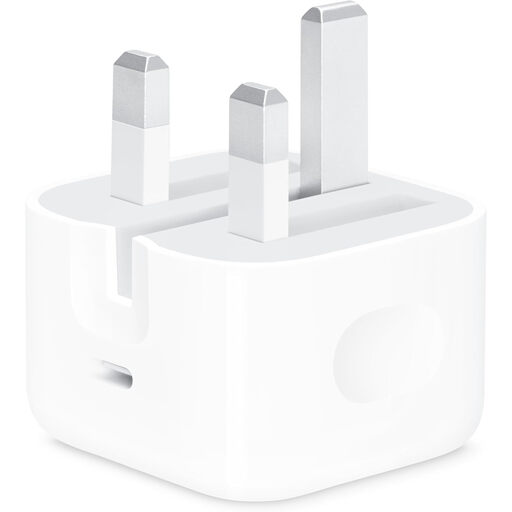
Why This Fits Their Persona: A straightforward choice for UK households, students and phone users who need one compact charger with a standard three-pin plug.
The 20W output and single USB-C port make the specification easy to understand. Check the cable requirement before ordering, as no charging cable is included.
UK three-pin plug, compact form and up to 20W output for compatible devices.
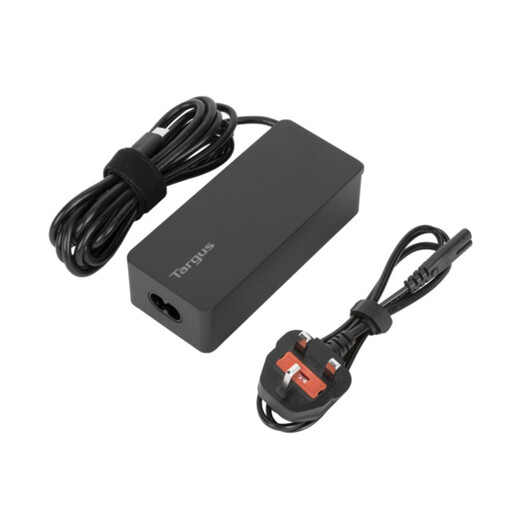
Why This Fits Their Persona: Suitable for remote workers and business travellers who want one adapter for a compatible laptop, tablet and phone.
Its stated 65W maximum is more suitable for many laptop applications than a phone-only adapter. Confirm your laptop’s required wattage before purchase.
USB-C PD, overcurrent, overheating and overvoltage protection, plus EU and UK power cords.
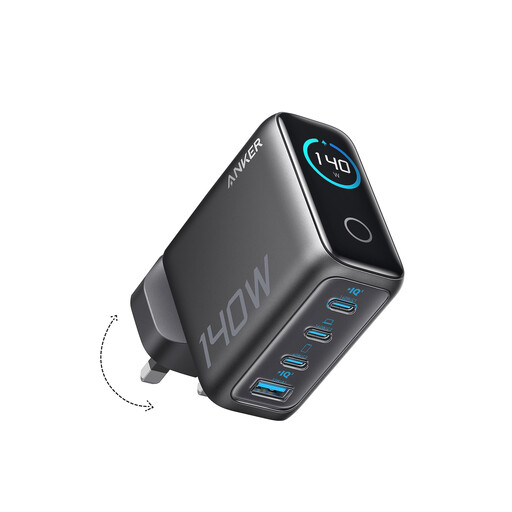
Why This Fits Their Persona: Designed for users managing several devices at a desk, in a home office or during work travel.
The four-port layout is more practical than carrying several single-port adapters, while the stated total output helps identify its intended high-demand use.
Four-device charging, two USB-C ports and GaN construction, with a display showing charging status and temperature.
We have compiled a complete, real-time list of products that fully satisfy these strict selection criteria and UK safety regulations.
Use this checklist when comparing USB-C chargers UK listings:
Usually, a compatible USB-C PD charger can charge a phone, provided you use an appropriate cable. The phone negotiates the power it can accept, so a 65W or 100W charger does not automatically force that full output into a lower-powered handset. Always check device and cable compatibility.
It can be useful where size and weight matter, particularly for business travel. GaN technology is associated with compact charger designs, but compare the plug type, wattage, port count and safety information rather than choosing solely because the product uses GaN.
Power consumption depends on the charger design and whether a device is connected. For sensible energy use, unplug the charger when it is not needed, especially overnight or when leaving home. Avoid using any adapter that becomes unusually hot, makes noise or shows physical damage.