What should you check before buying?
Identify the device and the cable it needs first, then check the charging mode, the seller and the intended number of devices.
| Concern |
What to check |
Who this matters to |
| Connector and charging standard |
Match the device model to its required cable ends and charging standard. Apple distinguishes USB-C cables for iPhone 15 and later from USB-C-to-Lightning cables for earlier compatible iPhones. |
If my old charger is gone, I need a replacement setup that connects to my device and supports its documented charging mode. About 37% of consumers put connector and charging-standard compatibility first. |
| Safety and traceability |
Check the manufacturer and model details, retailer identity, and relevant alerts or recalls through the UK Office for Product Safety and Standards. Do not rely on a CE or UKCA mark alone. |
When replacing a mains plug I use every day, I want to identify the product and seller before I bring it home. For about 36% of consumers, safety and traceability are the primary concern. |
| Charging mode and cable capacity |
Check the device maker's supported mode, the charger's stated standard and the cable requirement. Samsung specifies a 45W adapter and a 5A cable for its stated 45W mode. |
If I am replacing a charger to use a faster mode my device supports, I need the adapter and cable to meet that mode's requirements. Charging performance comes first for about 18% of consumers. |
| Several devices at one socket |
Check the port types and the stated output for each port or port combination when your devices charge together. |
With several devices to charge in one place, I need to know how the charger serves them at the same time. About 9% of consumers make multi-device convenience their primary need. |
Brands to consider
Brand ranges offer different starting points, but the charging requirements and package contents still need checking for the exact model.
Apple
A device-maker starting point for iPhone and iPad owners checking documented charging combinations.
- Apple Support specifies a USB-C cable for fast charging iPhone 15 and later, and a USB-C-to-Lightning cable for earlier compatible iPhones.
- An Apple-branded adapter is not required for every compatible setup: Apple also describes a comparable third-party USB-C PD adapter route. Check the device and cable requirements before choosing either.
Samsung
A device-maker reference for Galaxy owners checking which charging tier their model supports.
- Samsung publishes model-dependent guidance covering the device's supported power, charger output and cable specification.
- Samsung's stated 45W mode requires a 45W adapter and a 5A cable; not every Galaxy device supports that tier.
Anker
A third-party range to examine if you are comparing single-port charging with a shared multi-port setup.
- Anker's UK charger catalogue includes both single-port and multi-port models.
- Check the exact model's port allocation, claimed output and cable inclusion; a feature shown elsewhere in the range does not apply to every charger.
Belkin
A third-party option for comparing USB-C PD chargers and models listed with Programmable Power Supply (PPS) support.
- Belkin explains USB-C PD in terms of a compatible device, cable and charger, which gives buyers a useful set of items to check.
- Confirm the exact model's PD or PPS support against your device. Charging-speed claims do not establish the result for every phone or tablet.
Joybuy charger selections
These mains-charger options cover a single-port USB-C replacement, a multi-port setup and an Apple USB-C adapter. Match any option to your device and cable before ordering, and check the exact product identity against current UK safety alerts.
 No image available
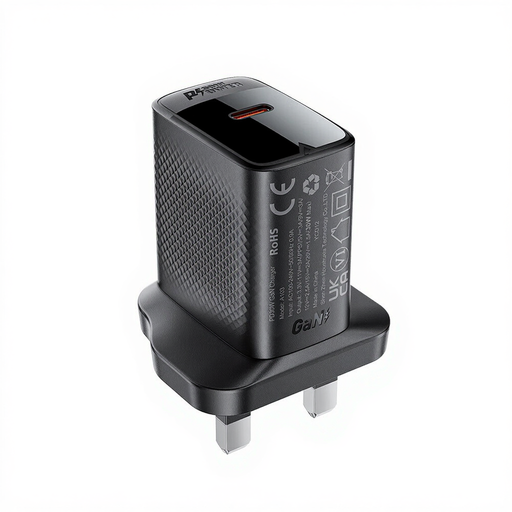
ACEFAST PD30W GaN USB-C Charger, Black
Consider this single-device replacement if your phone or tablet uses a charging mode supported by the charger and you have a suitable cable. The product name identifies a USB-C charger in the PD30W variant; check the exact device requirements and whether a cable is supplied.
View on Joybuy
 No image available
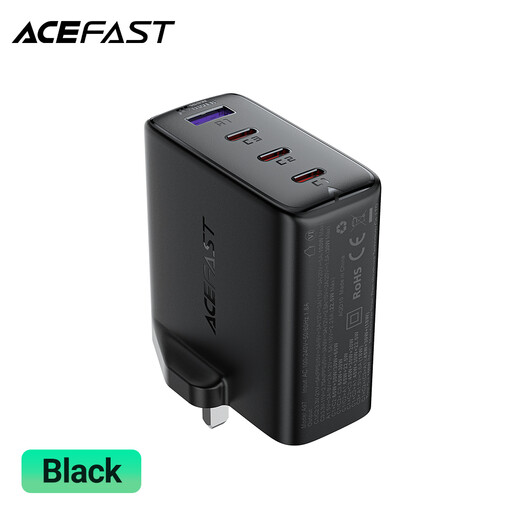
ACEFAST A97 PD100W GaN Charger, 3 USB-C + USB-A, UK
Consider the A97 if you intend to connect several devices at one socket. Its product name identifies three USB-C ports and one USB-A port; check the output stated for the port combination you will use, along with the cables needed for your devices.
View on Joybuy
 No image available
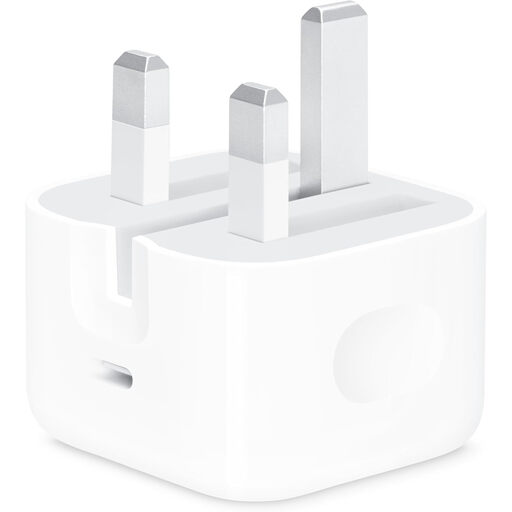
Apple 20W USB-C Power Adapter
Consider this adapter if you want an Apple-branded USB-C option and its stated output meets your device's requirements. Choose a cable that fits the device: Apple specifies USB-C for iPhone 15 and later, and USB-C-to-Lightning for earlier compatible iPhones. Check the package contents if you also need a cable.
View on Joybuy
Frequently asked questions
Is a CE or UKCA mark enough to judge a replacement charger?
No. Electrical Safety First warns that marks can be faked. Check the manufacturer and model details, the seller and relevant safety alerts as well as the marking; a visible mark alone does not establish that an individual charger is safe.
How can I check for a charger recall?
Search the UK Office for Product Safety and Standards Product Safety Alerts, Reports and Recalls service using the charger's brand and model number. Compare the alert's product details with the exact charger you are considering or already own.
Which cable does an iPhone need for fast charging?
Check the iPhone generation first. Apple Support specifies a USB-C cable for iPhone 15 and later, and a USB-C-to-Lightning cable for earlier compatible iPhones; the adapter must also support the charging setup Apple describes for that device.
Why might a Samsung phone charge below the adapter's headline wattage?
The adapter's maximum output is only one part of the setup. Samsung says charging depends on the device's supported power, the charger and the cable; its stated 45W mode requires both a 45W adapter and a 5A cable.
When does a multi-port charger make sense?
Consider one when you regularly charge several devices from the same socket and can confirm that the exact model provides the port types and simultaneous-use output they need. For one replacement device, a single-port charger can be simpler to match to its documented requirements.


