
24/7 Customer Support

Free returns

Same-day & Next-day Delivery

Quality Guaranteed

Unlock Your Welcome Offers: FREE Delivery | Up to 80% OFF | Free 30-day JoyPlus trial
Download the APP
A charger can look compact and powerful on a product page yet still be unsuitable for your phone, tablet or laptop. For UK buyers, the main risks are not usually the headline wattage alone. They include choosing the wrong plug format, overlooking how power is shared between ports or buying a charger without checking whether the cable is included.
This guide explains the practical specifications to check before buying USB-C chargers, followed by recommendations for different usage profiles.
A 100W USB-C charger does not automatically charge every device at 100W. Your phone, tablet or laptop negotiates the power it can accept. A device limited to 20W will not charge at 65W simply because the wall adapter supports it.
Charging speed also depends on:
For a USB-C phone charger, 20W to 30W may be sufficient. A laptop USB-C charger generally needs considerably more, especially for larger performance laptops.
Some chargers use a detachable EU plug or require an additional travel adapter. This can add bulk and create another connection point. For regular use in Britain, look for a UK three-pin plug or a product supplied with a UK power cord.
A suitable UK plug charger should have clear input information, appropriate safety markings and a design intended for standard UK sockets. Do not use a damaged plug, loose cable or adapter with visible cracks.
A multi-port USB-C charger may advertise its combined maximum output, but that power can be divided when two or more devices are connected. For example, a 40W dual-port charger may provide up to 20W per port in a two-device configuration, depending on the model.
Before buying a multi-port USB-C charger, check both:
USB-C PD is the main specification to look for when charging modern phones, tablets and laptops. It enables the charger and device to negotiate a suitable voltage and current rather than applying a fixed output.
As a practical guide:
A fast USB-C charger may still need a compatible cable to reach its stated output. If a charger is supplied without a cable, check whether your existing cable supports the required wattage.
A single-port USB-C wall charger is straightforward and often compact. Dual-port and three-port models are more useful for bedside tables, desks or travel, but their output allocation matters.
Also check whether the charger includes USB-A ports. A mixed USB-C and USB-A charger can be convenient if you still use older cables, while an all-USB-C model is more suitable for newer devices.
GaN chargers use gallium nitride components, allowing some models to offer a smaller housing than conventional silicon-based designs at comparable output levels. Compact size is particularly useful for business travellers and students carrying a charger between home, university and work.
Look for stated protection against overcurrent, overvoltage, overheating and short circuits. These features support safer operation, but they do not remove the need to keep the charger ventilated and dry. Stop using any charger that becomes unusually hot, emits a smell or shows physical damage.
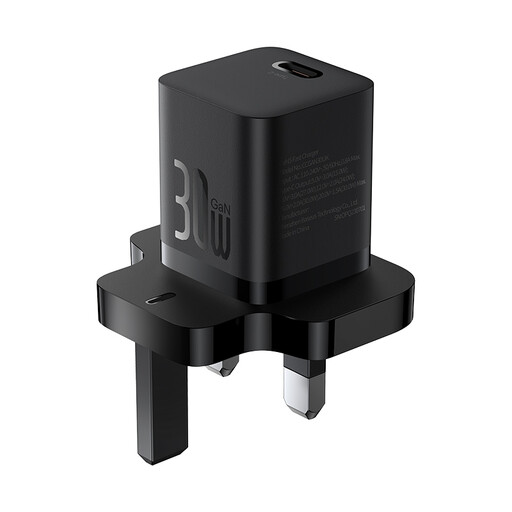
Why This Fits Their Persona: A pocket-sized option for phone users, commuters and students who want a UK plug charger with one USB-C port and up to 30W output.
Its listed UK configuration avoids relying on a separate plug adapter, while the single-port design avoids uncertainty over shared output.
30W USB-C output, GaN5 design, 51.5g weight and support for AC 110–240V input.
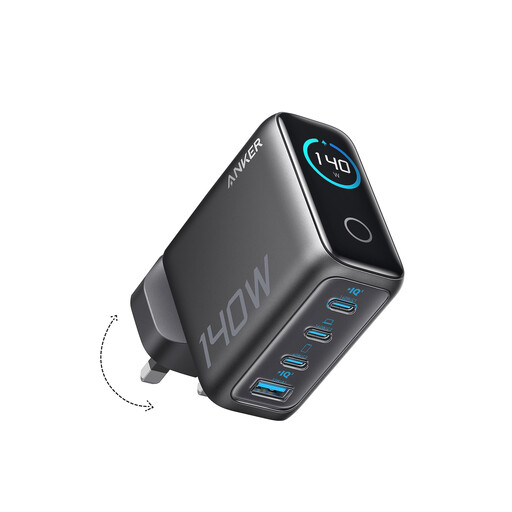
Why This Fits Their Persona: Designed for professionals with a laptop, phone, tablet and accessories to charge from one desk or hotel-room socket.
The four-port layout makes the port count clear, while the display provides charging status, temperature and port information.
Four ports, two USB-C ports listed with up to 140W maximum output, GaN construction and an integrated colour display.
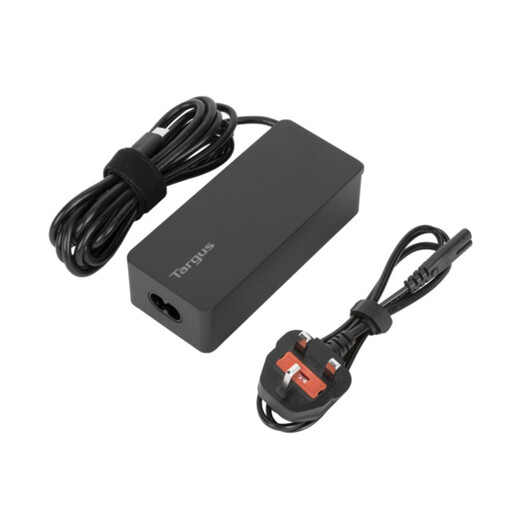
Why This Fits Their Persona: A practical choice for business travellers and users charging a USB-C laptop, tablet and phone with one higher-output adapter.
The 65W rating is more suitable for many USB-C laptops than a phone-only adapter, and EU and UK power cords are included for travel flexibility.
Up to 65W USB-C PD output, 1.8-metre cable, cable tie and listed overcurrent, overheating and overvoltage protection.
We have compiled a complete, real-time list of products that fully satisfy these strict selection criteria and UK safety regulations.
Not always. The connector may fit, but the required wattage and charging protocol can differ. A 30W USB-C charger may suit a phone and tablet but may charge a laptop slowly or fail to maintain its battery level during demanding use. Check the laptop manufacturer’s recommended power rating before purchasing.
The charger draws power according to the connected device and charging stage rather than continuously using its maximum advertised output. A 20W USB-C phone charger will generally use less energy for a phone than a 65W laptop charger powering a laptop. Unplug the adapter when it is not needed, particularly if it becomes warm while idle.
Lifespan depends on build quality, handling, heat exposure and daily use. Keep the charger dry, avoid covering it during operation and do not bend cables sharply at the connector. Replace it if the casing, pins or cable are damaged. A charger with suitable output and protection features can remain useful longer because it may support several compatible devices as your setup changes.