
24/7 Customer Support

Free returns

Same-day & Next-day Delivery

Quality Guaranteed

Unlock Your Welcome Offers: FREE Delivery | Up to 80% OFF | Free 30-day JoyPlus trial
Download the APP
A replacement cable can look like a simple purchase, but the wrong one may charge slowly, fail to transfer files or become unreliable after repeated bending. For UK households managing phones, tablets, laptops, games consoles and travel accessories, choosing suitable USB-C charging cables means looking beyond connector shape and headline wattage.
The most common buying pitfalls are easy to miss:
Start by checking both ends. A USB-C to USB-C cable is suitable for modern USB-C wall chargers, power banks, laptops and many current smartphones. A USB-C to USB-A cable connects a USB-C device to older chargers, desktop computers, car ports and some power banks.
Apple users should check the charging port carefully. iPhone models with a USB-C port can use a USB-C cable for iPhone, whereas older Lightning-equipped models require a USB-C to Lightning cable or a cable with a Lightning connector. A multi-connector option can be useful for households with mixed devices, but confirm the power and data specifications for each connector.
A 60W USB-C cable is generally suitable for phones, tablets and many lightweight laptops. A 65W USB-C cable can be a practical choice for USB-C PD-enabled laptops, tablets and smartphones. Users with higher-demand laptops or gaming devices may prefer a 100W USB-C cable, provided the charger and device also support the required Power Delivery profile.
A 240W USB-C cable is designed for USB-C Power Delivery 3.1 Extended Power Range equipment. It offers additional capacity for compatible high-power laptops, but it does not override the limits of the connected charger or device. For safe use, match the cable with a compatible, reputable power adapter and check the manufacturer’s stated ratings.
Charging wattage and data performance are different specifications. A cable labelled as a fast charging cable may still provide only USB 2 data speeds. That is enough for syncing photos, documents and music, but less suitable for large video files or fast external storage.
If you regularly move files between a laptop and phone, look for a clearly stated USB-C data cable specification such as 5Gbps or 10Gbps. The Cygnett Armoured cable listed below states up to 10Gbps transfer, while several everyday charging cables specify up to 480Mbps. Choose according to your actual workflow rather than paying for a higher data rate you will not use.
A braided USB-C cable can offer resistance to surface wear and tangling, while silicone designs are often flexible and easy to coil. Neither material makes a cable indestructible: avoid tight knots, sharp bends, heat, moisture and pulling the cable from the wire rather than the connector.
For most desks and bedside tables, 0.9m to 1.2m is a manageable range. A 2m cable provides more reach for sofas, hotel rooms and awkwardly positioned sockets, but it should be loosely coiled when stored. Look for strain relief around the connector, a clearly stated warranty and safety instructions. Stop using any cable showing fraying, exposed wires, cracked housings or unusual heat.
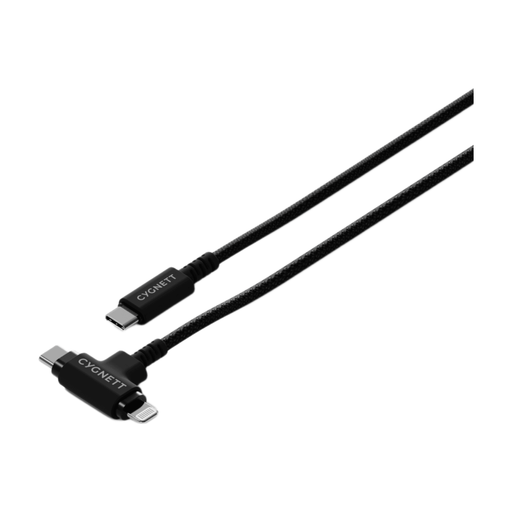
Why This Fits Their Persona: A practical option for homes with older USB-A chargers, office computers or car ports, while also supporting USB-C and Lightning devices.
The connector combination is clear, reducing the risk of buying a USB-C to USB-C cable for a USB-A power source.
1m length, right-angle design, braided construction, up to 60W USB-C charging and 480Mbps data transfer.
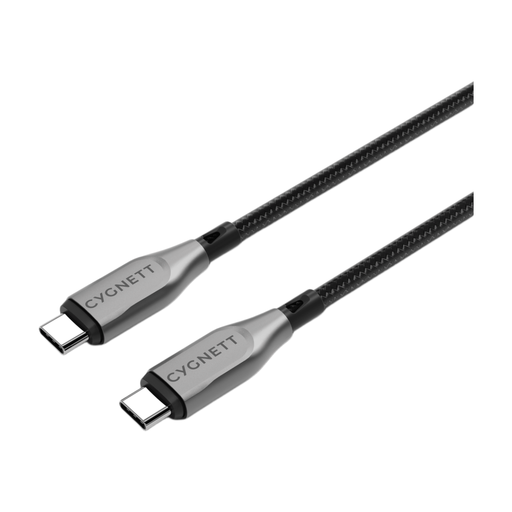
Why This Fits Their Persona: Suitable for professionals and creators who need a robust USB-C cable for laptops, tablets and smartphones.
It states both power and data performance, avoiding the assumption that high charging wattage automatically means fast file transfers.
Up to 100W charging, 10Gbps data transfer, double-braided nylon and a stated 5-year warranty.
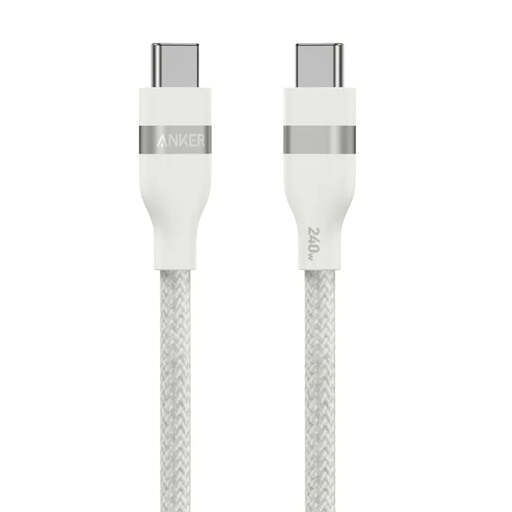
Why This Fits Their Persona: A compact choice for users charging high-demand USB-C laptops, tablets and phones with compatible PD equipment.
Its 240W rating is clearly presented as cable capacity, so buyers can still verify that their charger and device support the required power.
USB-IF certified, braided recycled-material exterior and stated 30,000+ bend lifespan.
We have compiled a complete, real-time list of products that fully satisfy these strict selection criteria and UK safety regulations.
Not always. The connectors may fit, but charging speed depends on the cable, charger and device. Check the required wattage and Power Delivery support. A cable rated for 60W may charge a phone and tablet effectively but may be unsuitable for a laptop that requires more power.
Lifespan depends on construction and handling. Braided or reinforced cables can resist everyday abrasion, but repeated sharp bends, tight wrapping, heat and pulling from the wire can cause early failure. Replace a cable if its insulation splits, connector becomes loose or it gets unusually hot.
Cable length does not normally create a significant household electricity cost by itself. However, longer or poorly constructed cables may experience greater resistance, particularly at higher loads. Choose the shortest practical length, use a compatible charger and avoid damaged cables to support efficient, safe charging.