Choose the upgrade that addresses the problem in your working day: for prolonged laptop use, the Health and Safety Executive advises separating screen and input positioning with a raised screen, keyboard and mouse. A dock can make repeated desk connections easier if your laptop supports its display and charging functions; a webcam or headset addresses call equipment, not a failing connection. If calls break up, check the home network first—Ofcom advises using Ethernet where practical for faster, more reliable access than Wi-Fi.
Who is this setup for?
Daily laptop-based home workers
If documents or spreadsheets keep you at a laptop for long stretches, screen and input positioning may matter more than extra ports. The Health and Safety Executive advises a separate keyboard and mouse so a laptop screen can be raised, and identifies a separate display for prolonged laptop use.
Hybrid workers with a fixed home desk
If you reconnect a display and several peripherals each time you work at home, a dock may simplify the routine. Check your exact laptop’s USB-C display and charging support before choosing one.
Frequent callers in shared homes
A camera angle, room noise and an unstable connection call for different fixes. Identify whether the difficulty is with video, audio or the network before adding meeting equipment.
What should you check first?
Start with the part of your work routine that causes trouble, then check whether an accessory fits your laptop, desk and home connection.
| Priority | What to check | Your needs |
|---|
| Screen and input position |
For prolonged laptop use, consider whether the screen can be raised while a separate keyboard and mouse remain comfortably placed. The Health and Safety Executive also identifies a separate display as an option. |
I spend long stretches on documents and need to position the screen without raising the keyboard with it. |
| Desk connections |
List the display, USB, network and charging connections you use together. For a USB-C dock, check the exact laptop’s display protocol, supported monitor configuration and charging requirement; Lenovo notes that dock operation depends on supported host protocols. |
Repeatedly reconnecting desk equipment interrupts my move between home and office. |
| Camera placement |
Check camera angle, mounting position, privacy control and compatibility with your calling software. Confirm that any advertised software-dependent feature works on your computer. |
My built-in camera is awkwardly placed for regular meetings, or I want a physical way to cover a separate camera. |
| Call audio |
Check microphone connection and placement, headset fit and compatibility with your call device. Noise-control features do not establish how a headset will perform in your room. |
In a shared room, I need to hear calls and place a microphone close enough for conversation. |
| Connection stability |
Check whether problems vary with household usage or Wi-Fi conditions. Ofcom advises connecting a computer directly to the router by Ethernet where practical; the broadband service can still affect the call. |
Calls break up when other devices are active, so I want to investigate the connection before changing my camera or headset. |
What can go wrong?
-
Assuming every USB-C port supports every dock function
A dock’s stated display and charging capabilities depend on the laptop as well as the dock. Lenovo specifies supported USB-C Alt-Mode, DisplayLink or Thunderbolt protocols for its USB-C and Thunderbolt docks.
Check your exact laptop model, port capabilities, supported display configuration and charging requirement against the dock before ordering.
-
Replacing call equipment when the connection is failing
A different webcam or headset will not resolve interruptions caused by the home connection. Ofcom notes that household activities, including virtual meetings, use the same available bandwidth.
Compare call performance at different times and try Ethernet directly to the router where practical before buying another meeting accessory.
-
Raising the laptop without changing the input setup
Raising the whole laptop also raises its keyboard and trackpad. The Health and Safety Executive advises separating the keyboard and mouse from a raised laptop screen for prolonged use.
Plan where a separate keyboard and mouse will sit when you raise the screen or add a monitor.
-
Treating call features as a guaranteed result
Camera correction and headset noise-control features do not determine lighting, fit, surrounding noise or software compatibility in your own workspace.
Choose a feature for the problem you have observed, and check any operating-system or companion-app requirements before buying.
Relevant brand references
Lenovo
Lenovo’s ThinkPad Universal USB-C Dock is a reference point for a fixed desk with several peripherals.
- Lenovo UK lists display outputs, 1Gbps RJ45 networking and charging for model 40AY0090UK.
- Check that the laptop supports the protocol required for the dock functions you intend to use.
Logitech
Logitech offers external webcams for home video calls, including the Brio 505.
- Logitech specifies Full HD 1080p capture and a physical privacy shutter for the Brio 505.
- Check device, meeting-platform and software requirements for the particular features you want.
Jabra
Jabra positions the Evolve2 55 as a headset for hybrid calls.
- Jabra specifies active noise cancellation and noise-cancelling microphones for this model.
- Fit, surrounding noise and microphone position affect the experience; the listed features do not guarantee a particular call result.
Dell
Dell’s Pro 7-in-1 USB-C Travel Hub is an example of a compact connection option.
- Dell UK lists video, network and data connections, with up to 90W power pass-through.
- Compare that pass-through rating with your laptop’s charging requirement and USB-C capabilities.
Joybuy products for your desk setup
These options address different parts of a home desk: screen placement, desk connections, video, audio and a wired network connection. Choose by the problem you need to solve rather than treating the accessories as interchangeable.
 No image available
Targus USB-C Universal Dual HDMI 4K Dock, 100W PD Pass-Thru
Consider this for a fixed desk where you reconnect displays and peripherals. Check your laptop’s USB-C Alt-Mode and charging requirements; the stated 100W pass-through rating does not guarantee the charging result for your laptop. Confirm the required external power adapter before purchase.
View on Joybuy
 No image available
Samsung 22-inch S40GD LS22D400GAUXXU Full HD Monitor
A separate screen is relevant when prolonged laptop work calls for more flexible screen positioning. Check that your computer can connect to this monitor, and plan for a separate keyboard and mouse if you will raise the laptop screen.
View on Joybuy
 No image available
Targus 2K Webcam with Auto Focus
A separate camera may help when laptop-camera placement is awkward for frequent calls. Confirm the actual video resolution before buying: the product title says 2K, while its listed technical specification says Full HD 1080p at 30fps. Check the connection and compatibility with your computer too.
View on Joybuy
 No image available
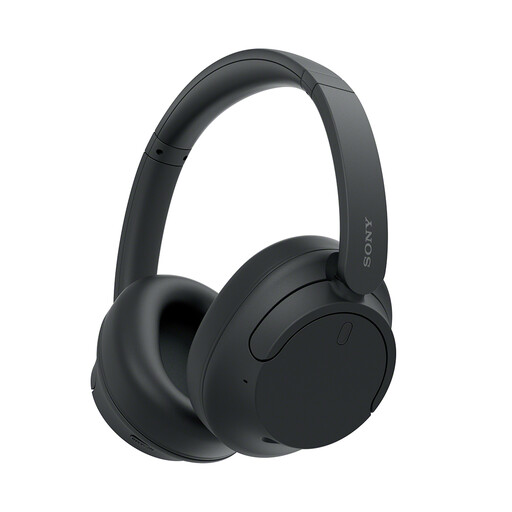
Sony WH-CH720N Noise-Cancelling Over-Ear Headphones, Black
These over-ear headphones are an audio option for calls in a shared space. Check your computer’s Bluetooth compatibility; noise-cancelling results will depend on fit and surroundings.
View on Joybuy
 No image available
V7 V7UC-U3CRJ45HDVG-BLK USB-C Adapter, 4K HDMI, VGA, Gigabit Ethernet, 100W PD
This adapter is relevant if you can reach the router by cable and also need USB-C desk connections. Check USB-C Alt-Mode support for display output and your laptop’s charging requirement. Confirm whether HDMI and VGA can run simultaneously before planning a two-display setup.
View on Joybuy
Frequently asked questions
When is a dock more useful than a basic USB-C hub?
A dock is worth considering when you repeatedly connect several desk devices, such as a display, USB peripherals and Ethernet. Check the exact laptop’s USB-C display protocol, supported monitor configuration and charging requirement before choosing one; the port shape alone does not establish compatibility.
Should I sort out my screen before buying a dock?
Yes, if screen and input position are the problem in prolonged laptop work. The Health and Safety Executive advises a separate keyboard and mouse so the laptop screen can be raised, and identifies a separate display for prolonged use. A dock addresses connections rather than replacing that positioning decision.
Will Ethernet fix every video-call problem?
No. Ofcom advises Ethernet directly to the router for faster, more reliable access than Wi-Fi, but the broadband service and other household activity can still affect calls. Compare performance at different times before deciding whether the connection or the call equipment needs attention.


