Who needs which setup?
The useful addition depends on what changes between your office and home workdays: connections, screen arrangement or calls.
Workers carrying a laptop between locations
If you reconnect at home after each office day, identify the display and peripherals you actually use there. For a dock, compare its requirements with the exact laptop port: Lenovo’s dock documentation specifies USB-C Alt Mode or Thunderbolt support for its USB-C and Thunderbolt docks.
People doing extended screen-based work
Document or spreadsheet work may call for a different screen and input arrangement at home. The UK Health and Safety Executive (HSE) advises considering the whole workstation, including equipment, furniture, working conditions and the task, rather than choosing a monitor in isolation.
People taking frequent video calls
Choose camera and audio equipment around your room, call privacy and work computer. A wearable audio device and a room speakerphone serve different listening arrangements; check the exact model’s connections and meeting-platform requirements before buying.
What should you check before buying?
Work out which part of your home setup needs changing, then check the laptop and room conditions that could limit your choice.
| Priority |
What to check |
Your needs |
| Desk reconnection |
Check the exact laptop’s video-output protocol, the dock’s host requirements and the ports needed by your display and peripherals. Compare documented charging requirements too: Lenovo specifies USB-C Alt Mode or Thunderbolt support for its USB-C and Thunderbolt docks, not compatibility based on connector shape alone. |
I move my laptop between home and office and want to reconnect the equipment I use at home without repeatedly changing several cables. |
| Screen and input layout |
Consider screen placement alongside the keyboard, mouse, desk, seating and lighting. HSE guidance says workstation assessment should account for the whole setup, the work and individual requirements; a new monitor alone does not address every layout issue. |
Long document sessions make the way my screen and input devices fit on the home desk more important than simply adding another device. |
| Calls at home |
Check camera position and framing, whether calls need private listening, and the exact audio device’s computer connection and meeting-platform compatibility. A speakerphone is a different choice from a wearable device when others may overhear the call. |
I take video meetings from home and need to choose equipment that suits my room, nearby noise and the privacy of the conversation. |
| Equipment you carry |
Decide which accessories stay on the home desk and which must travel. For a portable display, confirm its required video connection with the laptop before planning to use it in both places. |
I carry my setup on office days, so extra equipment needs to solve a specific screen, input or call problem without making every journey less practical. |
Relevant brand ranges
These ranges can help narrow a category, but the connection and feature checks still need to be made for the exact model.
Logitech
Logitech’s UK business catalogue covers input devices, webcams and call-audio products that may fit different parts of a home desk.
- Its catalogue includes wired, wireless and Bluetooth input options, alongside video-call accessories.
- Check operating-system, receiver or Bluetooth requirements and meeting-platform compatibility for the model you choose.
Jabra
Jabra’s UK range focuses on headsets, video-conferencing cameras and speakerphones.
- It offers several call-device formats for comparing personal listening with room audio.
- Jabra describes certification options, but certification, call controls and connections must be checked on the exact model against the platform you use.
Lenovo
Lenovo dock documentation is a useful starting point when checking a laptop-to-desk connection.
- Lenovo states that its USB-C and Thunderbolt docks work with notebooks supporting the relevant industry-standard USB-C Alt Mode or Thunderbolt protocol.
- Lenovo notes that some additional features may not be available on non-Lenovo systems. Confirm the exact laptop, dock, operating system and charging requirements.
Joybuy product options
These options cover several additions to a hybrid worker’s home setup: desk connections, a portable display, video calls, separate input devices and personal audio. Choose the category that addresses your working arrangement before comparing individual products.
 No image available
Targus USB-C Universal Dual HDMI 4K Docking Station, 100W Power Delivery Pass-Thru
A dock is worth considering if you regularly reconnect a compatible laptop to a home display and desk peripherals. This model is identified as a dual-HDMI 4K dock with 100W Power Delivery pass-through; check your laptop’s required USB-C video protocol and charging needs, plus whether the external power adapter needed for your setup is included.
View on Joybuy
 No image available
ASUS ZenScreen MB166CR FHD
This external display is an option if a second screen needs to move with your laptop. Before planning a one-cable setup, confirm that the exact laptop port provides the USB-C DisplayPort Alt Mode video connection required for this model; it is not a direct HDMI option.
View on Joybuy
 No image available
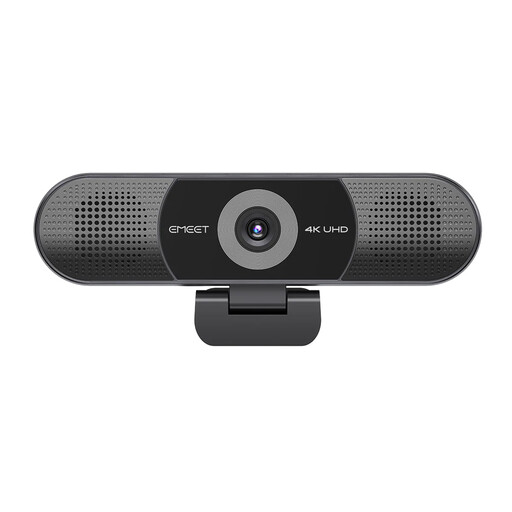
EMEET All-in-One 4K Webcam with Sony Sensor
Consider an all-in-one camera and room-audio device if your home call position calls for a separate webcam. The product name specifies a four-microphone array, two speakers, fixed focus and a 98° adjustable field of view; check the intended camera distance, computer connection and meeting-platform compatibility.
View on Joybuy
 No image available
HP 680 CFT Dual-Mode Keyboard/Mouse Combo
A separate keyboard and mouse may be useful when arranging a laptop screen at a home desk. Check that the keyboard has your preferred UK layout and that your work computer supports the connection method you intend to use.
View on Joybuy
 No image available
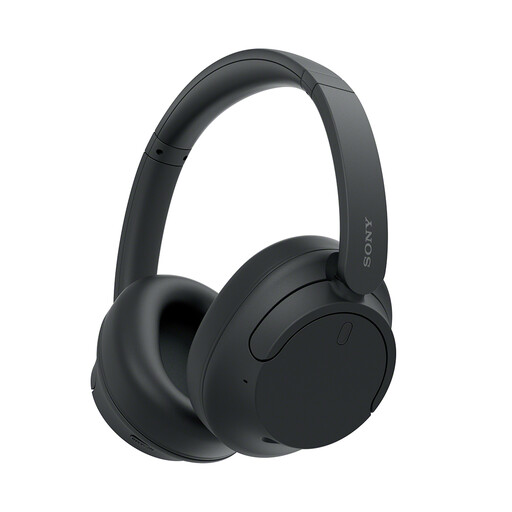
Sony WH-CH720N Noise-Cancelling Over-Ear Headphones (Black)
Wearable audio is worth considering when a speakerphone would let others hear your calls. Check the microphone and connection requirements of your work computer and meeting platform before using these headphones for meetings. Do not use noise cancellation where you need to remain aware of your surroundings.
View on Joybuy
Frequently asked questions
Does home working need a separate workstation assessment?
If you use display-screen equipment at home and in the office, HSE guidance says the assessment should cover both situations. Ask your employer how its process applies to your work and home setup; the guidance does not mean everyone should personally buy a monitor or dock.
Will any USB-C dock work with my laptop?
No: a USB-C connector alone does not confirm the video protocol needed by a particular dock. Lenovo specifies USB-C Alt Mode or Thunderbolt support for its USB-C and Thunderbolt docks. Compare the exact laptop port with the dock’s host requirements, display outputs and charging specifications.
Should I add a monitor or a separate keyboard and mouse first?
Start with the part of the home workstation that is difficult to arrange for your tasks. HSE guidance calls for considering the whole workstation, including equipment, furniture and working conditions, so assess screen placement and input-device position together before deciding what to add.
When does a headset make more sense than a speakerphone?
Choose personal audio when other people could overhear a call; consider a speakerphone when hands-free room audio suits a quiet, private space. For either choice, check the exact device’s microphone, computer connection and meeting-platform requirements.
What should I confirm before buying a dock for a work laptop?
Confirm the laptop model, operating system, port protocol and charging requirements against the exact dock specification. Also check the display connections, required cables and supplied power accessories; Lenovo notes that some additional dock features may not be available on non-Lenovo systems.


