Who is this for?
The useful starting point is how and where you work, not how many accessories you can add.
Long-term laptop home workers
If you work at a laptop for sustained periods, check whether you can position the screen and use the keyboard and mouse comfortably at the same time. The Health and Safety Executive advises separate input devices when raising a laptop screen for prolonged use.
Hybrid workers with two workstations
If you routinely divide work between home and an office, consider the arrangement at both locations. Health and Safety Executive home-working guidance says display screen equipment rules can apply to routine hybrid work; an assessment should address the individual setup rather than assume the office arrangement also works at home.
Laptop users with several connections to make
If your home desk needs external displays or multiple peripherals, establish the connections your exact laptop supports before choosing a hub, dock or adapter. Microsoft Support says Surface display support depends on the device model and connection path; Apple Support says simultaneous display support on a Mac also depends on the model and the displays’ resolution and refresh rate.
What should you check first?
Work out whether the main issue is screen position, display space, connections or calls. Then check the proposed accessory against the laptop and the actual desk arrangement.
| Priority | What to check | Your needs |
|---|
| Laptop position and input |
Check whether the screen can be raised while a separate keyboard and mouse remain usable. Allow room for all three items and check how the input devices connect. |
I spend long stretches at my laptop and need a screen position that does not dictate where I type or use the mouse. Health and Safety Executive guidance recommends separating the keyboard and mouse when raising a laptop for prolonged use. |
| Separate display |
Decide whether you need an independently positioned screen and what size fits the desk. Check the laptop’s supported display output, the monitor input and the cable or adapter between them. |
A separate screen would give me a display I can position independently of the laptop and input devices. |
| Dock or adapter |
List the connections you need, then check the exact laptop model, video-output support and intended display count. Confirm the dock or adapter’s host connection, the complete cable path and any charging requirement. |
I want to connect displays and peripherals at my home desk without assuming that a USB-C socket supports every display arrangement. Microsoft Support and Apple Support both make external-display capability dependent on the device and configuration. |
| Remote meetings |
Identify whether audio, microphone or camera placement is the practical issue. Check the peripheral’s connection type, available ports and support for your computer. |
Frequent calls make a separate headset or webcam worth considering if my current arrangement does not meet the way I work. |
| Employer assessment |
Check whether your working pattern brings you within display screen equipment assessment duties. Ask how necessary equipment is identified, approved and provided before ordering it yourself. |
If an accessory is needed for my work setup, I need to know the employer’s assessment and purchasing process. Health and Safety Executive guidance for Great Britain and Health and Safety Executive for Northern Ireland guidance say workers cannot be charged for equipment identified as necessary through a qualifying assessment. |
Relevant brand references
These brands provide useful product-category or compatibility information; their inclusion does not establish that a particular accessory suits your workstation.
Anker
Anker’s hubs and docks are relevant when a laptop needs connections for displays and peripherals through a dock.
- Anker describes USB-C docks as a way to expand a laptop’s available ports through one connection.
- Check the exact dock and laptop together for the intended displays, other connections and charging arrangement.
Logitech
Logitech has keyboard, mouse, headset and webcam options relevant to separate input devices and remote calls.
- Its home-working accessory range covers several peripherals that can be considered separately.
- Brand statements about comfort do not determine what an individual workstation assessment requires.
Microsoft Surface
Microsoft’s Surface documentation is a reference for checking an exact Surface model before connecting an external display.
- Microsoft Support explains that external-display capability depends on the Surface model and the cables or video adapters used.
- Surface guidance does not establish support for a third-party dock or a different laptop model; check those products separately.
Joybuy product options
These options cover a dock, separate monitors, a keyboard-and-mouse set and a headset for different laptop-workstation needs. Choose the type of accessory your setup calls for, then check compatibility and any employer approval before buying.
 No image available
Targus USB-C Universal Dual HDMI 4K Docking Station, 100W Power Delivery Pass-Thru
Consider this dock if your desk arrangement calls for HDMI display connections through a USB-C dock. The product name specifies dual HDMI, 4K and 100W Power Delivery pass-through; check the exact laptop’s video support, required charging power and complete connection path. Confirm the required power adapter and package contents before ordering.
Joybuy
 No image available
Samsung S40GD LS22D400GAUXXU 22-inch Full HD Monitor
A separate 22-inch Full HD display is an option when you need to position a work screen independently of your laptop. Check the laptop’s supported output, the monitor connection you intend to use and whether you need a separate cable.
Joybuy
 No image available
HP 680 CFT Dual-Mode Keyboard and Mouse Set
A separate keyboard and mouse let you plan an input position independently of a raised laptop screen, as described in Health and Safety Executive guidance for prolonged laptop use. Check which connection method works with your computer, particularly if you intend to use it without a USB receiver.
Joybuy
 No image available
AOC Q32V4 31.5-inch 2K IPS LED Monitor
This 31.5-inch separate display calls for a desk arrangement that accommodates its size. The product name also specifies 4ms, Adaptive Sync and built-in speakers. Check the laptop’s display output and required cable, and confirm that the screen’s positioning options meet your needs.
Joybuy
 No image available
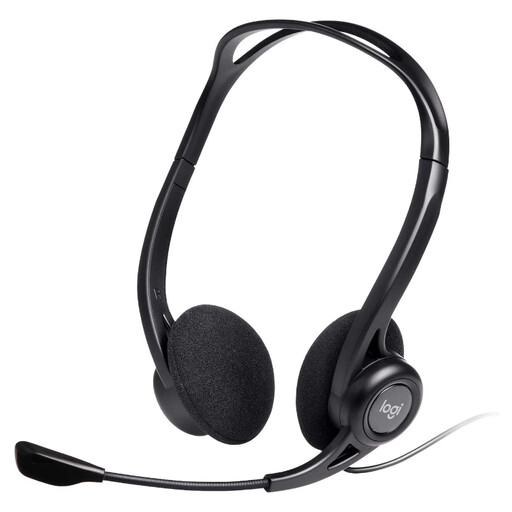
Logitech 960 Wired USB Headset with Inline Controls
A separate wired headset is an option if remote calls call for a dedicated microphone and headphones at your desk. The product name identifies a noise-cancelling microphone and inline controls; check that the computer has the required USB connection, or a suitable adapter.
Joybuy
Frequently asked questions
When do home-working display screen equipment assessments apply?
For Great Britain, the Health and Safety Executive says the regulations can apply to permanent or long-term home workers and routine hybrid workers who use display screen equipment daily for continuous periods of an hour or more. Health and Safety Executive for Northern Ireland guidance identifies the same daily, hour-or-more condition. Occasional or shorter home use needs to be considered separately.
Does every hybrid worker need a full set of equipment at home?
No. The Health and Safety Executive says a worker may not need office-type equipment at home to achieve a suitable arrangement. An assessment considers the existing workstation and identifies changes needed for that person’s work, rather than prescribing the same accessories for everyone.
What should I consider for prolonged laptop work?
Start with the relationship between the screen and input devices. The Health and Safety Executive advises a separate keyboard and mouse so a laptop screen can be raised on a riser or similar support; a separate display is another option to assess when the laptop screen does not meet the workstation need.
What must I check before buying a dock for external monitors?
Check the exact laptop model’s supported display count and configuration, its video connection, the monitor inputs and every cable or adapter between them. Also check the dock’s host-connection and charging requirements. Microsoft Support says Surface display capability depends on model and connection path; Apple Support says Mac display count depends on model, resolution and refresh rate.
Should I buy an assessed work accessory myself?
Check the employer’s process first. Where a qualifying display screen equipment assessment identifies necessary equipment, Health and Safety Executive guidance for Great Britain and Health and Safety Executive for Northern Ireland guidance say the worker cannot be charged for it. Ask which item is approved and whether the employer will supply it or arrange an approved purchase.


