Laptop-first hybrid workers
If you alternate between home and office, a repeatable screen and input arrangement may matter more than building two identical desks. Consider which items will stay at a regular desk and which you are willing to carry.


Start with your laptop’s actual display, port and charging capabilities, then add equipment that addresses the part of your working day that causes the most friction. A monitor and stand suit a repeatable fixed-desk arrangement; a dock makes sense when you reconnect several devices often, but only after checking the complete laptop-to-display connection. Choose keyboard, mouse and call audio for your typing and meeting needs rather than assuming every accessory belongs in the same setup.
The useful additions depend on whether your main difficulty is arranging a regular desk, reconnecting equipment or taking calls between locations.
If you alternate between home and office, a repeatable screen and input arrangement may matter more than building two identical desks. Consider which items will stay at a regular desk and which you are willing to carry.
If you regularly attach a display and peripherals to your laptop, a dock or USB-C hub monitor may reduce connection changes. Check the exact laptop’s video and charging support before planning around one cable.
If meetings move between home, office and other settings, concentrate on connection method, microphone requirements, comfort and what you can carry. Another display will not address a call-audio problem.
Identify the improvement you need first; check laptop compatibility before committing to any one-cable display or dock arrangement.
| Concern | Buying checks | Who this matters to |
|---|---|---|
| Screen space and desk arrangement | Check the monitor connection and the adjustment available from the monitor or laptop stand. For a USB-C hub monitor, confirm laptop video support and, if needed, USB Power Delivery. | If I work at the same desk for long stretches, I want screen space and a position I can set up consistently. About 31% of consumers put that desk arrangement first. |
| Dock and display compatibility | Check the exact laptop’s host-port technology and supported external-display count, resolution and refresh rate. Confirm charging requirements and what power hardware comes with the dock. | When I reconnect several devices each workday, I need the intended displays and charging to work through my laptop. For about 31% of consumers, reliable reconnection is the primary concern. |
| Keyboard and mouse fit | Choose a suitable keyboard layout and size; check whether the connection method works with your laptop and workplace device rules. | I may already have enough screen space but want keys and a pointing device that suit my typing and desk space. Roughly 19% of consumers give input-device fit and portability priority. |
| Call audio across locations | Check the headset’s connection method against your work device and meeting platform. Consider its carrying format and whether you need to hear people around you. | If my meetings happen in different surroundings, I need workable call audio without making the headset awkward to move. Call needs come first for about 19% of consumers. |
The Health and Safety Executive identifies workstation arrangement as relevant to sustained display-screen work; it does not make a monitor an automatic remedy. For display limits, Apple Support says the Mac model and each display’s resolution and refresh rate matter. Kensington likewise specifies that some dock display modes require support across the laptop, dock and monitor.
A matching connector does not establish the video mode or charging behaviour you need. A dock can connect physically without delivering the planned screen arrangement.
Find your exact laptop model and check its manufacturer’s port, external-display and USB Power Delivery specifications before choosing a dock, hub monitor or adapter.
Kensington says a maximum-resolution configuration for its SD4842P EQ dock requires DSC v1.2 support across the laptop, dock and monitor. Apple Support says a MacBook Air’s external-display capacity also depends on the particular model and display modes.
Write down the number of screens and the resolution and refresh rate you intend to use, then check that complete configuration against the laptop and dock specifications.
Kensington lists up to 100W Power Delivery for its SD4842P EQ dock but says the cable, power supply and power cords are not included. Its charging capability is not, by itself, a complete in-box setup.
Check the contents and power requirements of the exact dock, along with the charger and cables you already have.
You may need a separate power supply, host cable or mains lead.
For workers covered by display-screen-equipment duties in Great Britain, the Health and Safety Executive says employers must assess and manage workstation risks. Where an assessment indicates equipment is needed, workers cannot be charged for it.
Ask what assessment, equipment and support your employer provides. Keep a personal convenience upgrade distinct from equipment identified through that process.
These brands illustrate different product routes; the stated features and limitations apply to the cited product lines or models, not to everything bearing each brand name.
A reference point for a monitor-led fixed desk, including USB-C hub monitors.
A reference point when comparing mobile and fixed-desk docking connections.
A reference point for comparing keyboard and mouse formats at a regular or space-limited desk.
A reference point for headsets intended for office, mobile and multi-location calls.
For the call-audio and desktop-input parts of a laptop setup, these selections include headphones, keyboard-and-mouse sets and a standalone mouse. Check each item against your work device and the way you move between desks.
 Image unavailable
Consider these for calls between work locations if over-ear headphones fit what you are willing to carry. The product name specifies wireless use and adaptive noise cancellation; check connection and meeting-platform compatibility with your work laptop before buying.
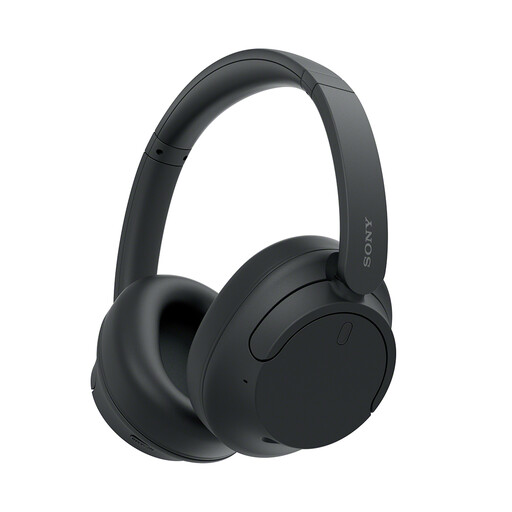 Image unavailable
These are another over-ear option to consider when calls form a regular part of hybrid work. Confirm how they connect to your laptop and meeting platform. Avoid using noise cancellation where you need awareness of people or activity around you.
 Image unavailable
This set suits a desk where a UK English keyboard layout is important. Check that its connection method and operating-system compatibility meet your work-device requirements before making it part of a repeatable setup.
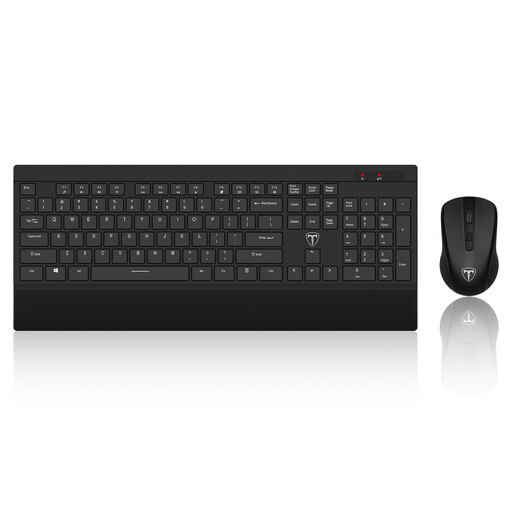 Image unavailable
Consider this full-size set if its US key layout suits your typing. That layout may be inconvenient if you rely on UK key placement; also check whether your work device permits the set’s USB receiver.
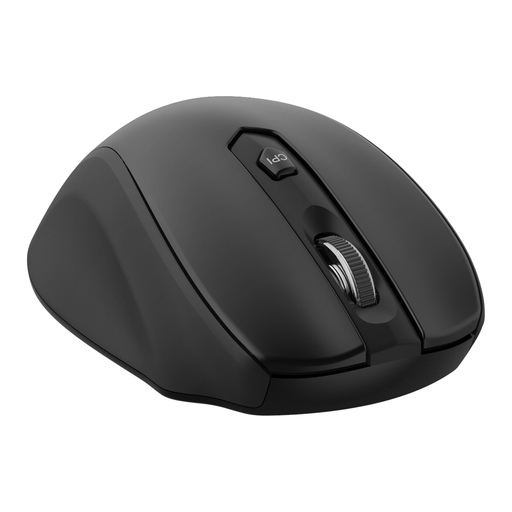 Image unavailable
This is a standalone pointing-device option if you do not need another keyboard. Its product name specifies a USB receiver and adjustable DPI levels; check receiver access and workplace device rules before relying on it at either desk.
Not automatically. For applicable home and hybrid display-screen workers in Great Britain, the Health and Safety Executive says employers have workstation responsibilities and cannot charge workers for equipment identified as needed through an assessment. Ask about your employer’s assessment process and available equipment before making a personal purchase for the same need.
No: the connector alone does not establish video or charging support. Check your exact laptop model’s host-port capabilities, supported display modes and USB Power Delivery requirements, then compare them with the dock, monitor, cable and power hardware you intend to use. Kensington’s dock specifications illustrate why advertised display modes can have conditions across connected devices.
Do not assume that its number of sockets increases your laptop’s supported display count. Apple Support says the number of external displays available to a MacBook Air depends on the model and the displays’ resolution and refresh rate. Check the manufacturer’s limits for your particular laptop and intended connection method.
Keep the order record, product listing and the compatibility details on which you relied, then contact the seller about the fault. The Consumer Rights Act 2015 explanatory notes published on legislation.gov.uk describe a short-term right to reject faulty goods; the applicable timing and conditions depend on the circumstances. A retailer’s change-of-mind terms are separate from remedies for faulty goods.