
24/7 Customer Support

Free returns

Same-day & Next-day Delivery

Quality Guaranteed

Unlock Your Welcome Offers: FREE Delivery | Up to 80% OFF | Free 30-day JoyPlus trial
Download the APP
Modern laptops are powerful and portable, but their minimalist design often leaves you with a frustrating shortage of ports. If you're trying to build a productive workspace around a MacBook, Dell XPS or even a compact Mac mini, you've likely faced the tangle of adapters and cables needed to connect dual monitors, charge your device and use essential peripherals. A single, elegant solution can declutter your desk and streamline your workflow.
This guide is designed to help you navigate the options and understand the key features to look for in a USB C docking station. We'll highlight what matters for a dual monitor setup and provide some practical recommendations to help you find a device that fits your needs.
Before diving into specific products, it's helpful to understand the core features that will make the biggest difference to your daily use. Consider these points when making your choice.
The primary reason for getting a USB C docking station dual monitor is to expand your screen real estate. Pay close attention to the video output specifications.
A key benefit of USB-C is its ability to transmit data, video and power over a single cable. A laptop docking station with 100W power delivery (PD) is a powerful feature. It allows the dock to pass power from your laptop's charger through to the laptop itself, charging it while all your peripherals are connected. This means you only need to plug in one cable to your laptop to connect to everything and stay powered up. Check the maximum power output (e.g., 85W or 100W) to ensure it's sufficient for your laptop, especially for larger 15- or 16-inch models.
Beyond displays, a good dock should serve as a central hub for all your accessories.
Here are a few recommendations that offer a strong combination of features, performance and connectivity for different user needs.

Why It Stands Out: This hub from Baseus is built for high-performance visual tasks. It is one of the few on the market that supports 4K@120Hz on a single HDMI port, with the second HDMI port still delivering a solid 4K@60Hz. Combined with 10Gbps USB-A and USB-C data ports, it's a powerful choice for users who prioritise speed.
Pros:
Who is it for? Creatives, gamers and tech enthusiasts who need the smoothest possible video output and rapid data transfer speeds for external SSDs.
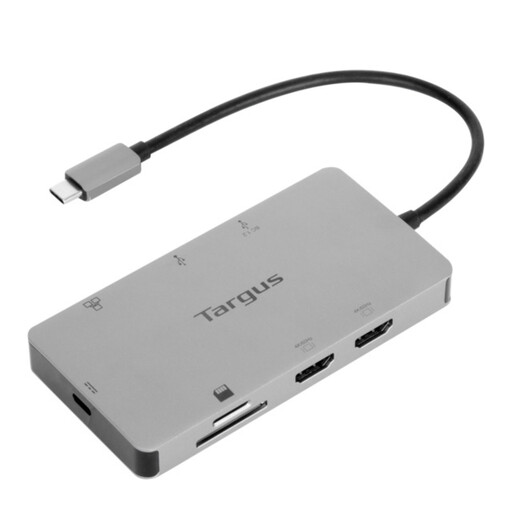
Why It Stands Out: The Targus docking station is a robust and reliable workhorse designed for professional environments. It delivers a consistent dual 4K UHD@60Hz experience across two HDMI 2.0 ports. Its universal compatibility with Windows, macOS, Chrome OS and even Samsung DeX makes it a highly flexible option for mixed-device households or offices.
Pros:
Who is it for? Professionals and remote workers who need a dependable, universally compatible docking station to create a seamless dual-monitor workstation with any modern laptop.
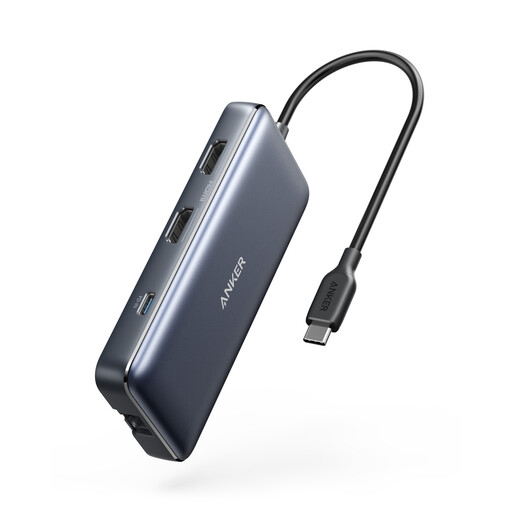
Why It Stands Out: Anker is a well-regarded name in charging and connectivity, and this 8-in-1 hub offers a balanced set of features in a compact form. It supports dual HDMI displays, making it a capable USB C multiport adapter. While dual monitor output is limited to 4K@30Hz, it can run a single display at a crisp 4K@60Hz.
Pros:
Who is it for? Mobile professionals and general users who need a versatile and portable docking station for laptop use and for whom dual 4K@30Hz is sufficient for their productivity tasks.
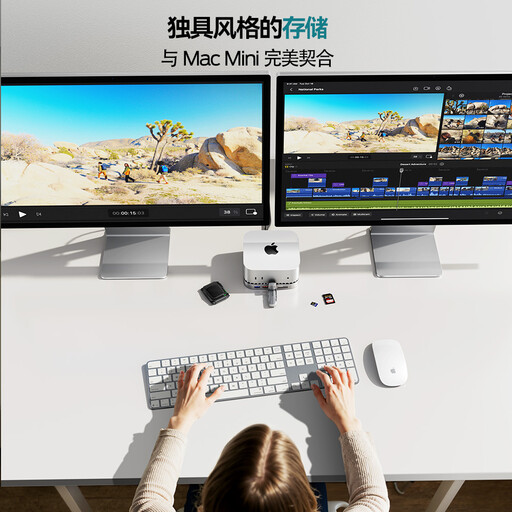
Why It Stands Out: The MOVESPEED DK5A1 is uniquely designed with Mac mini users in mind but works just as well with laptops. Its standout feature is the focus on high-speed data, with 10Gbps USB-C and USB-A ports and a fast SD/TF card reader capable of up to 160MB/s. The single HDMI 2.0 port provides a clean 4K@60Hz output.
Pros:
Who is it for? Content creators, photographers and Mac mini owners who prioritise fast data and media transfer speeds alongside a single, high-quality 4K monitor setup.
If the recommendations above don't quite match what you're looking for or if you need a different combination of ports, there are many other models available.
Explore our full collection of USB-C Docks to find the perfect fit for your desk.
Most modern USB-C docking stations are designed for cross-platform compatibility and will work with macOS, Windows and even Chrome OS, provided the laptop's USB-C port supports DP Alt Mode for video and Power Delivery for charging. However, some specific features or display configurations (like extending to two displays on certain MacBooks) can vary, so it's always good to check the product's compatibility list.
The majority of USB-C hubs and docking stations are "plug-and-play," meaning they don't require any manual driver installation. Your operating system should automatically recognise the device and its functions. More complex, enterprise-grade docks might require a driver for advanced features, but this is less common for the models aimed at general consumers and professionals.