
24/7 Customer Support

Free returns

Same-day & Next-day Delivery

Quality Guaranteed

Unlock Your Welcome Offers: FREE Delivery | Up to 80% OFF | Free 30-day JoyPlus trial
Download the APP
Modern laptops from brands like Apple, Dell and Microsoft are wonderfully sleek and portable. However, this slim design often comes at the cost of connectivity, leaving you with just one or two USB-C ports. If you're tired of juggling adapters and struggling to connect your monitor, keyboard and other essentials, a USB-C docking station is the single-cable solution you need.
This guide is designed to help you navigate the options and find the right device to transform your laptop into a powerful and organised workstation. We will explore the key features to consider and present a few of our top recommendations for UK professionals, creatives and students in 2026.
Choosing the right connectivity solution depends entirely on your specific needs. Before you buy, consider these three key factors.
First, make a list of all the devices you want to connect simultaneously. Do you need to drive one or two external monitors? If so, at what resolution and refresh rate?
One of the main advantages of a laptop docking station is its ability to charge your laptop through the same USB-C cable that handles data and video. This is known as Power Delivery (PD).
Check your laptop's power requirements. Most ultra-portable laptops require 45W to 65W of power. More powerful machines, like a 16-inch MacBook Pro or a mobile workstation, may need up to 100W. Choosing a dock with sufficient power delivery ensures your laptop's battery charges efficiently, even under a heavy workload. Note that some docks require you to use your laptop's existing power adapter, passing the power through the dock to your device.
The terms USB-C hub and docking station are often used interchangeably, but there is a key difference.
Here are a few standout options that cater to different needs, from creating a full-featured home office to staying productive while travelling.
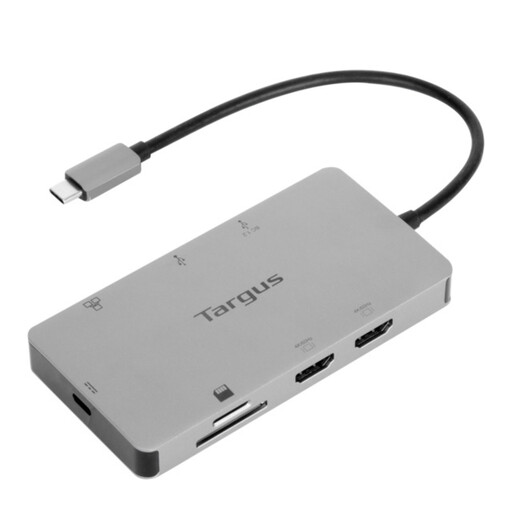
Why It Stands Out: This Targus docking station is built for professionals who demand a high-performance, dual-display setup. It leverages USB-C Alt. Mode to drive two 4K UHD monitors at a fluid 60Hz refresh rate via its dual HDMI 2.0 ports. With 100W power delivery pass-through, it can keep even the most power-hungry laptops fully charged.
Pros:
Who is it for? This is an ideal choice for home and office-based professionals, data analysts and designers who need a reliable and powerful hub for a permanent dual monitor docking station setup.
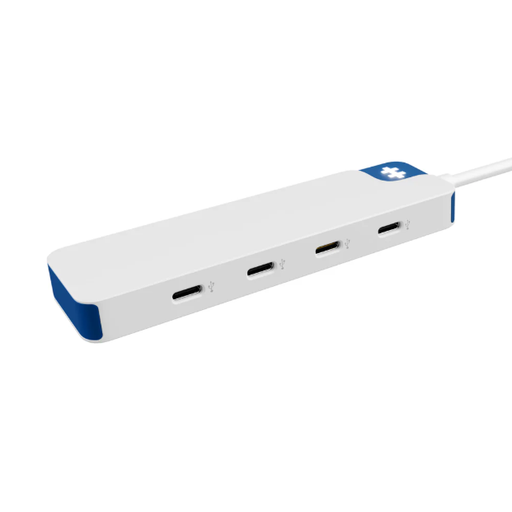
Why It Stands Out: The HyperDrive Flex is the definition of a portable USB-C dock. Its incredibly compact and lightweight aluminium body houses the four most essential ports for modern productivity: HDMI for external displays, USB-A for accessories, a 3.5mm audio jack and a USB-C port for pass-through charging.
Pros:
Who is it for? Students, hybrid workers and anyone who needs a simple, reliable way to connect an external display and a USB device while on the move. It's a great companion for a docking station for MacBook Air or an iPad with USB-C.

Why It Stands Out: The Baseus Metal Gleam II strikes a remarkable balance between comprehensive connectivity and high performance. It's a 10-in-1 powerhouse that supports dual HDMI displays, including one at a stunning 4K@120Hz—a feature gamers and video editors will appreciate. It also includes ultra-fast 10Gbps USB-C and USB-A ports for rapid data transfers.
Pros:
Who is it for? This hub is aimed at power users, gamers and creative professionals who need both high-refresh-rate video output and high-speed data transfer without committing to a large, stationary dock.
If these recommendations don't quite match what you're looking for, don't worry. There is a wide variety of hubs and docks available, each with a unique combination of ports, power and portability.
Explore our full range of portable device docking stations to find your perfect match.
A USB-C hub is generally a smaller, more portable device that draws power from the laptop. It's designed to add a few extra ports for on-the-go use. A docking station is a more robust, stationary solution that often has its own power supply, allowing it to support more peripherals and provide higher power to the laptop.
Most modern USB-C docking stations and hubs are "plug-and-play," meaning they work automatically without needing any special software or drivers. However, some advanced models with specialised chipsets (like those using DisplayLink technology for triple-monitor support) may require a one-time driver installation to enable all features. Always check the product specifications.
Yes, most USB-C docking stations are compatible with MacBooks. However, it's important to be aware of a limitation with Apple's own silicon. MacBooks with standard M1, M2 or M3 chips natively support only a single external display. To connect two or more external monitors, you will need a docking station that uses DisplayLink technology. MacBook Pro models with M1/M2/M3 Pro or Max/Ultra chips do not have this limitation and can support multiple external displays natively.