
24/7 Customer Support

Free returns

Same-day & Next-day Delivery

Quality Guaranteed

Unlock Your Welcome Offers: FREE Delivery | Up to 80% OFF | Free 30-day JoyPlus trial
Download the APP
Modern laptops like the MacBook Pro and Dell XPS are powerful and portable, but their minimalist design often leaves us short on ports. Juggling dongles for your monitor, keyboard, external drive and charger is a common frustration that clutters your workspace and hinders productivity. A USB-C docking station solves this by consolidating all your connections into a single, powerful cable.
This guide is designed to help you navigate the technical specifications of today's docking stations. We will break down the key features to look for and provide our recommendations to help you find a device that streamlines your workflow, whether you're a creative professional, a remote worker or simply aiming for a tidier desk.
Selecting the right dock involves more than just counting ports. Performance specifications are critical for ensuring a smooth and efficient experience. Here are a few key factors to consider.
Not all USB ports are created equal. Many hubs offer standard USB 3.0 speeds of 5Gbps, which is adequate for keyboards and mice. However, for transferring large files from external SSDs or high-speed memory cards, a USB C hub 10Gbps is essential. A port rated for 10Gbps (often labelled as USB 3.2 Gen 2) can deliver real-world transfer speeds approaching 1000MB/s, cutting down wait times significantly for videographers, photographers and data-heavy professionals.
A primary function of a docking station is to connect external monitors. For crisp, fluid visuals, look for a 4K 60Hz HDMI dock. A 60Hz refresh rate provides a much smoother experience for video editing, gaming and even general desktop use compared to the choppier 30Hz found on many older or affordable hubs. If your workflow involves multiple screens, you'll need a dual monitor adapter for laptop functionality, but be sure to check the supported resolution and refresh rate for each display, as performance can vary when two are connected simultaneously.
A quality USB C hub with Ethernet and PD (Power Delivery) is the cornerstone of a single-cable setup. Power Delivery allows you to charge your laptop through the docking station itself, eliminating the need for a separate power brick. Check the wattage output—most modern laptops require at least 65W, with more powerful models like the MacBook Pro benefiting from 85W or more. An integrated Ethernet port is also a crucial feature for remote and office workers who need a stable, high-speed wired internet connection for video conferencing and large downloads.
Here are a few standout options that cater to different needs, from creative workflows to professional multi-monitor setups.
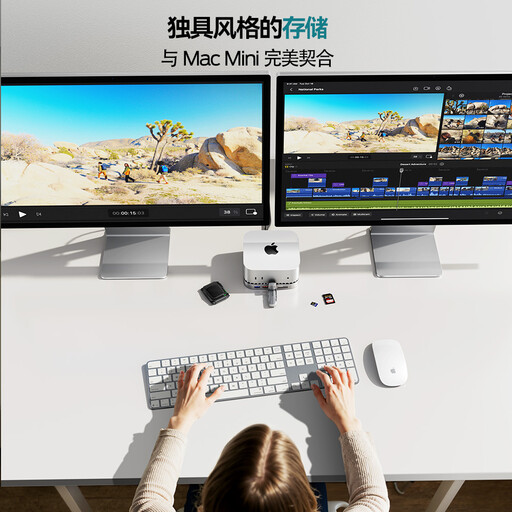
Why It Stands Out The MOVESPEED DK5A1 is engineered for performance, making it an excellent choice for content creators and Mac mini users. Its standout feature is the inclusion of both USB-C and USB-A ports that support 10Gbps data transfer speeds, allowing you to connect high-speed SSDs without a bottleneck. The SD/TF card reader is also exceptionally fast, rated at up to 160MB/s, which is a significant time-saver for photographers and videographers importing media.
Pros
Who is it for? This is a great option for creative professionals, particularly photographers and video editors, who rely on fast storage and memory cards. It's also an ideal companion for Mac mini users looking to expand their connectivity without compromising on desk aesthetics.

Why It Stands Out The Baseus Metal Gleam Series II is built for power users who need advanced multi-monitor capabilities. It is one of the few hubs on the market to feature a 4K@120Hz HDMI port, making it suitable for high-refresh-rate gaming monitors and ultra-smooth video playback. It also supports a dual monitor setup (one at 4K@120Hz, the other at 4K@60Hz), providing exceptional display flexibility. Combined with 10Gbps data ports and 100W PD input, it’s a true workstation powerhouse.
Pros
Who is it for? This dock is aimed at tech-savvy professionals, gamers and anyone using a high-refresh-rate 4K monitor. Its dual-display capability makes it a strong choice for traders, programmers and designers who need maximum screen real estate.
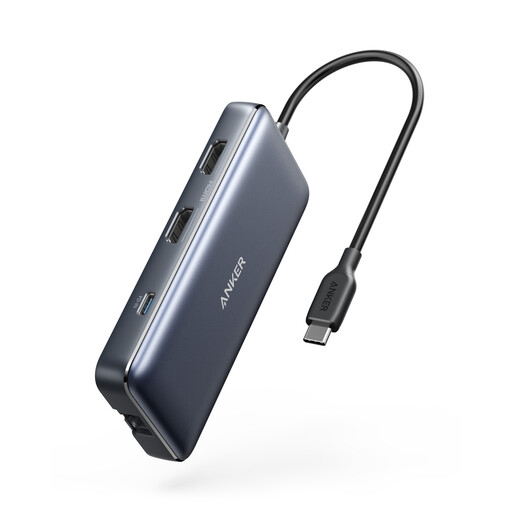
Why It Stands Out Anker is a well-regarded name in charging and connectivity, and the PowerExpand 8-in-1 hub delivers a balanced mix of features for everyday professional use. It offers dual HDMI display support, allowing you to connect two monitors at 4K@30Hz or a single monitor at a smoother 4K@60Hz. With 85W pass-through charging, it provides ample power for most laptops, including the MacBook Pro, making it a reliable workhorse for a home or office setup.
Pros
Who is it for? This is a solid all-rounder for remote or hybrid workers and general professionals who need to connect two standard monitors and essential peripherals. It’s a practical choice for creating a productive workstation without needing top-tier data speeds or refresh rates.
If the models above don't quite fit your specific requirements, there is a wide variety of docking stations and hubs available, each with a unique combination of ports, speeds, and form factors. To find the perfect match for your devices and workflow, feel free to browse our complete collection.
Explore our full range of PC USB hubs to find the perfect match for your setup.
1. What is the difference between a USB-C hub and a USB-C docking station? While the terms are often used interchangeably, docking stations are typically larger, more powerful and designed for a stationary desk setup. They often have their own power supply and offer a wider array of high-performance ports (like multiple video outputs and faster Ethernet). Hubs are generally smaller, bus-powered (drawing power from the laptop) and more portable, making them better for travel or light-duty expansion.
2. Will a USB-C docking station work with my Thunderbolt laptop? Yes. Thunderbolt 3 and Thunderbolt 4 ports use the same physical USB-C connector and are fully backward-compatible with USB-C devices. You can plug any USB-C docking station into a Thunderbolt port on your laptop (such as a MacBook Pro docking station setup) and it will function correctly.
3. Do I need to install drivers for a USB-C docking station? For the vast majority of USB-C docks, no drivers are needed. They are designed to be plug-and-play with modern operating systems like Windows, macOS and Linux. However, some very advanced docks with specialised chipsets for driving three or more monitors may require a driver (like one from DisplayLink) to function correctly. Always check the product page for any specific software requirements.