What to decide before buying
Identify any assessed workstation need first, then decide whether screen position, repeated desk connections or calls are the practical reason to add equipment.
| Concern |
What to check |
Who this matters to |
| Employer assessment |
Check whether your employer’s DSE arrangements apply and whether an assessment identifies equipment or a workstation change. |
If an ongoing workstation problem needs attention, I want to know whether an employer assessment should come before personal spending; about 33% of consumers put that boundary first. |
| Screen and input position |
Check where the screen can sit and whether a raised laptop will have a separate keyboard and mouse. |
At a fixed desk, I need to move the screen without raising the keys and pointing device with it. Roughly 27% of consumers make that separation their primary need. |
| Desk connections |
Match the laptop’s video and charging capabilities to the required displays and dock connections. |
When I reconnect several devices each workday, I need the intended display and charging arrangement to work with my laptop; for about 27% of consumers, connectivity comes first. |
| Calls |
Check the available USB or audio connections and space for any webcam or headset receiver. |
If meetings drive my equipment choice, I need call peripherals that connect alongside the rest of my desk setup. Call readiness is the main concern for approximately 13% of consumers. |
Joybuy products for home-work setups
These selections cover external monitors, laptop connection devices and a webcam for a home or hybrid desk. Choose the equipment that addresses your particular setup, and check any employer-assessed DSE requirement before paying personally.
 Image unavailable
Targus USB-C Universal Dual HDMI 4K Dock, 100W PD Pass-Thru
Consider this dock if you repeatedly connect a laptop to HDMI displays and desk equipment. Its name specifies dual HDMI 4K connections and 100W power-delivery pass-through; check the exact laptop’s display limits and charging requirement, plus what power adapter is supplied.
View on Joybuy
 Image unavailable
Lenovo L32p-30 31.5-inch 4K UHD IPS USB-C Monitor
This separate display is an option when laptop screen position is the main concern. The product name specifies a 31.5-inch 4K UHD IPS screen and USB-C; confirm that your laptop supports the intended video connection and check USB-C charging compatibility if you plan to use it.
View on Joybuy
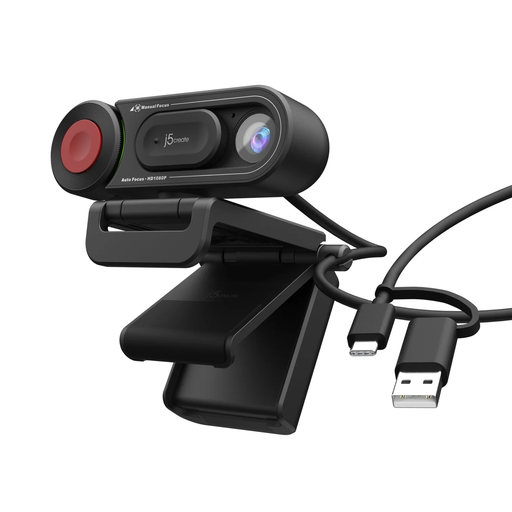 Image unavailable
j5create JVU250 HD Webcam with Auto & Manual Focus Switch, Black
This webcam is relevant when the laptop’s camera or its placement does not suit routine video calls. The named variant has an auto and manual focus switch; check its connection and compatibility with your computer and conferencing software.
View on Joybuy
 Image unavailable
AOC Q32V4 31.5-inch 2K IPS Monitor with Speakers
Consider this standalone screen when you need a display separate from the laptop. Its product name specifies a 31.5-inch 2K IPS screen and built-in speakers; check the required laptop-to-monitor connection and whether the stand suits your intended screen position.
View on Joybuy
 Image unavailable
V7 V7UC-U3CRJ45HDVG-BLK USB-C Adapter
This adapter is relevant when a laptop needs additional desk connections. Its named configuration includes 4K HDMI, VGA, Gigabit Ethernet, dual USB 3.0 ports and 100W power delivery; check the laptop’s USB-C video and charging support, and confirm the number of independent displays you need.
View on Joybuy
Frequently asked questions
Can UK DSE rules apply when I work from home?
Yes, they can apply to permanent or long-term home work and routine hybrid work. The Health and Safety Executive says employers should establish whether the rules apply where workers use display screen equipment daily for continuous periods of an hour or more.
Should a hybrid-worker DSE assessment cover the home desk?
Where the UK DSE rules apply, the Health and Safety Executive says the assessment should cover both home and office situations. It says a trained worker can complete a self-assessment in most cases, with suitable training and employer review, rather than requiring a home visit.
Must I pay for equipment identified by a DSE assessment?
No. The Health and Safety Executive says workers cannot be charged where an applicable DSE workstation assessment indicates the employer needs to take action, such as providing equipment. That does not make every preferred upgrade an employer-provided requirement.
Is a laptop riser enough for prolonged desk work?
A riser raises the laptop’s built-in keyboard and touchpad as well as its screen. For prolonged laptop use with an elevated screen, the Health and Safety Executive advises a separate keyboard and mouse; a separate display is another screen-positioning option.
Will any USB-C dock charge my laptop and run two monitors?
No: a USB-C-shaped connection alone does not establish those functions. Laptops Direct notes that USB-C does not always carry video or power, so check the exact laptop port, charging requirement and supported display configuration against the dock and both monitors.


