Who is this setup for?
The useful addition depends on whether screen position, calls or repeated laptop connections cause the difficulty at your home desk.
Laptop-based document workers
If you spend prolonged periods working on documents, consider whether the laptop screen gives you enough space and can be positioned comfortably. The Health and Safety Executive advises using a separate keyboard and mouse when elevating a laptop screen, or using a separate display.
Workers making frequent video calls
Identify whether the problem is camera placement and framing, voice pickup, or keeping call audio private. A webcam, headset and speakerphone address different parts of a call, so the right purchase depends on the room and the laptop connections available.
Workers reconnecting at a regular home desk
If you repeatedly attach a display, power, network and peripherals, a dock or USB-C hub monitor may reduce separate connections. Check the exact laptop’s video, charging and operating-system capabilities before choosing one.
What should you check first?
Decide what needs to work at home, then check the equipment against your laptop, desk and meeting software. A feature listed for one device does not establish compatibility with every work laptop.
| Priority |
What to check |
Your needs |
| Screen space and position |
Check whether a separate display or laptop riser fits your work, and whether you have a separate keyboard and mouse for prolonged laptop use. For an arm, check screen weight, mounting pattern, desk-edge thickness and rear clearance. |
I work on documents for long stretches and need the screen positioned separately from where I type. |
| Camera and call audio |
Check camera mounting and the available USB connection. Assess microphones and speakers separately; if private listening matters, consider a headset rather than a speakerphone. Check workplace meeting-software requirements. |
My calls need a better camera angle, clearer voice capture or audio that other people in the room cannot hear. |
| Displays through USB-C |
Check the exact laptop model, supported external-display count and resolution, and the video standard required by the monitor or dock. Apple Support notes that USB-C display adapters for a Mac must support DisplayPort Alt Mode or a compatible Thunderbolt standard; some multi-display docks also require software. |
I want an extra screen, but need to know that my work laptop can actually drive the display arrangement I plan to use. |
| Charging and peripherals |
Compare the laptop’s charging requirement with the dock or monitor’s stated power delivery. Check the required power adapter, cable, network connection and peripheral ports, as well as any workplace restrictions on drivers. |
At my home desk, I would rather reconnect the laptop to the equipment I use than attach every cable individually. |
| Moving between locations |
Decide which equipment will stay at home and which you will carry. Check each portable device’s connector and whether it needs a separate cable, power source or permitted software. |
I move between home and the workplace, so anything I carry needs to work with the connections available in both places. |
Relevant brand references
These examples illustrate different equipment types and model-specific checks; they are not a ranking or an indication that every product from a brand has the same features.
Dell
Dell’s P2725QE is an example of a USB-C hub monitor for a regular desk.
- Dell lists a 27-inch 4K display, Ethernet and up to 90 W USB-C power delivery for this model.
- Check host compatibility and the display arrangement: Dell specifies Thunderbolt for single-cable daisy chaining and notes restrictions affecting certain Mac chips.
Logitech
The Brio 500 is a standalone webcam example for workers considering camera placement and framing.
- Logitech lists Full HD 1080p resolution and describes automatic light correction and framing features for this model.
- Those camera features do not replace a decision about private listening, microphone needs or an available laptop connection.
Jabra
Jabra’s Speak2 55 illustrates the portable speakerphone route for suitable call spaces.
- Jabra lists USB-A and USB-C on the same cable, Bluetooth, a carry pouch and a room-size guideline of up to 4.5 m by 4.5 m.
- Check the room and confidentiality needs; a shared speakerphone does not contain call audio like a headset.
Anker
Anker’s Prime Docking Station with DL7400 is an example of a dock intended to consolidate desk connections.
- Anker lists multiple display and peripheral connections, Ethernet and up to 140 W upstream charging for the cited model.
- Anker requires the latest DisplayLink driver for its stated display functions. Check laptop, operating-system and workplace software compatibility.
Ergotron
The cited LX Desk Arm illustrates the physical-fit checks involved in adjusting a monitor at a fixed desk.
- Ergotron specifies a screen-weight range of 3.2 kg to 11.3 kg for the cited arm.
- Its under-mount clamp also has a specified desk-edge thickness range of 1.2 cm to 3.2 cm; check mounting and clearance before choosing it.
Joybuy product options
These options span laptop connection hardware, call equipment and a portable second screen. Choose by the problem each device addresses, then confirm its connections and requirements against your own laptop and workspace.
 No image available
Targus USB-C Universal Dual HDMI 4K Docking Station, 100W PD Pass-Thru, Retail Packaging
For a desk with displays and peripherals to reconnect, the listing describes two HDMI outputs, USB connections, Ethernet and up to 100 W power-delivery pass-through. Its stated dual-4K-at-60-Hz capability depends on the host setup: check your laptop’s USB-C video support and intended two-display configuration. The description calls for an external 100 W or higher adapter; confirm whether it is included.
View on Joybuy
 No image available
Baseus Metal Gleam Series II 10-in-1 USB-C Hub, Cosmic Black
For a laptop needing display and wired-network connections, the listing specifies two HDMI outputs, RJ45 Ethernet, USB ports, card readers and a USB-C PD input rated up to 100 W. It gives separate HDMI maximums of 4K at 120 Hz and 4K at 60 Hz; do not assume those modes work simultaneously. Video requires host USB-C DisplayPort Alt Mode, so check your laptop’s supported display arrangement and charging compatibility.
View on Joybuy
 No image available
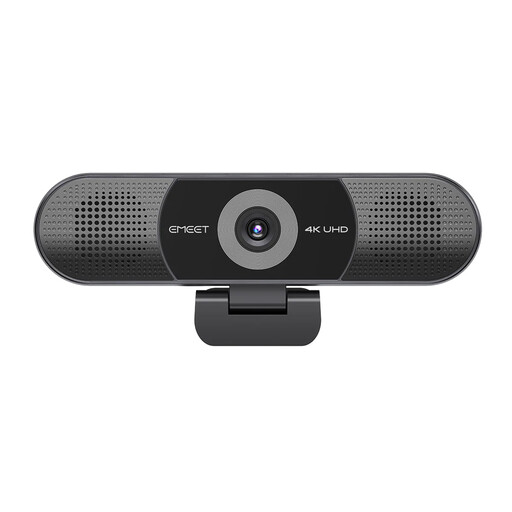
EMEET All-in-One 4K Webcam with Sony Sensor, 4-Mic Array and Dual Speakers
For calls where camera placement and a combined microphone-and-speaker unit matter, the listing specifies 3840 × 2160 at 30 FPS, a 98° adjustable field of view, four microphones and dual speakers. These are product specifications, not a measure of call quality in your room. Check its USB connector, mounting arrangement and compatibility with your workplace’s meeting software.
View on Joybuy
 No image available
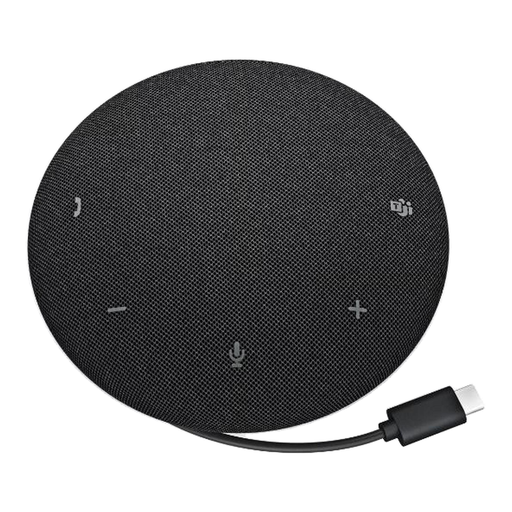
DELL Pro Wired Speakerphone SP325
For shared call audio rather than private listening, the listing describes a wired USB-C speakerphone with four microphones, call controls and a stated 2.50 m microphone pickup range. That range does not guarantee results in every room. Check the laptop connection and workplace call-device requirements; choose a headset instead if other people should not hear the call.
View on Joybuy
 No image available
ASUS ZenScreen MB166C 15.6-inch Full HD Portable USB-C Monitor
For a second screen that can move between work locations, the listing specifies a 15.6-inch IPS display, 1920 × 1080 resolution at 60 Hz and a weight of 780 g. It describes video and power over USB-C, which requires a suitable laptop connection: check your laptop’s USB-C display capability. The listing states that this model has no HDMI input or built-in speaker.
View on Joybuy
Frequently asked questions
Do I need an external monitor to work from a laptop at home?
Not automatically. Consider one if the laptop screen lacks usable space or cannot be positioned comfortably for prolonged work. The Health and Safety Executive advises a separate keyboard and mouse when elevating a laptop screen; a separate display is another arrangement it describes.
Will any USB-C dock add monitors and charge my laptop?
No. Check your exact laptop’s video output, supported display count and resolution, charging needs, cable and operating system against the dock’s requirements. Some display arrangements need Thunderbolt or DisplayPort Alt Mode, while a DisplayLink dock may require a driver that your workplace must permit.
When should I choose a speakerphone instead of a headset?
A speakerphone can suit a room where shared call audio is appropriate; choose a headset when you need personal listening and more contained audio. Check the speakerphone’s stated pickup range against the room. For example, Jabra gives the Speak2 55 a pickup range of up to 2.3 m and a room-size guideline of up to 4.5 m by 4.5 m, specific to that model.
Does Microsoft Teams certification matter for call equipment?
It is a useful signal if Microsoft Teams is the platform your workplace requires. Microsoft says its device certification tests requirements covering audio and video quality, interface, management and security. Certification does not establish how a device will suit every room, another meeting application or your privacy needs.


