What should you check first?
Set up the screen and input devices for your usual home work first, then decide which connections and accessories need to travel with you.
| Priority | What to check | Your needs |
|---|
| Screen and input position |
Check whether a riser or separate monitor lets you position the display independently. For prolonged laptop use, the HSE advises using a separate keyboard and mouse when elevating the laptop screen. |
At my regular home desk, I want to raise the screen without having to type on a raised laptop keyboard. |
| Display space |
Decide whether the laptop screen gives you enough working space. If choosing a monitor, check the laptop’s video output, the monitor’s input and the cable needed to join them. |
I use the home desk repeatedly and would rather leave a separate display there than carry one between locations. |
| Dock compatibility |
Check the exact laptop model, supported video mode, charging capability and required display configuration. Kensington says USB-C video and power features depend on the host; its UH1400P, for example, requires USB-C DisplayPort Alt Mode and Power Delivery. |
A single connection would make it easier to reconnect my laptop, but I need it to work with the ports and permissions on my work device. |
| Portability |
Separate what can stay at home from what must fit in a work bag. Check the connections, layout and accessories you would need at each location rather than carrying a larger desk setup by default. |
I change workplaces regularly, so the items I carry need to be practical to pack and reconnect. |
| Calls and device approval |
Check the headset connection and collaboration-platform variant, plus any employer rules for Bluetooth, USB receivers, docks and software. A headset does not replace a suitable screen and input arrangement. |
Calls take up much of my working day, but any audio kit also has to connect to my employer-issued laptop. |
| Workstation assessment |
For UK workers who use display-screen equipment daily as part of normal work for continuous periods of an hour or more, the HSE says the employer must carry out a workstation assessment. For hybrid work, it says the assessment should cover home and office. |
Before choosing equipment for my work laptop, I want to know what has been assessed and which accessories my employer approves or supplies. |
Joybuy product options
These options cover separate displays, keyboard-and-mouse sets and a USB-C hub for a hybrid laptop setup. Choose the workstation arrangement first, then check each accessory against your laptop and workplace requirements.
 No image available
ASUS ZenScreen MB166C 15.6-inch Full HD IPS portable monitor
A separate display to consider if you need your screen to move between work locations. The product name specifies USB Type-C; check the laptop’s video and power compatibility, and confirm whether the stand or case you need is supplied.
View on Joybuy
 No image available
Samsung 22-inch S40GD LS22D400GAUXXU Full HD monitor
A separate screen for a recurring home-desk setup. Check which video connection your laptop can provide and which cable is needed; use separate input devices if you also plan to position the laptop away from its built-in keyboard.
View on Joybuy
 No image available
HP 680 CFT Dual-Mode keyboard and mouse set
Separate input devices let you raise a laptop screen without relying on its built-in keyboard for prolonged desk work. Check the keyboard layout and whether your employer permits the connection method you intend to use.
View on Joybuy
 No image available
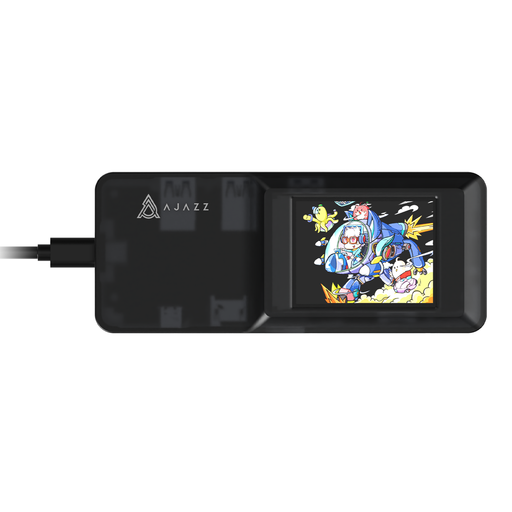
AJAZZ AKP01E 8-in-1 USB-C hub
A port-adapter option when you need to reconnect desk peripherals to a laptop. The product name identifies TF/SD card slots and USB-C connectivity; check the host’s video support, operating system, charging arrangement and workplace approval before relying on it for a display.
View on Joybuy
 No image available
Philips 3000 Series SPT6318B/05 UK English keyboard and mouse set
A separate keyboard and mouse for use with an elevated laptop or external display. The product name specifies a UK English version; check that your laptop has the connection you need and that your employer permits it.
View on Joybuy
Frequently asked questions
Does a hybrid worker need a home workstation assessment?
Under UK HSE guidance, an employer must assess the workstation of a worker who uses display-screen equipment daily as part of normal work for continuous periods of an hour or more. Where that worker routinely uses it both at home and in the office, the assessment should cover both situations.
Is a laptop stand enough for prolonged desk work?
A stand alone does not separate the raised screen from the laptop’s built-in keyboard. For prolonged laptop use, the HSE advises a separate keyboard and mouse so the screen can be elevated while the input devices remain independently positioned.
Will any USB-C hub connect a work laptop to a monitor and charge it?
No: Kensington notes that USB-C describes the connector, while video and power-delivery capabilities depend on the laptop. Check the exact host port, the hub’s display and charging requirements, and your employer’s peripheral rules; Kensington’s UH1400P, for example, requires host DisplayPort Alt Mode and Power Delivery.
When is a larger dock worth considering instead of a mobile hub?
Consider a larger dock for a mostly fixed desk where you repeatedly connect several peripherals or external displays. Confirm the laptop, operating system, cables and monitors meet that dock’s requirements: Kensington’s SD4843P multi-display specification, for example, applies to compatible Windows laptops rather than every USB-C device.


