Start with your laptop’s exact model, ports, display limits and charging requirements before choosing desk accessories. A single-cable dock suits a repeatable desk connection only if the whole display and power setup is compatible; a direct monitor connection and separate call and input devices may be simpler when dock compatibility is uncertain. For an employer-managed laptop, check permitted accessories and connection methods before buying.
Who is this setup for?
Workers reconnecting one laptop at a fixed desk
If you move between home and a workplace, a dock may reduce the connections you make each time. Check that your particular laptop supports the intended display, peripherals and charging through that dock.
Employees adding equipment to a managed laptop
A headset, webcam, keyboard or mouse may address calls and document work without changing the display setup. Confirm permitted devices, drivers and wireless connection methods with your employer or IT team.
Laptop users mainly needing more screen space
If one external display is the main goal, check the laptop’s display specifications and a suitable direct connection before adding a dock. A direct connection still depends on the laptop model and the chosen display settings.
What should you check first?
Work from the connection your laptop can make, then choose the screen, call and input accessories that solve your day-to-day tasks.
| Priority | What to check | Your needs |
|---|
| Video connection |
Check the exact laptop port and the display standard required by the dock, cable or adapter. Microsoft Learn’s docking guidance and Apple Support’s Mac adapter guidance both make the connection standard relevant; the USB-C connector shape alone is not a compatibility guarantee. |
I want the screen to connect when I return to my desk, rather than finding that a suitable-looking port cannot carry the required video signal. |
| Display configuration |
Check the laptop’s supported external-display count and the resolution and refresh rate of the complete setup. Apple Support says Mac display limits depend on the model and display settings; Microsoft Learn cautions that a dock’s individual headline capabilities may not all be available simultaneously. |
More room for documents would help, but I need to know whether my laptop can run the screens I plan to connect. |
| Charging through a dock |
Compare the dock’s stated power delivery with the laptop’s charging requirements and accepted input. Microsoft Support notes that insufficient power can reduce functions when using its Surface USB4 Dock; check the documentation for your own laptop and dock. |
I would like one connection for my desk equipment without having to assume it will also charge my laptop. |
| Calls and input |
Check the headset or webcam connection, microphone and camera placement, and available ports. For a keyboard and mouse, confirm the connection method and layout you intend to use. |
Clear speech and a workable typing setup matter more to me than adding a dock if my current screen connection already meets my needs. |
| Managed-device use |
Ask your employer or IT team about accessory support, installation rights and wireless pairing before purchase. UK National Cyber Security Centre and GOV.UK guidance addresses organisational support and device-security decisions; it does not mean every privately bought peripheral is prohibited. |
I need equipment I am permitted to connect to my work laptop, without relying on a driver or receiver I cannot use. |
What can go wrong?
-
Assuming any USB-C dock can drive your monitor
The connector does not establish the laptop’s video capability. Apple Support and Microsoft Learn identify display standards and host capabilities that must match the connection; USB peripherals could connect while the intended screen does not.
Check the exact laptop port, required adapter or dock standard, and supported external-display configuration.
-
Reading separate dock maximums as one combined setup
Microsoft Learn cautions that connecting multiple devices can limit a dock’s simultaneous display configuration. Microsoft Support also notes that insufficient power can reduce functions on its Surface USB4 Dock.
Compare documentation for the monitor count, resolution, refresh rate, connected peripherals and charging arrangement you intend to use together.
-
Buying for a managed laptop without checking permissions
An accessory that needs installation, pairing or a receiver may not fit an employer’s supported configuration. GOV.UK’s guidance on personally owned work devices addresses organisational security decisions rather than granting or denying approval for a particular peripheral.
Ask the employer or IT team which devices and connection methods are permitted and who supports them.
-
Choosing a webcam or monitor by one headline specification
A monitor’s available settings depend on the laptop and connection path. For calls, the microphone, camera position, connection and meeting-software support also affect whether an accessory fits the task.
Decide whether calls, document space or fewer desk connections are the immediate need, then check the complete connection from laptop to accessory.
Relevant brand references
Microsoft Surface
A reference for Surface users considering the Surface USB4 Dock as a desk connection.
- Microsoft Support describes charging and connected-device functions for the Surface USB4 Dock.
- Its guidance says the host must accept the supplied power; insufficient power can reduce functions. Check compatibility with the exact Surface model.
Apple
A reference for Mac users checking external displays and USB-C or Thunderbolt adapters.
- Apple Support says simultaneous external-display support depends on the Mac model, resolution and refresh rate.
- Apple Support specifies applicable display-adapter standards; a USB-C connector does not establish compatibility with every Mac.
Logitech
A reference for desk accessories centred on video calls and keyboard-and-mouse use.
- Logitech describes a business desk kit containing a webcam, headset, keyboard and mouse.
- That product-line description does not establish whether a particular model or connection method is approved for an employer-managed laptop.
Joybuy options for calls and desk input
These headset and keyboard-and-mouse options address calls and typing at a laptop desk. Check your laptop’s connections and any workplace restrictions; these accessories do not replace a display or dock compatibility check.
 No image available
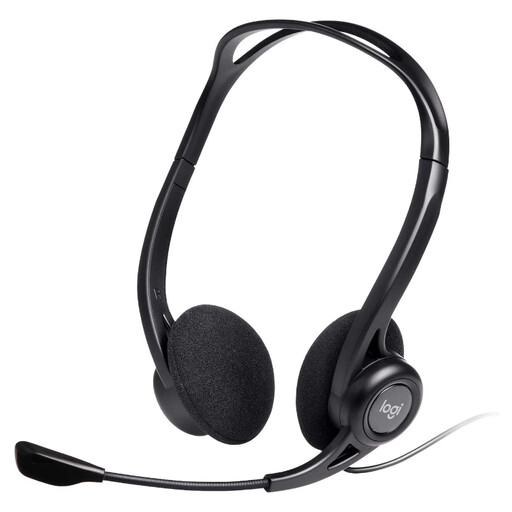
Logitech 960 wired USB headset
For laptop calls, this wired headset has an inline remote and a noise-cancelling microphone. Check the available USB connection and whether your employer permits the headset.
View on Joybuy
 No image available
HP 680 CFT Dual-Mode keyboard and mouse
This keyboard-and-mouse set is an option for desk-based input. Confirm which connection method you would use and whether it is supported on your laptop and permitted at work.
View on Joybuy
 No image available
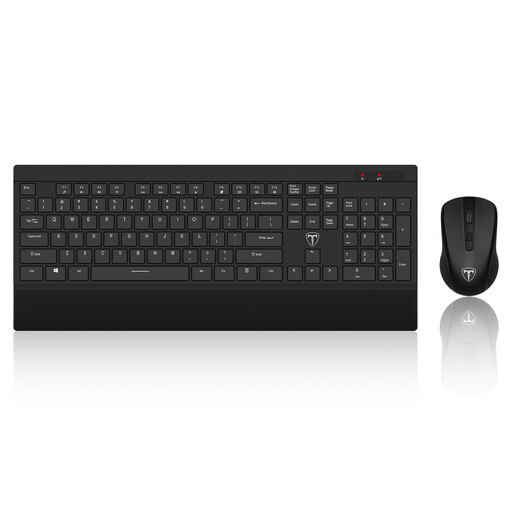
ET Silent 2.4GHz keyboard and mouse, US layout
This wireless keyboard-and-mouse set may suit a desk where a US keyboard layout works for your typing. Check its connection requirements, available laptop ports and workplace permission.
View on Joybuy
 No image available
Philips 3000 Series SPT6318B/05, UK English
This wireless keyboard-and-mouse set is the UK English version for a laptop desk. Check its connection requirements, operating-system compatibility and any workplace restrictions before choosing it.
View on Joybuy
Common questions
Does a USB-C port guarantee that a dock can run a monitor?
No. Check the exact laptop port and the display protocol required by the dock or adapter. Microsoft Learn discusses DisplayPort over USB-C for docking, while Apple Support specifies applicable DisplayPort Alt Mode or Thunderbolt standards for Mac display adapters.
Will a dual-monitor dock deliver its advertised maximum on both screens?
Not necessarily. Check the laptop’s display limits and the dock’s specifications for two displays operating simultaneously at your intended resolution and refresh rate. Microsoft Learn cautions that a dock may not support two 4K displays alongside Ethernet and USB devices at the same time; Apple Support says Mac display limits also depend on the model and display settings.
How do I check whether a dock will charge my laptop?
Compare the dock’s power delivery with the laptop’s supported charging input, then check the conditions for the intended connection. Microsoft Support says that insufficient power can reduce functions when using its Surface USB4 Dock; that model-specific warning is a reason to check your own dock and laptop documentation.
Can I connect my own accessories to an employer-managed laptop?
Ask your employer or IT team before assuming a dock, webcam or wireless receiver is permitted. UK National Cyber Security Centre and GOV.UK guidance addresses organisational support and security for remote work and personally owned devices; your employer can clarify supported accessories, drivers and connection methods for your laptop.


