
24/7 Customer Support

Free returns

Same-day & Next-day Delivery

Quality Guaranteed

Unlock Your Welcome Offers: FREE Delivery | Up to 80% OFF | Free 30-day JoyPlus trial
Download the APP
Modern laptops, from the MacBook Pro to the Dell XPS, are marvels of portable power. Yet, their sleek, minimalist designs often come at the cost of connectivity, leaving you with a tangle of adapters and chargers to create a functional workspace. If you're a creative professional, remote worker or power user in the UK, you know the frustration of not having enough ports. The goal is simple: a clean, powerful desk with multiple monitors, all connected through a single cable.
This guide is designed to help you navigate the options and find a USB C docking station for a dual monitor setup that declutters your desk and streamlines your workflow. We will look at the key features to consider and highlight a few recommended models that cater to different needs.
Before you purchase, it's important to understand what specifications matter most for your specific setup. A docking station is an investment in your productivity, so matching its features to your daily tasks is crucial.
The primary reason for getting a dock is often to connect multiple displays. However, not all docks are created equal.
For professionals handling large files, data speed is non-negotiable. A standard USB hub might operate at 5Gbps, but for transferring 4K video footage or large design assets, you should look for a 10Gbps USB C hub. This higher bandwidth allows you to connect external SSDs and achieve transfer speeds approaching 1,000MB/s, significantly cutting down on waiting time.
A good docking station should replace all your other adapters. Think about your daily peripheral needs.
Based on features that support demanding professional workflows, here are a few options to consider.

Why It Stands Out: This Baseus hub is a powerhouse for high-performance visual setups. Its standout feature is the dual HDMI output, with one port supporting a stunning 4K at 120Hz and the other supporting 4K at 60Hz. This makes it an exceptional choice for users with high-refresh-rate monitors.
Pros:
Who is it for? Creative professionals, gamers and tech enthusiasts who need to drive high-refresh-rate 4K displays and require maximum data transfer speeds. It's an excellent MacBook Pro docking station for demanding users.
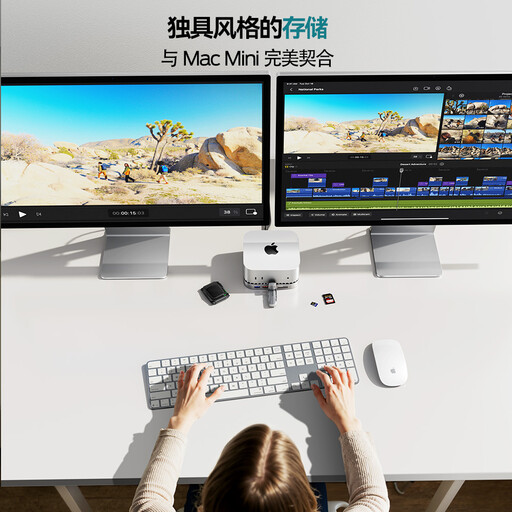
Why It Stands Out: The MOVESPEED DK5A1 is built for creators and those who value a clean, minimalist desk. Its design is a perfect companion for a Mac mini, but it's equally effective for laptops. It focuses on providing high-speed, practical ports in a compact and durable aluminium body.
Pros:
Who is it for? Photographers, videographers and Mac mini users who need a reliable, high-speed hub for data transfer and a single 4K display, all within a streamlined and stylish package.
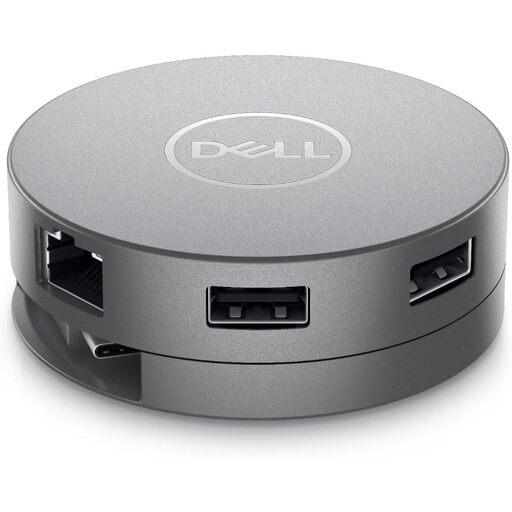
Why It Stands Out: While many docks are designed for a stationary desk, the DELL DA310 is engineered for portability. Its compact, circular design and patented cable management system make it an ideal companion for hybrid workers and business travellers. It offers a wide array of video outputs in a single, tiny package.
Pros:
Who is it for? The on-the-go professional who needs a reliable, all-in-one adapter for presentations and connecting to various displays and networks while travelling. Note that it is designed to drive one display at a time.
If the models above aren't the perfect match, or if you're looking for different port combinations, we have a wider range of solutions. Explore our full collection of USB Port Connectors to find the ideal fit for your setup.
No, they do not. For a USB-C port to output video, it must support DisplayPort Alternate Mode (DP Alt Mode). Furthermore, the ability to run two separate external displays (known as Extended Mode) depends on the laptop's graphics card and operating system. For example, MacBooks with the standard M1, M2 or M3 chip only natively support one external monitor, whereas MacBook Pro models with Pro, Max or Ultra chips support two or more. Always check your laptop's technical specifications.
In most cases, yes. A laptop dock with Ethernet provides a direct, wired connection to your router. This eliminates the signal interference and bandwidth fluctuations common with Wi-Fi, resulting in a more stable, consistent and often faster connection, which is ideal for video calls, online gaming and downloading large files.
This depends on your laptop. Check the wattage of the charger that came with your device. A 13-inch laptop might only need a 65W charger, while a high-performance 16-inch model may require 96W or more. To ensure your laptop charges at full speed while connected to the dock, choose a model with Power Delivery (PD) that meets or exceeds your original charger's wattage. A 100W PD charging station is a safe choice for most powerful laptops.