
24/7 Customer Support

Free returns

Same-day & Next-day Delivery

Quality Guaranteed

Unlock Your Welcome Offers: FREE Delivery | Up to 80% OFF | Free 30-day JoyPlus trial
Download the APP
As our collection of gadgets grows, from the latest iPhone 15 and Samsung smartphones to powerful MacBooks and tablets, the humble USB-C cable has become the universal lifeline. Yet, buying a replacement or an upgrade isn't as simple as it seems. The market is flooded with options and many fall short of their promises, leading to slow charging, frustrating tangles and premature failure.
Before you add another cable to your basket, it's crucial to understand the common pitfalls that lead to wasted money and disappointment. We'll help you sidestep the marketing hype and focus on what truly matters.
braided charging cable can fray and stop working within months.To find a reliable USB-C fast charging cable, you need to look past the flashy packaging and check three core parameters.
This is the single most important factor for fast charging. Power is measured in watts (W) and your cable needs to be able to handle the power your device requires.
iPhone 15 charger cable or Samsung fast charger cable), tablets and many ultra-portable laptops such as the MacBook Air.100W USB C cable is essential for more demanding devices. This includes larger laptops like the MacBook Pro, high-performance Windows notebooks and some gaming consoles. A 100W cable is backwards-compatible, so it will safely charge lower-power devices too.Remember, to achieve these speeds, your power adapter (the plug) and your device must also support the same wattage. A PD power delivery cable is only as fast as its weakest link.
The material of a cable affects its flexibility, feel and long-term durability.
silicone USB C cable offers excellent flexibility and is highly resistant to tangling and kinking. The soft-touch finish feels pleasant to handle and high-quality silicone is very durable against bending fatigue, especially at the connector joint.Regardless of the material, look for cables with reinforced connector necks. This extra support is critical for preventing the internal wires from breaking after repeated plugging and unplugging.
2-metre Type C cable offers far more convenience for charging from distant wall sockets or at your bedside.USB C data cable with USB 3.1 or Thunderbolt specifications, but for everyday charging and light data tasks, 480Mbps is sufficient.We've filtered through the options to find cables that address the common pitfalls and match specific user needs.
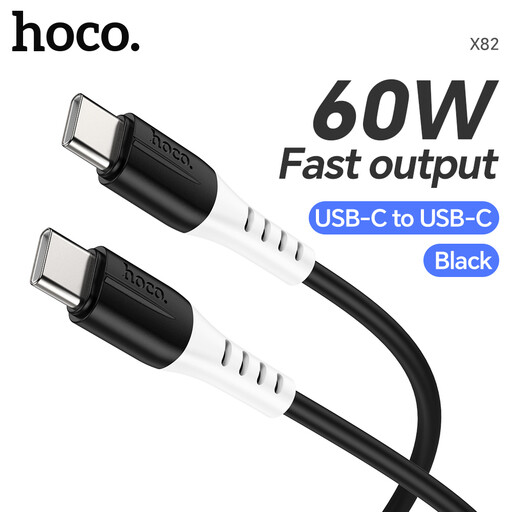
Why This Fits Their Persona: This is for the user who needs a reliable replacement for their phone, tablet or portable laptop cable. It provides a solid balance of performance and durability for daily use without overspending.
Its food-grade silicone jacket directly counters the durability deception by being extremely flexible and tangle-resistant, reducing stress on the connector joints where other cables fail.
Supports up to 60W Power Delivery, making it versatile enough for fast-charging phones, tablets and even a MacBook Air. The silicone material remains flexible and avoids permanent kinks.
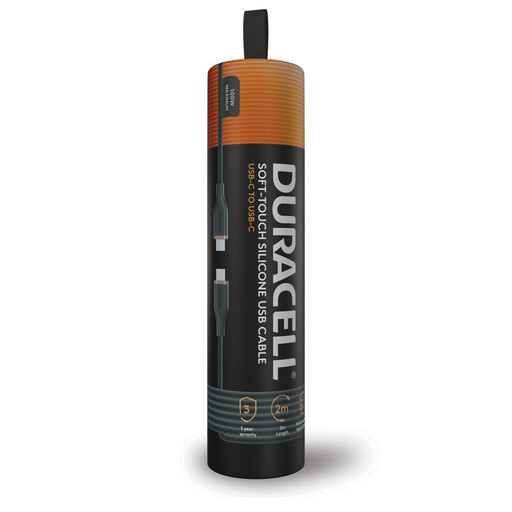
Why This Fits Their Persona: For the professional or tech enthusiast juggling a high-power laptop, smartphone and other gadgets. This cable is built for maximum performance and convenience, whether at an office desk or on the go.
It avoids the "Power Promise" mismatch by clearly stating its 100W capability, ensuring it can handle demanding devices like a MacBook Pro without bottlenecking performance. The construction is described as using Dupont Kevlar fibre, addressing durability concerns.
Delivers up to 100W PD charging for maximum speed on compatible laptops and devices. The generous 2-metre length provides excellent flexibility for various charging setups.
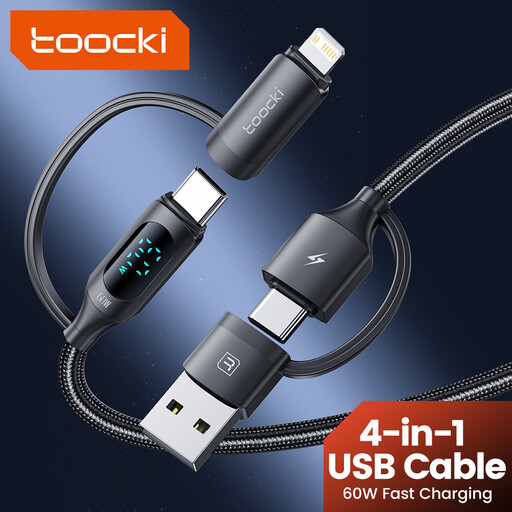
Why This Fits Their Persona: Perfect for the person who wants to minimise clutter in their travel bag or on their desk. This cable consolidates multiple charging standards into a single, convenient solution.
It directly refutes the "one-size-fits-all" myth by being an intentionally versatile product. Instead of failing at one thing, it's designed to do many, combining USB-A/C to USB-C/Lightning connectors in one braided cable.
Its 4-in-1 design allows you to charge a huge range of devices, from older USB-A power banks to the latest iPhones and Androids, all with a single cable. The braided build adds resilience for travel.
We have compiled a complete, real-time list of products that fully satisfy these strict selection criteria and UK safety regulations.
The simplest way is to check the original power adapter that came with your device (e.g., your MacBook or Samsung phone charger). The wattage (W) is usually printed in small text on the plug. For optimal performance, choose a cable and a new power adapter with a wattage rating that matches or exceeds that number.
No, it will not. The USB Power Delivery (PD) protocol is a smart technology. Your phone will communicate with the charger and only draw the amount of power it is designed to handle safely. Using a higher-wattage cable is perfectly safe and is a good way to future-proof your purchase for more powerful devices you might own later.
Not necessarily. True durability comes from the quality of the materials and, most importantly, the reinforcement at the connector joint where the cable bends. A well-made silicone USB C cable can be more flexible and resistant to bending fatigue than a cheaply constructed braided cable whose outer layer frays easily. Focus on the strain relief design at the ends of the cable.