
24/7 Customer Support

Free returns

Same-day & Next-day Delivery

Quality Guaranteed

Unlock Your Welcome Offers: FREE Delivery | Up to 80% OFF | Free 30-day JoyPlus trial
Download the APP
A frayed cable, a phone that takes hours to charge or a laptop that stubbornly refuses to power up—these are familiar frustrations. The market for USB-C cables is flooded with options, but many fail to deliver on their promises. As a Joybuy Product Recommendation Officer, my role is to help you navigate past the marketing clutter and find a cable that meets your needs without the guesswork.
Before you add another cable to your basket, let's look at the common pitfalls that lead to disappointment and wasted money.
To avoid these traps, focus on three core parameters. Getting these right ensures you buy a cable that is not only compatible but also performs as you expect.
This is the single most important factor for charging speed. The wattage tells you the maximum power a cable can safely handle. You must match the cable's wattage to your device and your power adapter.
While USB-C is becoming universal, the connector on the other end of the cable is just as important.
A cable's lifespan is determined by its materials and construction.
Instead of a generic list, we've matched our recommendations to specific user needs. This ensures you get a product that solves your exact problem.
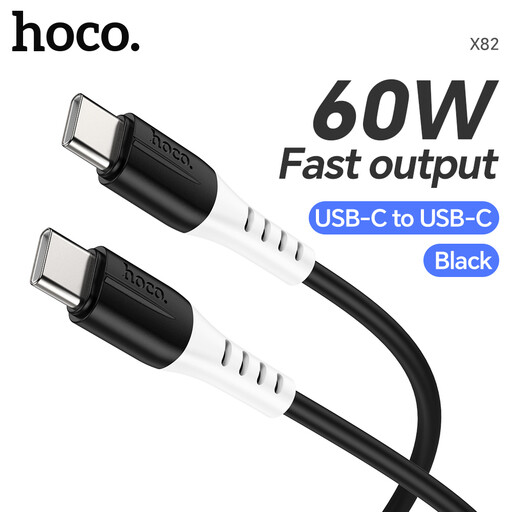
Why This Fits Their Persona: This is an ideal replacement or primary cable for anyone charging a modern smartphone, tablet, or lightweight laptop. It provides a solid 60W of power, which is more than enough for daily fast-charging needs without paying for excess capacity you won't use.
It clearly states its 60W PD capability, cutting through the vague "fast charging" claims. The food-grade silicone jacket is highly resistant to tangling and fraying, addressing a primary cause of cable failure.
Excellent flexibility and a soft-touch feel. Supports both fast charging and standard 480Mbps data transfer, making it a great all-rounder.
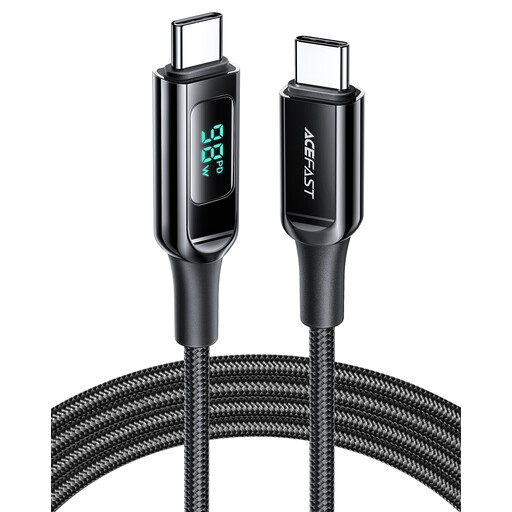
Why This Fits Their Persona: For professionals and tech enthusiasts who rely on a powerful laptop like a MacBook Pro, this cable delivers the necessary 100W power. The long 2-metre USB C cable length is practical for office and home use, and the built-in power display provides at-a-glance confirmation of charging speed.
It eliminates the power guesswork with a clear 100W rating and a digital display to verify performance. The 2-metre length and durable build directly counter the limitations of standard, fragile cables.
High-power 100W output for demanding laptops. The integrated digital power display is a unique, practical feature for monitoring charge performance.

Why This Fits Their Persona: For drivers tired of plugging in their phone every time they get in the car, this device is a game-changer. It converts a factory-wired CarPlay or Android Auto system into a seamless wireless experience, eliminating cable clutter and hassle.
This isn't just another cable; it's a solution. It avoids the trap of buying multiple car cables by making them redundant. This wireless CarPlay adapter and Android Auto dongle in one is a specific fix for a common annoyance.
True plug-and-play setup with automatic reconnection. Supports both Apple CarPlay and Android Auto, making it versatile for households with different devices.
We have compiled a complete, real-time list of products that fully satisfy these strict selection criteria and UK safety regulations.
To confirm fast charging, you need to check three things: your device's specifications for maximum charging wattage, your power adapter's output wattage and the cable's own wattage rating (e.g., 60W, 100W). All three components must be aligned. For example, a 100W-rated cable will not charge a laptop at 100W if the power adapter is only rated for 30W.
With normal use, a well-constructed braided charging cable should last for several years. The most common point of failure is not the braided sheath itself but the joint where the cable meets the connector head. Look for products that feature long, reinforced strain relief at these points, as this is the best indicator of long-term durability.
Yes, the primary difference is the power requirement. While both may use a USB C to USB C cable, a powerful laptop like a MacBook Pro requires a high-wattage cable (typically 100W or more) to charge effectively. Most Android phones, on the other hand, will fast-charge perfectly well with a 30W or 60W PD cable. Using an under-powered cable with a laptop will lead to very slow charging, or it may not charge at all while in use.