
24/7 Customer Support

Free returns

Same-day & Next-day Delivery

Quality Guaranteed

Unlock Your Welcome Offers: FREE Delivery | Up to 80% OFF | Free 30-day JoyPlus trial
Download the APP
A USB-C GaN charger can replace several bulky power adaptors, but choosing by wattage alone can lead to wasted money. A charger marked “100W” may share that output across multiple ports, while a compact 30W model may be unsuitable for a laptop. UK shoppers also need to check the plug type, charging protocol and whether a cable is included.
This guide explains the practical specifications to check before buying a fast USB-C charger, followed by product recommendations for different types of user.
A multi-port charger may advertise its combined output rather than the power available from one USB-C port. For example, a 100W charger can provide 100W when one USB-C port is used, but its total output may reduce when two or three devices are connected.
Check these figures separately:
The Anker Prime 100W model, for instance, provides up to 100W through either USB-C port when used alone, while its maximum total output is listed as 89W with three ports in use.
USB-C describes the connector, not the charging speed. A 20W or 30W charger may suit a phone, earbuds or some tablets but may not provide enough power for a laptop. A laptop charger should generally be selected according to the computer manufacturer’s recommended wattage.
A USB-C PD charger is usually more suitable for modern laptops and tablets because USB Power Delivery allows compatible devices and chargers to negotiate an appropriate power level. However, compatibility still depends on the device, cable and supported charging profile.
Some compact chargers are supplied with an EU plug. They may support a broad input range, but that does not automatically make them convenient for everyday use in Britain. For a straightforward setup, look for a UK plug charger or a model supplied with both UK and EU power leads.
Also check the product listing carefully for included cables. Some chargers are sold as the adaptor only, meaning a suitable USB-C cable must be purchased separately.
Match output to your devices rather than paying for unused capacity.
A higher number does not force excess power into a device. Compatible equipment normally negotiates the power it can accept, but using a suitable certified cable remains important.
Gallium Nitride, or GaN, allows manufacturers to create compact switching components that can support high output in a relatively small enclosure. This is useful for commuters, students and business travellers carrying a travel charger in a laptop bag.
Compact size should not replace practical checks. Look for ventilation guidance, overheating protection, overcurrent protection and clear manufacturer information. Do not cover a charger during operation or use one that is cracked, damaged or unusually hot.
A single USB-C port keeps a charger small, but a multi-port USB-C charger can reduce the number of adaptors needed at a desk or hotel bedside. Consider the devices you normally charge together:
Read the detailed output table rather than relying only on the headline wattage.
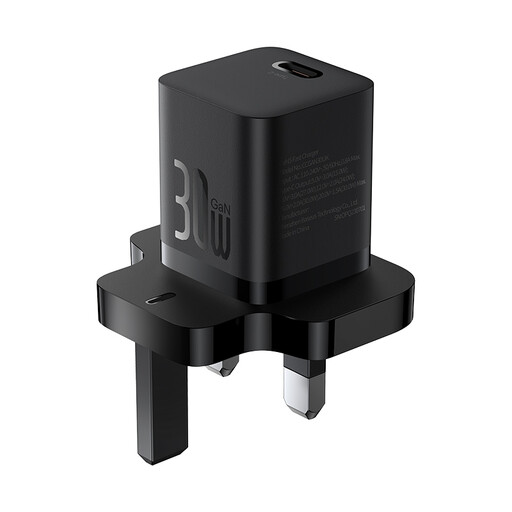
Why This Fits Their Persona: A 30W UK plug charger provides a compact option for phone users, students and anyone replacing a basic adaptor without paying for laptop-level output.
Its stated 30W output is clear, and the UK cluster avoids relying on an additional plug adaptor for ordinary British sockets.
30W USB-C PD output, 51.5g weight and a compact 4.9 × 4.4 × 4cm design.
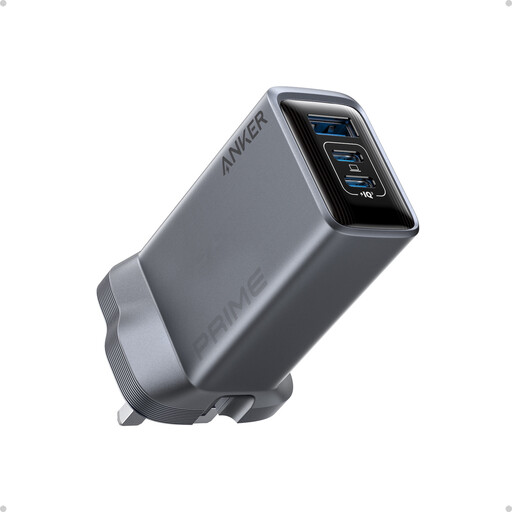
Why This Fits Their Persona: Remote workers and home-office users can charge a laptop, phone and accessory from one desktop-friendly adaptor.
The specification states both single-port and three-port figures: up to 100W from one USB-C port and 89W total across three ports.
Two USB-C ports, one USB-A port, foldable prongs and a stated 24-month warranty.
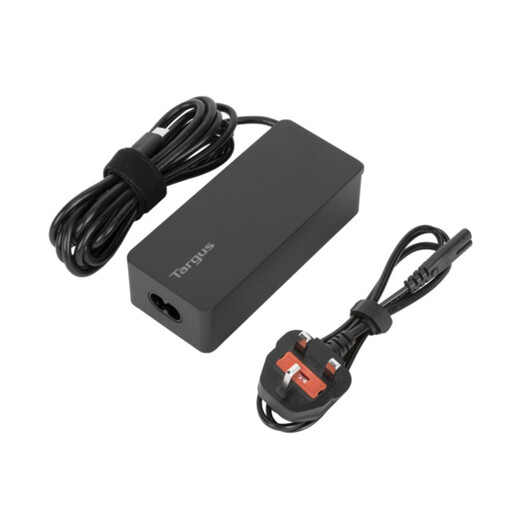
Why This Fits Their Persona: Its 65W capacity suits many USB-C laptops, tablets and phones, while the included UK and EU power leads are useful for trips from Britain to Europe.
The package specification identifies the power output, cable length and both UK and EU leads, reducing uncertainty before travel.
65W USB-C PD, 1.8m cable, cable tie and listed protection against overcurrent, overheating and overvoltage.
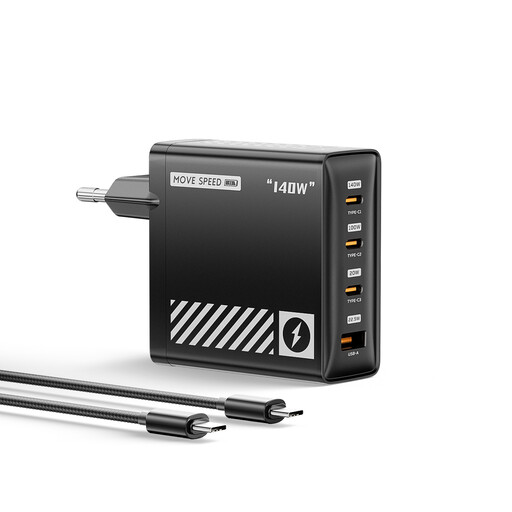
Why This Fits Their Persona: Suitable for users carrying a powerful laptop alongside phones, tablets and accessories, provided they arrange a compatible UK plug solution.
Its specification separates the outputs: USB-C1 up to 140W, USB-C2 up to 100W, USB-C3 up to 20W and USB-A up to 22.5W.
Four ports, PD 3.1 support, 140W maximum output and a stated 296.4g weight.
We have compiled a complete, real-time list of products that fully satisfy these strict selection criteria and UK safety regulations.
For many compatible smartphones, 30W is sufficient for fast charging, assuming the phone supports the relevant USB-C PD or manufacturer charging protocol. It may also suit tablets, but check the device specification and use a suitable cable.
Yes, if its output and charging protocol match the MacBook’s requirements. A 65W USB-C PD charger is suitable for many smaller laptops, while higher-powered MacBook models may require 100W or more. Check the laptop’s supplied charger rating before replacing it.
The wattage printed on a charger is its maximum output, not a constant electricity demand. Actual consumption varies according to the connected device, battery level and charging stage. A 100W or 140W charger does not continuously draw that amount when charging a small phone.
Before ordering, confirm the plug format, port-sharing table, PD profile, cable requirements and device wattage. These checks provide a more reliable basis for choosing a USB-C GaN charger than headline speed claims alone.