
24/7 Customer Support

Free returns

Same-day & Next-day Delivery

Quality Guaranteed

Unlock Your Welcome Offers: FREE Delivery | Up to 80% OFF | Free 30-day JoyPlus trial
Download the APP
Modern high-performance laptops like the MacBook Pro and Dell XPS are powerful tools, but their minimalist design often leaves professionals short on essential ports. Juggling multiple dongles for a monitor, a wired internet connection and a charger is inefficient, especially when working remotely or travelling for business. The solution is a single, capable accessory that restores functionality without cluttering your workspace.
This guide is designed to help you navigate the options and identify a high-performance USB C hub with 100W power delivery. We will outline the key features to look for and present our recommendations to help you find a reliable hub that can power your laptop and connect all your peripherals simultaneously.
Choosing the right hub involves more than just counting ports. For UK professionals who rely on their mobile workstation, here are a few key considerations.
Not all USB-C hubs are created equal when it comes to charging. While many offer power pass-through, the wattage is critical. A standard 60W hub may not be sufficient to charge a high-performance laptop under load, leading to slow charging or even battery drain. A 100W PD hub ensures that your device receives enough power to charge rapidly, even while running demanding applications and powering connected accessories. Always check that the hub's PD rating matches or exceeds your laptop's charger specifications.
Consider your daily workflow. Do you need to connect to external displays? A hub with USB C to HDMI and ethernet is a versatile choice. An HDMI port supporting 4K resolution is ideal for creative work, while a Gigabit Ethernet port provides a stable, high-speed internet connection crucial for video conferencing and large file transfers. For maximum compatibility, especially when presenting in different environments, a model that also includes a VGA port can be invaluable.
For a travel USB C hub, size and durability are paramount. A compact, lightweight design is essential, but it shouldn't come at the cost of reliability. Look for features like high-grade EMI/RF shielding to prevent interference with your Wi-Fi or Bluetooth signals and corrosion-resistant connectors that can withstand the rigours of daily use.
Based on features, versatility and user needs, here are our recommendations for professionals seeking to expand their laptop's capabilities.
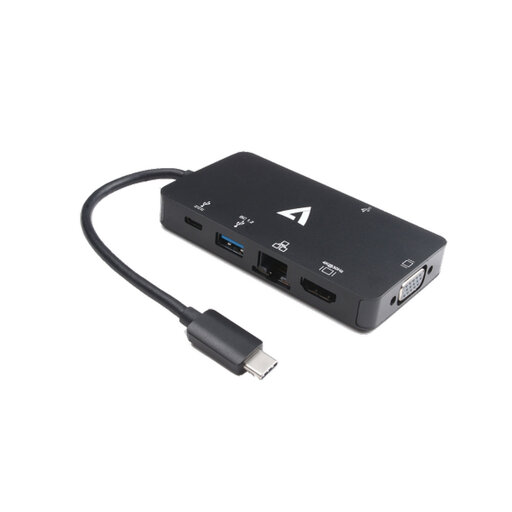
Why It Stands Out: This V7 adapter is a true workhorse, functioning as a portable MacBook Pro docking station alternative. It combines video output, wired networking, data transfer and powerful charging into a single device. Its inclusion of both HDMI and VGA ports makes it exceptionally useful for professionals who present in various locations with unpredictable display connections.
The hub delivers 100W Power Delivery, enough to charge demanding laptops at full speed. Its Gigabit Ethernet port ensures a stable connection for important online meetings, while the two USB 3.0 ports accommodate legacy peripherals like mice and keyboards. The build quality, featuring EMI shielding and strain relief, is designed for longevity and reliable signal transfer.
Pros:
Who is it for? The business traveller or remote worker who needs a single, reliable solution to connect to any display, maintain a stable internet connection and keep their laptop fully powered.
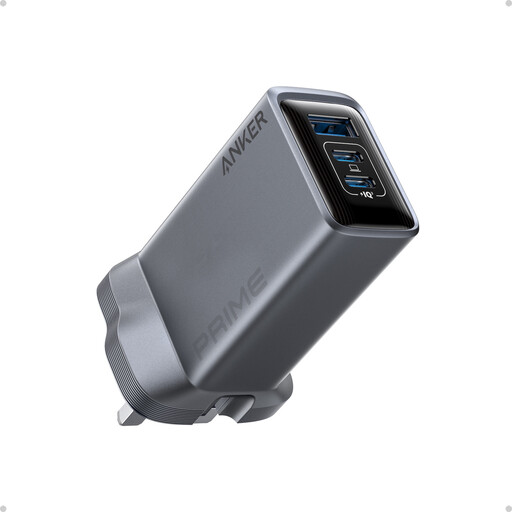
Why It Stands Out: While not a traditional hub, the Anker Prime charger addresses the power aspect of the mobile workstation with exceptional efficiency. Using Gallium Nitride (GaN) technology, this GaN charger hub packs 100W of power into a remarkably compact form factor. It can charge up to three devices simultaneously, with each of its two USB-C ports capable of delivering a full 100W when used alone.
According to Anker, it can charge a 14-inch MacBook Pro to 50% in just 30 minutes. Its foldable prongs and small size make it an excellent travel companion for those who prioritise fast, multi-device charging over peripheral connectivity.
Pros:
Who is it for? The tech-savvy user who already has the necessary ports but needs a powerful, compact and fast-charging solution for their laptop, phone and other gadgets.
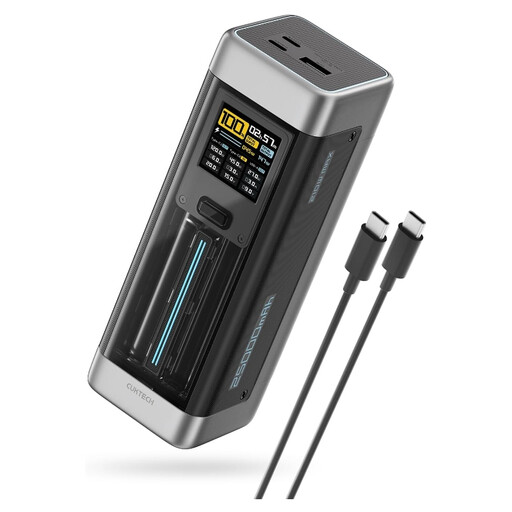
Why It Stands Out: For true off-grid productivity, the CUKTECH NO.20 power bank is a formidable choice. It moves beyond simple pass-through charging by offering a massive 25,000mAh battery capacity and a staggering 140W maximum output via its PD3.1 USB-C port. This is more than enough to fast-charge the most power-hungry laptops, like a 16-inch MacBook Pro, from anywhere.
Its smart digital display provides real-time information on power output, input and remaining battery life. With three ports (2x USB-C, 1x USB-A), it can charge multiple devices simultaneously, making it a complete mobile power station for professionals working away from a power outlet.
Pros:
Who is it for? The digital nomad, field worker or frequent flyer who needs to keep their entire tech arsenal, including a high-performance laptop, charged for extended periods without access to a wall socket.
The right USB C multiport adapter depends entirely on your specific needs. If the recommendations above aren't quite what you're looking for or if you need a different combination of ports, be sure to explore our broader collection.
? Browse our full range of USB port adapters
It depends on your laptop. High-performance models like a 15-inch or 16-inch MacBook Pro, Dell XPS 15/17 or gaming laptops often ship with a charger rated at 96W or higher. Using a hub with lower wattage (e.g., 60W) may result in your battery draining during intensive tasks, even while plugged in. To ensure optimal performance and charging speed, it is advisable to match your hub's power delivery to your laptop's original charger.
Poorly shielded USB 3.0 devices and hubs can sometimes generate radio frequency interference in the 2.4GHz band, which can disrupt Wi-Fi and Bluetooth connections. To avoid this, look for hubs that specify high-grade EMI/RF shielding in their construction, like the V7 adapter mentioned above. This feature helps contain electronic noise and ensures your wireless connections remain stable.
USB-C DisplayPort Alternate Mode (or "Alt Mode") is a feature that allows a USB-C port to transmit non-USB signals, such as video. For a 4K USB C adapter with charging to send a video signal to an HDMI or DisplayPort monitor without special drivers, your laptop's USB-C port must support Alt Mode. Most modern high-end laptops from Apple, Dell, HP and Lenovo include this feature, but it is always wise to check your device's specifications.