
24/7 Customer Support

Free returns

Same-day & Next-day Delivery

Quality Guaranteed

Unlock Your Welcome Offers: FREE Delivery | Up to 80% OFF | Free 30-day JoyPlus trial
Download the APP
Modern laptops are thinner and lighter than ever, but this sleek design often comes at a cost: fewer ports. If you've found yourself struggling to connect an external monitor, a mouse and a memory card to your MacBook or Dell XPS at the same time, you're not alone. The good news is that a single, well-chosen accessory can solve this problem.
A USB C hub, also known as a multiport adaptor, expands one USB-C port into many, restoring the connectivity you need for a productive workspace. However, the market is filled with options, from simple adaptors to complex docking stations. This guide is designed to help you understand the key features to look for and to highlight a few practical solutions for different needs, whether you're setting up a home office, working on the go, or just trying to reduce clutter.
Before you buy, it's helpful to consider how you plan to use your hub. Focusing on these three points will help you narrow down the options and find a device that serves you well.
Think about the devices you use daily. Do you need to connect to a projector for presentations? A USB C to HDMI port is essential. For photographers or videographers, built-in SD and microSD card readers are a must. If you rely on a stable, wired internet connection for video calls or online gaming, look for a USB C hub with ethernet. For a more advanced setup, a dual monitor adaptor function allows you to create an expansive multi-screen workspace. List your "must-have" and "nice-to-have" ports to guide your choice.
Many USB C hubs feature Power Delivery, often listed as PD charging. This allows you to charge your laptop through the hub itself, using the same USB-C port that the hub is plugged into. This is particularly useful for laptops with only one or two ports. Check the wattage (W) of the PD port. A hub with 60W PD is fine for many ultrabooks, but power-hungry laptops may require a hub that supports up to 100W to charge effectively while in use. This feature effectively turns your hub into a laptop docking station, handling data, video and power all at once.
The right device also depends on where you'll use it. A compact, lightweight multiport adaptor is ideal for carrying in a laptop bag. For a permanent desk setup, a larger USB C docking station might offer more ports and a more robust build. Alternatively, if your main problem is a shortage of wall sockets for charging your phone and tablet, a plug through USB adaptor or a USB C charger plug with a pass through socket could be the most practical solution, as it keeps the mains outlet free for other appliances.
Here are our recommendations for versatile USB-C solutions, selected to meet a range of common needs for UK users.
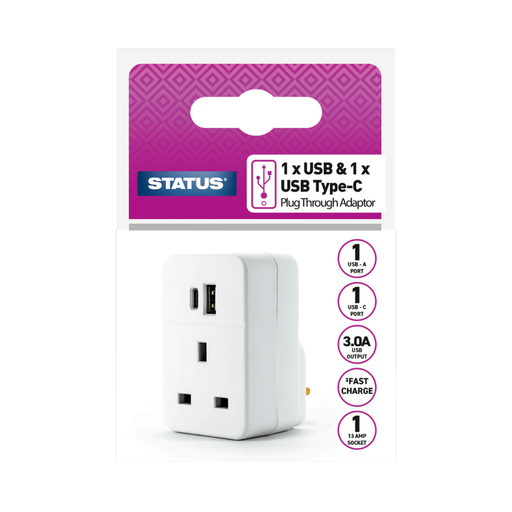
Why It Stands Out: This adaptor's main advantage is its integrated 13A pass through socket. Unlike typical USB charger plugs that block an entire wall outlet, this design allows you to continue using the socket for other appliances like a lamp or a laptop charger, while also providing USB charging ports.
Pros:
Who is it for? This is an ideal solution for anyone in a home or office with limited wall sockets. It's perfect for charging smartphones, tablets and other personal devices without sacrificing a valuable plug point.

Why It Stands Out: This is a comprehensive connectivity solution designed for power users. It offers an impressive 10 ports, including two separate HDMI outputs that support high-resolution, high-refresh-rate displays (4K@120Hz and 4K@60Hz), making it a powerful dual monitor adaptor.
Pros:
Who is it for? This hub is aimed at professionals, content creators and tech enthusiasts who need to build a full-featured workstation. It's an excellent choice for anyone requiring a high-performance laptop docking station with multi-monitor support and fast data speeds.
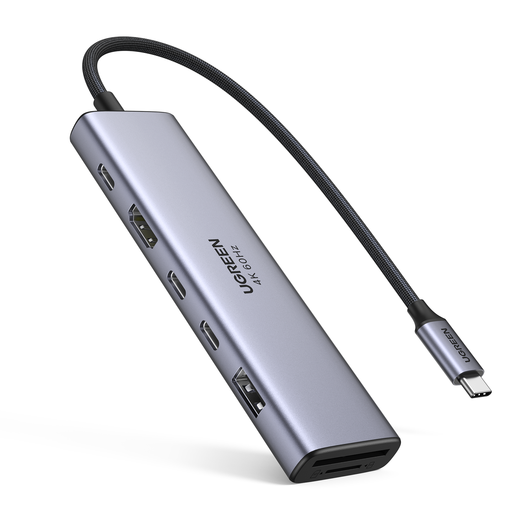
Why It Stands Out: This UGREEN model strikes a great balance between portability and functionality. It provides a well-rounded selection of seven essential ports, including modern, high-speed USB 3.2 ports for both Type-A and Type-C connections, ensuring fast file transfers.
Pros:
Who is it for? This is a solid all-rounder for students, remote workers and general users. It’s a reliable multiport adaptor for everyday tasks like connecting to a monitor for a presentation, transferring photos from a camera and connecting peripherals.
If these recommendations don't quite match what you're looking for, or if you need a simpler solution, there are many other types of adaptors available.
For those who just need to connect an older USB-A device to a new USB-C port, a more basic adaptor may be all that's required. Explore our full range of USB A to C adapters to find the perfect fit for your devices.
Generally, a USB C hub is a smaller, more portable device that draws power directly from the laptop it's connected to. A laptop docking station is typically larger, designed for a stationary desk setup, and often comes with its own power supply. Docking stations tend to offer more ports and higher-power capabilities than portable hubs.
If your laptop has limited USB-C ports (one or two), a hub with PD charging is highly recommended. It allows you to use a single port to connect all your accessories—like an external hard drive and a monitor—while simultaneously charging your laptop. Without it, you would need to choose between charging your device or using your hub.