
24/7 Customer Support

Free returns

Same-day & Next-day Delivery

Quality Guaranteed

Unlock Your Welcome Offers: FREE Delivery | Up to 80% OFF | Free 30-day JoyPlus trial
Download the APP
As modern laptops like the MacBook Pro and Dell XPS embrace a minimalist design, the versatile USB-C port has become standard. While this streamlines the look, it often leaves users without the essential ports they need for everyday tasks. A USB-C hub, or multiport adapter, is the clear solution, but the market is flooded with options that often over-promise and under-deliver.
Before you add any USB-C hub to your basket, it's crucial to understand the common pitfalls that lead to wasted money and frustration. Many devices are plagued by misleading specifications and design flaws that only become apparent after purchase.
To make an informed choice, you need to look past the marketing buzzwords and focus on a few key technical parameters. These are the non-negotiable features that determine whether a USB-C hub will be a reliable tool or a source of constant problems.
For a smooth, modern viewing experience, 4K at 60Hz is the standard you should look for. The refresh rate (measured in Hertz, or Hz) indicates how many times per second the image on the screen is updated. A 60Hz refresh rate provides fluid motion, which is essential for everything from editing video to simply moving your cursor across the screen. To use this feature, your laptop's USB-C port must support DisplayPort Alt Mode, which allows it to transmit a video signal. Most modern high-performance laptops do, but it's always wise to check your device's specifications.
Power Delivery allows you to charge your laptop through the USB-C hub itself. However, the hub consumes some of that power to operate its own ports—typically around 10-15W. This means a hub advertised with 100W PD input will only deliver about 85-90W to your laptop. For power-hungry devices, ensure the hub offers high-wattage pass-through charging to keep your battery topped up under a heavy workload.
Not all USB ports are created equal. A complete USB-C multiport adapter should offer a mix of ports to suit your needs:
Instead of providing a generic list, we've matched our recommendations to specific user profiles. This helps you find a product that not only works well but also fits your exact needs and budget.
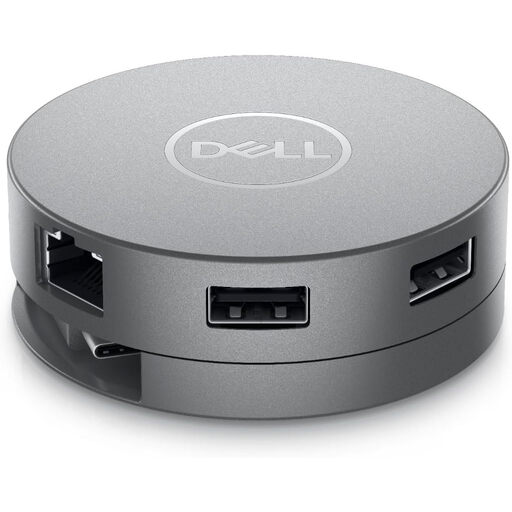
Why This Fits Their Persona: This compact, round adapter is designed for life on the road. Its patented cable management keeps your bag tidy and the comprehensive port selection, including the legacy VGA port, ensures you can connect to any display, whether in a modern boardroom or an older university lecture hall.
It avoids the trap of limited video compatibility by offering HDMI, DisplayPort and VGA. The 90W power pass-through is clearly stated and sufficient for most professional laptops, preventing the underpowered charging issue.
Its main advantage is versatility. The combination of modern (4K HDMI, DisplayPort) and legacy (VGA) video outputs in a single, portable unit makes it an ideal USB-C travel adapter.
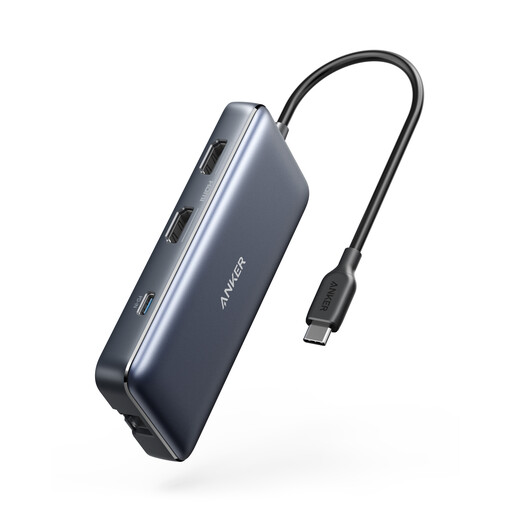
Why This Fits Their Persona: This hub is a true docking station replacement for creatives and professionals. With dual HDMI ports for multi-monitor setups, SD/microSD card readers for media transfer and high-speed data ports, it turns a single USB-C port into a full-fledged workstation.
It directly addresses the 4K trap by specifying its capabilities: one display at 4K@60Hz or two displays at 4K@30Hz. It also offers up to 85W pass-through charging, avoiding the underpowered hub problem for demanding laptops.
The dual HDMI output is its standout feature, allowing for an expanded desktop across two external monitors. The inclusion of both SD and microSD card readers adds significant value for content creators.
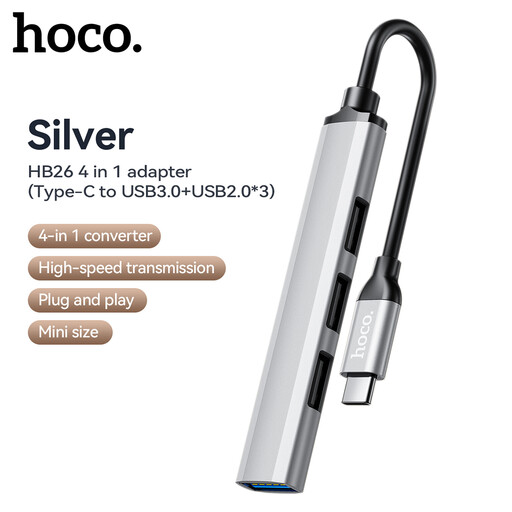
Why This Fits Their Persona: For students or professionals who simply need to connect legacy USB-A devices like a mouse, keyboard or thumb drive, this adapter is a straightforward and affordable solution. It focuses on one job—expanding USB access—and does it well.
It avoids the trap of overpaying for unnecessary features. By not including video output or power delivery, it keeps the cost down and provides a simple, reliable solution for basic connectivity needs.
Its primary advantage is its simplicity and affordability. It provides one high-speed USB 3.0 port for fast data transfer and three USB 2.0 ports for standard peripherals, covering all the basics without complication.
We have compiled a complete, real-time list of products that fully satisfy these strict selection criteria and UK safety regulations.
A USB-C hub is an active electronic device and does draw a small amount of power from your laptop to function, even when no peripherals are connected. However, the drain is minimal and generally not noticeable during normal use. If you are using a hub with Power Delivery, it will charge your laptop while simultaneously powering itself and any connected devices.
No, they do not. For a USB-C port to output video to a monitor via a hub, it must support a feature called DisplayPort Alt Mode (or DP Alt Mode). While this is standard on most high-end and mid-range laptops (like the MacBook Pro/Air, Dell XPS and Microsoft Surface), it is often absent on more affordable models. Always check your laptop's technical specifications to confirm it supports video output over USB-C before purchasing a hub for that purpose.
The lifespan of a USB-C hub depends heavily on its build quality and usage patterns. A well-made hub with an aluminium casing for better heat dissipation should last for several years with normal use. Signs of a failing hub include frequent disconnection of peripherals, flickering video output or the hub becoming excessively hot to the touch. To prolong its life, avoid putting physical strain on the cable and connector and ensure it has adequate ventilation during heavy use.