What should you check before buying?
Choose the connections you need at the desk, then confirm that the laptop can provide the video and charging functions you expect through its host port. A USB-C connector by itself does not establish those capabilities, as Kensington and Dell’s guidance explains.
Compact USB-C hub
Choose it when: The regular setup is a webcam and a few peripherals, particularly if the adapter will travel with the laptop.
Trade-off: Its smaller set of connections may not cover a permanent desk setup, and charging or video output must be checked for the exact hub and laptop.
Powered USB-C dock
Choose it when: A fixed desk needs the webcam, monitor, network connection and laptop charging attached through one host cable.
Trade-off: Display and charging functions depend on the laptop, and the power supply or host cable is not included with every model.
Thunderbolt or USB4 dock
Choose it when: A compatible laptop also needs a more demanding multi-display or fast-storage setup.
Trade-off: A webcam alone does not call for those capabilities, and a USB-C-shaped laptop port does not confirm Thunderbolt support.
| Concern | What to check | Who this matters to |
|---|
| Laptop and webcam compatibility |
Match the webcam’s USB-A or USB-C connector to a downstream data port. For a monitor, check the laptop’s stated USB-C video method rather than relying on connector shape. |
If my main aim is to plug in a webcam, I want to know that both it and the laptop will work with the chosen device. Roughly 40% of consumers put this compatibility need first. |
| Charging and desk connections |
Compare the laptop’s charging requirement with the dock’s host Power Delivery specification, check the supplied power equipment and reserve a USB port for the webcam. |
At a fixed desk, I want the webcam and other peripherals to stay connected while one cable handles laptop charging. Around 30% of consumers place that one-cable need first. |
| External-monitor support |
Match the monitor connector and stated display conditions to the laptop’s DisplayPort Alt Mode, Thunderbolt or other required video support. |
If I study at an external monitor as well as use a webcam, the display connection matters more to me than extra unused ports. Roughly 20% of consumers prioritise that need. |
| Portability and desk space |
Compare the adapter’s size and connections with the desk setup, including any charger or cable needed to use it. |
When I carry my laptop between places, I would rather keep the setup small than leave a full dock on the desk. Around 10% of consumers put portability first. |
Joybuy products for a webcam setup
These USB-C hubs and docks offer different combinations of peripheral, display and desk connections. For a webcam-first setup, start by matching its connector to a downstream USB data port; treat monitor output and laptop charging as separate checks against your laptop and the chosen model.
 No image available
Targus USB-C Universal Dual HDMI 4K Docking Station, 100W Power Delivery Pass-Thru
Consider this for a fixed desk where the webcam connection is accompanied by monitor and charging needs. The named configuration has dual HDMI outputs and 100W Power Delivery pass-through; confirm the laptop’s video support, the webcam’s USB connector and whether the external power adapter is supplied.
View on Joybuy
 No image available
MOVESPEED DK5A1 USB-C 10-in-1 Hub
For a webcam plus other USB peripherals, this configuration lists USB-A and USB-C connections, alongside HDMI specified at up to 4K 60Hz. Check the laptop’s video capability if using HDMI; a USB-C power output specification should not be taken as confirmation that it charges the laptop.
View on Joybuy
 No image available
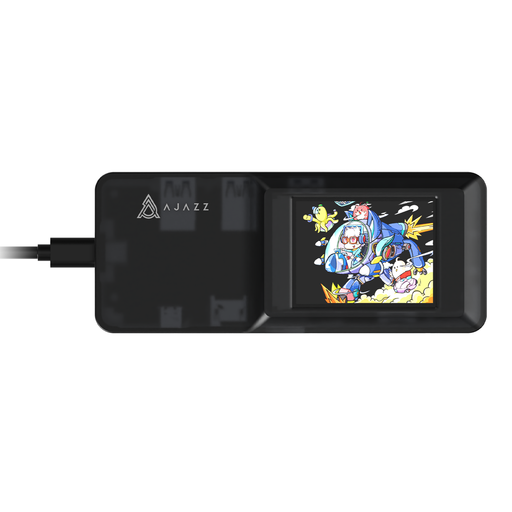
AJAZZ AKP01E Visualization Hub 8-in-1
This is a desk-expansion option if the webcam will share the setup with other peripherals. Confirm that its USB port connectors match the webcam; it also lists HDMI, RJ45 and SD/TF connections, with the SD and TF slots not intended for simultaneous use. Check the laptop’s required host functions and the power arrangement separately.
View on Joybuy
 No image available
Mokin 2USBC to TB+ USB-C Docking Adapter
For a webcam-and-peripherals desk setup, the named variant includes two USB-A 3.0 connections, a USB-C 3.0 data connection, SD/TF slots and HDMI specified at 4K 60Hz. Match the webcam connector first, then check the laptop’s support for the display function if you intend to use HDMI.
View on Joybuy
 No image available
USB-C Adapter with 2 HDMI, DP, USB 3.0/2.0, RJ45, PD, SD/TF and Audio
This multiport arrangement may suit a desk that needs a webcam alongside network or display connections. The named variant has two USB 3.0 and two USB 2.0 interfaces; confirm their connector types against the webcam. Check laptop video support and the Power Delivery conditions before relying on monitor output or charging.
View on Joybuy
Frequently asked questions
Will any USB-C dock connect both my webcam and monitor?
No: the webcam needs a matching downstream USB data connection, while monitor output depends on the laptop supporting the dock’s stated video method, such as DisplayPort Alt Mode or Thunderbolt. Dell and HP both document host-dependent video requirements, so check the exact laptop port and dock specification.
Do I need a powered dock just for a webcam?
Not necessarily: a compact hub can cover a webcam and a small number of peripherals if the ports match. A powered dock is more relevant when the same setup must also handle laptop charging, additional connections or a regular monitor; check its supplied power equipment and the laptop’s charging requirements.
Will I have to install software for a dock?
Check the exact model rather than assuming either way. DisplayLink advises users of DisplayLink-powered devices to follow the manufacturer’s software instructions, especially when setting up its video function; confirm operating-system support and whether your laptop permits installation.
Which electrical marking matters when buying a dock in Great Britain?
Both UKCA and CE marking can be relevant under the applicable Great Britain rules; check the product’s marking and the seller’s information rather than assuming that one mark alone settles compliance. GOV.UK’s Great Britain guidance covers the Electrical Equipment (Safety) Regulations 2016 and the continued recognition of relevant EU requirements. Northern Ireland has separate arrangements.
What if the dock I buy online is unsuitable or faulty?
For an eligible UK online purchase, GOV.UK guidance says consumers generally have 14 days after receipt to notify the seller that they wish to cancel, followed by another 14 days to return the item; exceptions can apply. A faulty or misdescribed dock is a separate issue from changing your mind, so explain the fault to the seller rather than treating a retailer’s voluntary returns policy as the limit of your rights.


