Who this setup suits

Frequent home-office commuters

You move your work laptop between locations several times a week and need a light, repeatable connection routine rather than duplicate full-size equipment. A compact hub, compatible charger, portable audio gear and a protective carry solution are especially relevant; check display and charging support first. Lenovo documentation and Office for National Statistics data on hybrid work provide useful context.

Home-desk hybrid workers

You spend long or regular periods at a home desk and may need an external monitor, separate keyboard and mouse, plus a dock that reduces repeated cable changes. The Health and Safety Executive says the whole workstation and work task matter, not monitor size or port count alone.

Users of employer-managed laptops

You need accessories for a company device but cannot assume every USB-C dock, wireless receiver, display mode, firmware tool or network feature will be supported. Prioritise exact-model compatibility and employer IT confirmation before purchasing.

Buying priorities

Portable connection kit

Choose this when: You usually connect one screen and everyday peripherals at different desks.

Key trade-off: Video output, charging and display support still depend on the laptop and the hub working together.

Fixed home-desk setup

Choose this when: You work regularly at one home desk and want monitors, network and peripherals ready to connect.

Key trade-off: A dock and monitor should be chosen around the full workstation, desk space and approved laptop configuration.

Priority What to check Your needs
Workstation across both locations Consider the whole desk arrangement, including screen position, input devices, furniture and working conditions. Check whether a monitor, stand, separate keyboard or mouse addresses an identified need. I need my home setup to support regular work rather than simply copying the office connection arrangement. The Health and Safety Executive says assessments should cover both home and office situations.
Display, ports and charging Confirm the laptop supports the required video output, such as DisplayPort Alt Mode where applicable. Compare the intended monitor arrangement, hub power input, charger output and laptop power requirement. I want to connect my monitor, wired network and peripherals without assuming that a USB-C-shaped port will deliver video, sufficient charging or the display mode I need.
Calls and input devices Check whether the headset connection type, keyboard layout, Bluetooth or receiver method and free USB ports work at both desks. Confirm approval requirements for managed laptops. I need practical typing, pointing and calls when moving between a quiet home desk, a shared office and travel days.

Common buying pitfalls

  • Treating every USB-C port as a full docking port

    A hub can fit physically yet fail to provide video or the intended charging function when the laptop lacks the required USB-C features. Microsoft notes that some hardware and software combinations can cause USB-C problems.

    Check the exact laptop manual or support page for display output, Power Delivery input and supported monitor arrangements, then compare these details with the hub specification.

  • Choosing a fixed dock without exact laptop compatibility

    Dock functions can vary by laptop brand and operating system. Lenovo notes that some functions may be limited outside its own laptop range, including features that can matter on managed devices.

    Confirm the laptop model, operating system, required displays and employer IT requirements before selecting a desk dock. If these details cannot be confirmed, check the retailer’s return terms before choosing a simpler connection option.

  • Buying accessories before assessing both work locations

    A monitor or dock alone may not address the actual issue if desk space, screen position, input placement or a home-only discomfort problem is driving the need. Health and Safety Executive guidance considers the home and office workstations together.

    List your tasks, time spent at each location, existing desk arrangement, required peripherals and any discomfort before choosing equipment. Raise persistent pain or discomfort through your employer’s DSE process.

  • Assuming personal peripherals will be accepted on a managed device

    A peripheral can be technically compatible but still be impractical if it needs an unavailable port, adapter, driver or firmware tool, or if employer policy restricts it.

    Check approved connection types and peripheral policy before buying. For calls, choose a connection method that the employer supports and that remains practical at home and in the office.

Relevant brand references

Lenovo

Commercial and travel-oriented USB-C and Thunderbolt docking options, including desk docks and compact travel docks.

  • Some docks can support non-Lenovo notebooks that meet industry USB-C docking standards.
  • Lenovo compatibility material identifies possible functional limitations outside ThinkPad systems, so the exact laptop and compatibility table remain important.

Anker

Consumer USB-C hubs and docking accessories for compact single-cable expansion, including HDMI, USB ports and pass-through charging.

  • Anker’s UK Nano USB-C Hub product page lists HDMI video, 100W PD input and up to 85W laptop charging.
  • The same product guidance requires a host USB-C port that supports both DisplayPort Alt Mode and Power Delivery.

Logitech

Home and office peripherals, including keyboards, mice, webcams and USB headsets for a fixed home-desk input and call setup.

  • Its UK work-from-home range includes wired USB headset and webcam options alongside keyboard-and-mouse combinations.
  • The laptop still needs the right USB connection or approved adapter, and wireless-receiver policies can vary on managed devices.

Jabra

Business-focused headsets marketed for people moving between office, home office and other work locations.

  • Jabra positions its hybrid-work range around portable professional calling and distraction control.
  • These are manufacturer positioning claims; confirm the approved connection method, unified-communications requirements and charging routine for an employer-managed laptop.

Joybuy product options

These Joybuy options cover carrying, compact laptop connections, fixed-desk docking and external-monitor routes for a hybrid laptop setup.
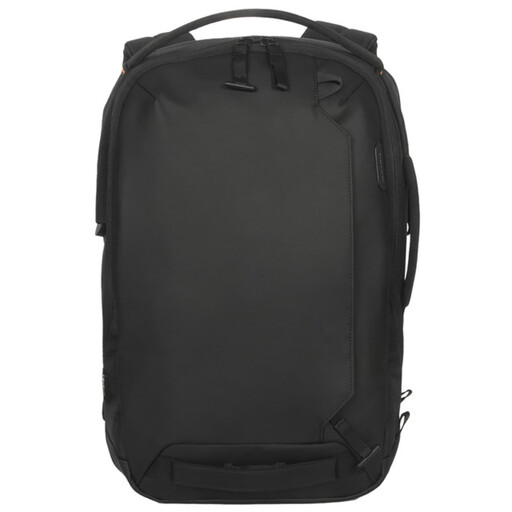
Targus Commuter 15.6-inch Laptop Backpack in Black

Targus Commuter 15.6-inch Laptop Backpack – Black

For commuters carrying a laptop and daily work accessories between home and office.

Stated features include padded, lockable laptop storage, a separate tablet pocket, organiser pockets, expandable 16–20 L storage, a trolley strap and a stated 0.75 kg weight.

Fits laptops up to 15.6 inches; check your laptop’s actual dimensions before buying.

Joybuy
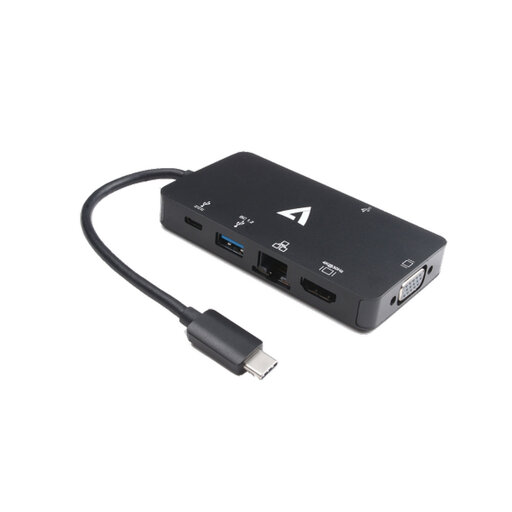
V7 V7UC-U3CRJ45HDVG-BLK USB-C adapter

V7 V7UC-U3CRJ45HDVG-BLK USB-C Adapter

For a compact routine connecting one display, wired network and everyday peripherals at changing desks.

Specifications state HDMI up to 3840 × 2160 at 30 Hz, VGA up to 1920 × 1200 at 60 Hz, Gigabit Ethernet, two USB 3.0 ports and 100 W Power Delivery input.

It is specified for SST single-display operation only. Display output requires a laptop with USB-C Alt Mode, and 100 W pass-through does not confirm the charging rate for your laptop.

Joybuy
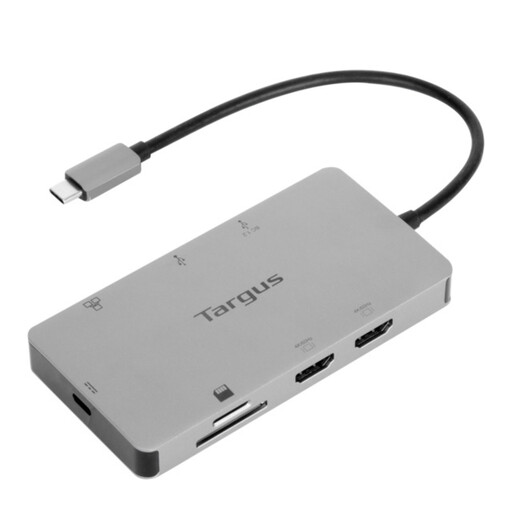
Targus USB-C Universal Dual HDMI 4K Docking Station

Targus USB-C Universal Dual HDMI 4K Dock

For a regular home desk where displays, network and peripherals can remain connected.

The listing specifies two HDMI 2.0 outputs at 4K/60 Hz, 100 W Power Delivery pass-through, Gigabit Ethernet, USB-A ports and SD/Micro SD card readers.

USB-C Alt Mode and an exact laptop, operating-system and monitor configuration are required. A 100 W or higher external adapter is stated for dock power input.

Joybuy
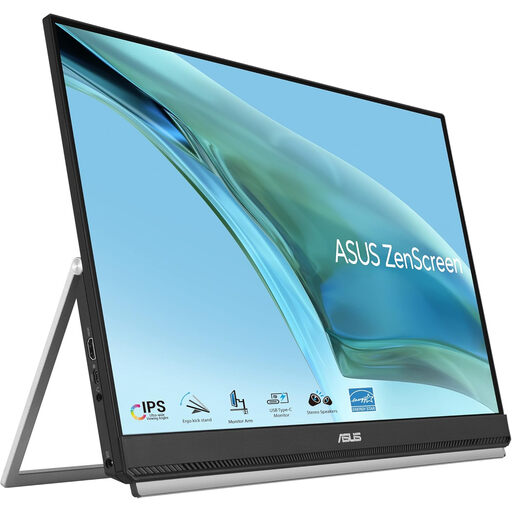
ASUS ZenScreen MB249C IPS USB-C monitor

ASUS ZenScreen MB249C IPS USB-C Monitor

For a regular home desk needing a larger second screen and adjustable positioning options.

Listed features include a 23.8-inch Full HD IPS anti-glare display, USB-C with 60 W Power Delivery, HDMI, built-in speakers, a kickstand, C-clamp arm and partition hook kit.

Single-cable USB-C use requires DisplayPort Alt Mode. Assess desk space, screen position and mounting suitability as part of the full workstation.

Joybuy
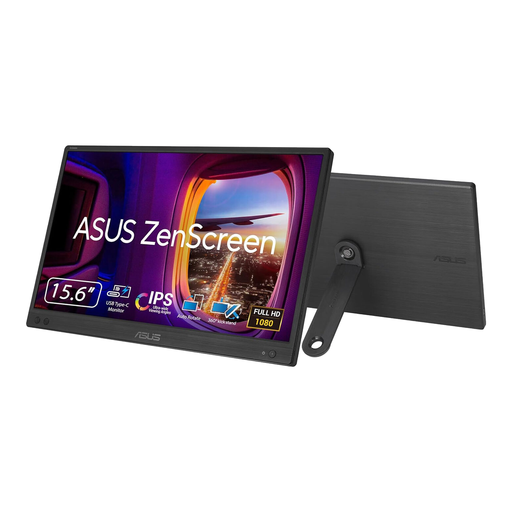
ASUS ZenScreen MB166CR FHD portable monitor

ASUS ZenScreen MB166CR FHD

For commuters who need a lightweight second screen at home, in the office or at flexible workspaces.

The listing states a 15.6-inch 1920 × 1080 IPS display, anti-glare surface, 780 g weight, 11.8 mm thickness and a single-cable USB-C connection.

USB-C video and power require DisplayPort Alt Mode. HDMI is not supported, and no built-in speakers are stated.

Joybuy

Frequently asked questions

Does UK display-screen-equipment guidance apply if I work partly from home?

For workers in Great Britain, the Health and Safety Executive says DSE regulations can apply when someone works at home long term or routinely splits time between workplace and home, and uses DSE daily for continuous periods of an hour or more. The assessment should cover both home and office situations; Northern Ireland has separate regulations, with similar guidance for long-term home and hybrid workers.

Will any USB-C hub let my laptop charge and drive an external monitor?

No. USB-C describes a connector type, not guaranteed video output or charging. Check the laptop specification for the required video capability, such as DisplayPort Alt Mode, and Power Delivery support, then compare the hub’s video ports, charging capability and intended display arrangement.

How should I set up accessories on an employer-managed laptop?

Check with IT or consult the employer’s approved-accessory list before purchasing a dock, wireless receiver, Ethernet adapter or device that needs firmware software. Lenovo compatibility guidance shows that standards-based docks can still have feature limitations across laptop brands and operating systems.

If a DSE assessment says I need equipment at home, can my employer make me pay for it?

No, where a DSE workstation assessment identifies action such as providing DSE equipment, the Health and Safety Executive states that workers cannot be charged for it. This applies to equipment identified through the employer’s assessment, not automatically to every personally preferred accessory.

What product-safety check matters when buying mains-powered charging equipment?

For Great Britain, electrical equipment supplied to the market is subject to the Electrical Equipment (Safety) Regulations 2016, according to the Office for Product Safety & Standards. Buy from an identifiable seller or manufacturer, retain purchase and warranty details, and match the charger’s connector and power specification to the laptop rather than relying on port shape alone.