Laptop-only home workers short of screen space
If documents, calls and work applications compete for room on one laptop screen, an external monitor may address the constraint. Check what display output the laptop supports before choosing one.


Choose an external monitor when limited screen space is the main obstacle; consider a dock or USB-C hub when you also need to reconnect displays, power and peripherals at one desk. If calls, typing or screen position are the problem instead, a webcam, input device or stand is a more targeted purchase. Before buying, check the exact laptop’s display and port capabilities, charging requirements and any employer restrictions.
If documents, calls and work applications compete for room on one laptop screen, an external monitor may address the constraint. Check what display output the laptop supports before choosing one.
A dock or hub may make it easier to reconnect displays and peripherals when moving a laptop between desks. Its video protocol and charging output still need to match the laptop.
Check with employer IT before relying on a dock, accessory software or a wireless peripheral. Device permissions can affect whether the intended setup is usable at work.
Start with the part of the workspace that is holding you back, then check the laptop and desk requirements for the product that would address it.
| Priority | What to check | Your needs |
|---|---|---|
| Screen position | Review screen height, desk arrangement and reflections. The Health and Safety Executive advises considering the whole display-screen workstation, not equipment in isolation. | I can see the screen, but its position or glare makes the workspace awkward to use. An adjustable setup may matter more to me than another connection. |
| Display capacity | Check the exact laptop model’s supported external-display count, resolution and refresh rate, then match its video output to the monitor input. Apple says Mac display support varies by model and display settings; Microsoft warns that a Windows display adapter may limit additional monitors. | I need room for documents, calls and applications at the same time. The number of separate screens my laptop can drive matters more than the number of sockets on a hub. |
| Desk connections | Match the laptop port to the dock’s required video protocol and cable. Compare dock charging output with the laptop’s power requirements; Lenovo and Microsoft both describe functions that depend on the host connection. | When I return to my desk, I want to reconnect my display and peripherals without setting up each one separately. |
| Calls and input | Check a webcam’s operating-system, app and port requirements, or a keyboard’s layout and connection method. For a managed laptop, confirm that required devices and software are permitted. | My display and ports are sufficient; I would rather address camera placement, typing or cursor control than add a monitor or dock. |
A matching connector does not establish that the laptop, dock and cable support the intended display, data and charging functions.
Check the exact laptop model and port specification against the dock’s required protocol, cable and charging output before choosing it.
Two outputs do not guarantee two independent extended displays. Anker says its Nano 8-in-1 hub mirrors its external outputs on macOS, while Microsoft notes that a Windows laptop’s display adapter may limit additional monitors.
Check the laptop’s external-display limits and the hub’s operating-system-specific display mode if separate screens are essential.
A larger screen or dock may leave screen position, glare or the desk arrangement unchanged. The Health and Safety Executive advises assessing the whole workstation.
Identify the setup issue first, then consider screen adjustment, external input devices or changes to lighting where they address it.
For workers in Great Britain, the Health and Safety Executive says workers cannot be charged where a display-screen-equipment workstation assessment identifies action that is needed.
If equipment is intended to address a work-related workstation issue, ask your employer about the applicable assessment and approval process before buying it yourself.
Dell’s UltraSharp U2424HE is a USB-C hub monitor to consider when the screen itself also needs to provide desk connections.
The ThinkPad Universal USB-C Dock 40AY0090UK is a reference point for a desk that needs display and peripheral connections through a dock.
Anker’s USB-C hubs are relevant when connection expansion, rather than a replacement screen, is the purchase priority.
Logitech’s MX Keys S is relevant when keyboard use and switching devices matter more than additional display space.
These options cover larger laptop workspaces, a dock for desk connections, a webcam for calls and a keyboard-and-mouse set for input. Choose according to the shortcoming in your own setup, then check compatibility with your laptop.
 Image unavailable
Consider this external display when a laptop screen leaves too little room for documents and applications. Check that your laptop can drive the resolution and refresh rate you intend to use; if you plan to charge through the monitor, confirm its power output against the laptop’s requirements.
 Image unavailable
This is another external-screen option for a desk where the laptop display feels cramped. Its title specifies a 27-inch, 16:9 4K UHD monitor; check whether your laptop’s available output supports your intended resolution and refresh rate, and confirm charging requirements separately.
 Image unavailable
Consider a dock when desk connections are the obstacle rather than screen size alone. This model is described as having dual HDMI outputs and 100W power-delivery pass-through; check the laptop’s USB-C video protocol and support for the intended separate displays. Confirm whether the required external 100W-or-higher power adapter is included or available.
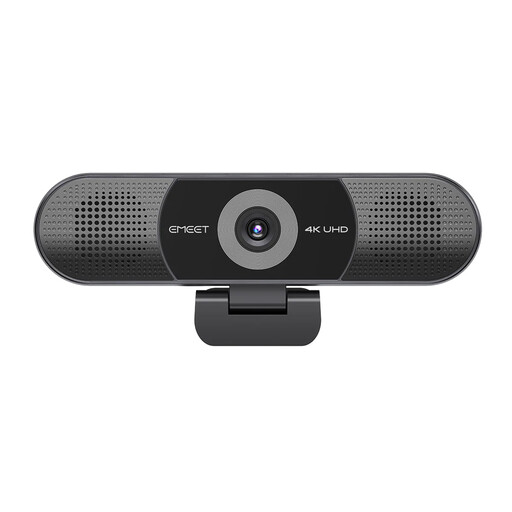 Image unavailable
A webcam is a targeted choice when camera placement or call equipment is the issue, not display space. This model’s title lists four microphones, speakers and fixed focus alongside its adjustable 98° field of view. Check whether fixed focus suits the intended position and whether a managed work device permits any software needed for your preferred features.
 Image unavailable
This set addresses typing and cursor control without adding display space. Check that its keyboard layout suits you and that your laptop supports the connection method you plan to use; ask employer IT about device permissions if it is a managed work laptop.
No. The connector alone does not establish video, charging or dock capabilities. Check the exact laptop port, the dock’s required protocol, the cable and the display configuration; Lenovo specifies relevant USB-C Alt Mode, DisplayLink or Thunderbolt support for its docks, while Microsoft notes that a USB4 dock can have limited functionality with an unsuitable host or cable.
Not necessarily. Apple says external-display support depends on the Mac model and each display’s resolution and refresh rate. Anker says its Nano 8-in-1 hub mirrors its external outputs on macOS, so check the exact hub’s display mode before buying for two separate desktops.
Check the laptop’s stated external-display limit and the output you intend to use. Microsoft notes that a display adapter may not support more than one external monitor; an extra socket alone does not establish support for another independent screen.
For workers in Great Britain, the Health and Safety Executive says workers cannot be charged where a display-screen-equipment workstation assessment identifies action that is needed. That does not mean every personally preferred accessory must be provided; ask your employer about the assessment and the equipment it identifies.
Check employer IT permissions before relying on either. A dock’s intended functions may depend on the laptop’s supported connection, and permission to use associated software or peripherals depends on the organisation’s device rules.