Who is this for?
The useful starting point is the task your current workstation makes difficult, not a standard list of accessories.
Laptop-first home workers
If you work for long periods on a laptop, decide whether screen position, typing and pointer placement, or available screen area needs attention first. The Health and Safety Executive describes separate input devices as part of a setup that allows a laptop screen to be raised.
Multi-device desk users
If your laptop needs to connect to displays and other desk devices, identify the connections you actually use before considering a dock. DisplayPort and Lenovo documentation show why the laptop’s supported video protocol matters alongside the dock’s connections.
Workers choosing equipment after an assessment
If a workstation assessment has identified a problem, use that finding to decide what to change. The Health and Safety Executive advises looking at the whole workstation, including equipment, furniture and working conditions.
What matters when choosing equipment?
For regular home or hybrid screen work, check positioning and the work you need to do before choosing connections or additional hardware. Where display screen equipment rules apply, the Health and Safety Executive’s guidance makes the workstation assessment individual rather than prescribing the same equipment for everyone.
| Concern |
What to check |
Who this matters to |
| Screen and input position |
Can the screen be raised while a separate keyboard and mouse remain suitably placed on the desk? Check a riser’s fit for the laptop. |
For prolonged laptop work, I need to move the screen without lifting the keys and trackpad along with it. About 31% of consumers put screen and input positioning first. |
| Usable screen space |
Check the host’s documented video output, the monitor’s input and the space available for its stand and viewing position. |
When the laptop display limits the work I need to see at once, a separate screen becomes my priority. Screen space comes first for about 31% of consumers. |
| Desk connections |
Match the laptop’s video protocol and display limits to the dock or adapter; check charging requirements separately. |
If I connect displays and peripherals whenever I sit down, I want a connection arrangement that supports those devices. About 23% of consumers prioritise desk connectivity. |
| Assessment and workplace arrangements |
Check the workstation assessment and the employer’s equipment approval and reimbursement arrangements before purchasing personally. |
Before choosing hardware, I need to know which change my assessment calls for and how equipment is arranged at work. This is the primary concern for about 15% of consumers. |
Joybuy products for different setups
These products cover separate displays, external keyboard-and-mouse input, and a docking connection. Choose among those functions according to your workstation and computer connections; a display or dock does not replace every adjustment to screen and input position.
 Image unavailable
Targus USB-C Universal Dual HDMI 4K Docking Station, 100W Pass-Thru
Consider this if your desk arrangement calls for two HDMI display connections through a dock. Its stated 100W power delivery is pass-through: check the exact laptop’s display and charging requirements, and confirm the external power adapter and other package contents before relying on the intended setup.
View on Joybuy
 Image unavailable
ASUS ProArt PA278CV IPS WQHD Monitor
This is a separate-display option when the existing screen area is the main constraint. Check the computer’s output, desk fit and the exact model’s connection and stand details; confirm USB-C charging capability before planning a one-cable laptop setup.
View on Joybuy
 Image unavailable
Dahua 32-inch 4K 165Hz Curved OLED Gaming Monitor
Consider the larger curved format only if it fits the desk and your intended viewing position. The product name specifies 3840 × 2160 resolution and USB-C Type-C 65W; check the exact computer’s video output and charging needs rather than assuming compatibility.
View on Joybuy
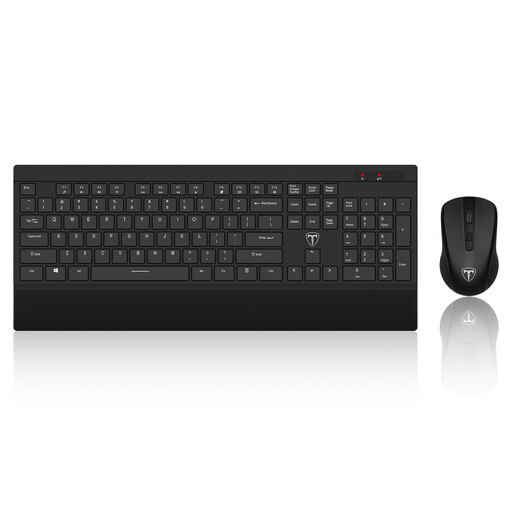 Image unavailable
ET 2.4GHz Wireless Keyboard and Mouse, US Layout
This set supplies separate input devices for a laptop or monitor arrangement. Check whether its US keyboard layout and wireless connection suit your typing and computer setup, and confirm the battery and package details before use.
View on Joybuy
 Image unavailable
ASUS ZenScreen MB166CR FHD Monitor
This separate screen is an option for a laptop setup where a portable display suits the available workspace. Confirm that the exact laptop supports the monitor’s stated USB-C DisplayPort Alternate Mode and check how you will position the screen during regular work.
View on Joybuy
Common questions
Does every UK home worker need an external monitor?
No. The Health and Safety Executive says home workers may not need office-type furniture or equipment to achieve a workable setup. Where display screen equipment rules apply, the equipment decision follows the individual workstation assessment and work arrangement rather than a universal monitor requirement.
Do I need a separate keyboard and mouse with a laptop stand?
For prolonged laptop work with the screen raised, plan for separate input devices. The Health and Safety Executive’s laptop guidance pairs an elevated screen with a separate keyboard and mouse so the input devices can stay independently positioned.
Will any USB-C laptop port run a monitor or dock?
No: the connector shape does not confirm the required video protocol. DisplayPort describes Alternate Mode for video over USB-C, and Lenovo’s dock documentation identifies protocol-specific compatibility. Compare the exact laptop port with the intended monitor or dock, including display and charging requirements.
Will my employer provide home-working display equipment?
That cannot be determined from a general equipment list. In the UK, the Health and Safety Executive says employers should assess the workstation where display screen equipment rules apply and address identified risks; a particular monitor, dock or accessory is not automatically required for every worker. Check your employer’s assessment and equipment approval process.
Does tax guidance mean my employer must reimburse equipment?
No. GOV.UK describes conditions under which employer-provided or reimbursed home-working equipment used only for business purposes can be exempt from reporting and tax. That tax treatment does not itself require reimbursement; check your employer’s purchasing and approval arrangements before buying personally.


