What should you check?
Decide where the screen will live, then match its placement and connections to the laptop before choosing accessories.
| Priority | What to check | Your needs |
|---|
| Screen and space |
Measure usable desk width and depth. Compare a fixed screen’s footprint with a portable model’s size and storage needs. |
I want room for documents or calls without making my work surface awkward to use. |
| Laptop connection |
Check the exact laptop’s video-capable ports and external-display limits. Match its output to the monitor input and the required cable or dock. |
I need the second display to work with my laptop, not just a cable whose plugs fit. |
| Positioning |
Check the supplied stand’s adjustments. For an arm, verify the monitor’s mounting interface and the arm’s screen, weight and desk-clamp limits; VESA identifies FDMI as a display-mounting standard. |
For regular desk work, I want to place the screen where I can view it comfortably. |
| Portable setup |
Check the exact monitor’s video and power requirements, including any stated USB-C mode. Verify charging or power pass-through separately rather than assuming one cable handles everything. |
If I move or put away the screen, I want to know what cable and power arrangement I will need each time. |
Relevant brand examples
These examples illustrate different monitor formats; their features and editorial mentions apply to the named models, not every display from each brand.
Dell
The Dell S2725DC is an example of a fixed screen for a dedicated desk.
- Dell UK lists a 27-inch, 2560 × 1440 IPS display, USB-C connectivity and height, pivot, swivel and tilt adjustment for this model.
- Check the laptop’s USB-C video and charging support against the intended connection.
Lenovo ThinkVision
The ThinkVision M14 illustrates a smaller screen that can move with a laptop.
- Lenovo UK specifies a 14-inch FHD display, 598 g weight and an adjustable foot for the M14.
- Lenovo’s stated USB-C extend-or-duplicate use requires a notebook port supporting DP1.2 Alt Mode and PD2.0.
ASUS ZenScreen
ZenScreen is ASUS’s portable-monitor range for setups that need a movable display.
- ASUS’s UK range information identifies laptop-focused models with HDMI, USB-C or USB 3.0 connectivity.
- Inputs, power functions and stands vary by model; check the exact version rather than relying on the range description.
HP
The HP Series 5 Pro 14-Inch WQXGA Portable Monitor (514pn) appears in PCMag UK’s September 2026 portable-monitor roundup.
- PCMag UK placed this model in its overall portable-monitor category and highlighted its 16:10 panel and fold-out kickstand.
- That editorial assessment concerns the named model; check its connections against your laptop.
MSI
The MSI Pro MP165 E6 is another model named in PCMag UK’s September 2026 portable-monitor roundup.
- PCMag UK placed it in the roundup’s low-cost portable-monitor category.
- That category does not establish compatibility with a particular laptop or suitability for every workspace.
Joybuy monitor options
These options include a desk monitor and screens for more flexible setups. Compare their stated formats with your workspace, then confirm the exact connection and power requirements for your laptop.
 No image available
ASUS ProArt PA278CV WQHD IPS monitor
Consider this fixed monitor for a regular desk setup. Check that its inputs suit your laptop’s video output and confirm any USB-C charging requirement before relying on a single-cable connection.
 No image available
ASUS ZenScreen MB249C IPS USB-C monitor
Consider the MB249C if you need a screen for a changing workspace. Check its placement options against where you will use it, and confirm USB-C video and charging compatibility with your laptop. Verify its weight if you expect to carry it regularly.
 No image available
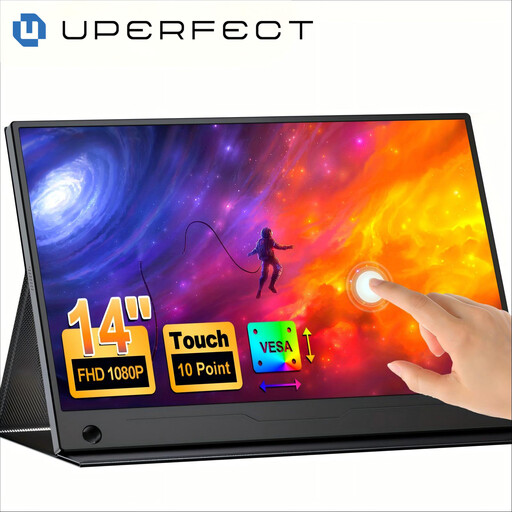
UPERFECT 14-inch 60Hz touchscreen portable monitor
The 14-inch touchscreen format is worth considering for a compact second-screen setup. Before using its stated VESA mounting option, check the exact pattern against your mount; also confirm your laptop’s video output and the monitor’s power needs.
 No image available
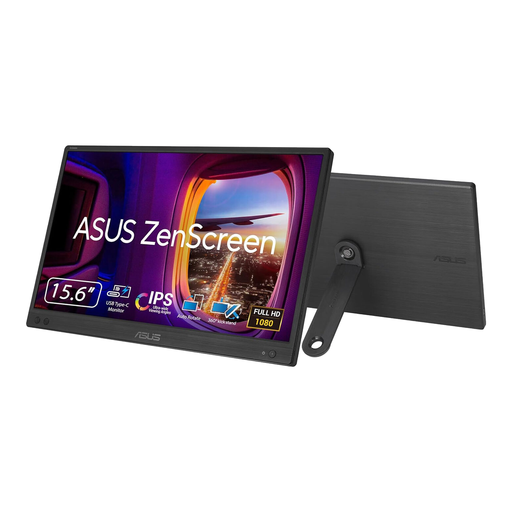
ASUS ZenScreen MB166CR FHD portable monitor
Consider this FHD model for a movable laptop setup. Its stated connection uses USB-C DisplayPort Alternate Mode, so confirm that your laptop provides the required video output and meets the monitor’s power needs.
 No image available
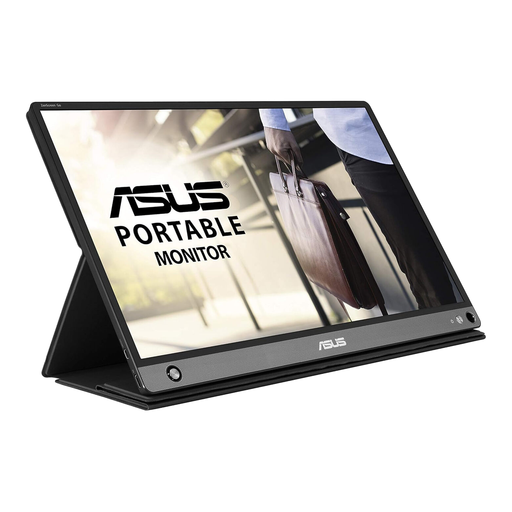
ASUS ZenScreen Go MB16AHP FHD portable monitor
Consider the ZenScreen Go for a flexible second-screen setup. Check which cable matches your laptop’s video output, and confirm the battery operating time and external power requirements for how you intend to use it.
Common questions
Will any USB-C laptop port connect to a monitor?
No. USB-C describes the connector, not guaranteed video support. Check the laptop’s external-display specification and the monitor’s input and power requirements. Lenovo, for example, specifies DP1.2 Alt Mode and PD2.0 support for the ThinkVision M14’s stated USB-C use.
Can a Mac laptop use more than one external monitor?
That depends on the exact Mac and the connected displays. Apple says the number supported simultaneously varies by Mac model, resolution and refresh rate, so check those limits before choosing a dock or two-screen setup.
What should I do after connecting a second screen in Windows?
Check the cable or dock connection, then use Windows Display settings to identify or detect the screen and arrange the displays to match their physical positions. Microsoft also provides resolution, scale and layout controls there.
Does a portable monitor make sense for a small home workspace?
It can if you need to move or store the second screen. Compare its working footprint and stand with the space available, then check its video and power connections; a compact format does not remove those compatibility checks.
Can any monitor go on an arm?
No. Confirm the exact monitor’s mounting interface and weight against the arm’s supported screen, weight and desk-clamp limits. VESA’s FDMI standard covers display mounting interfaces, but the two products still need to match.


