Laptop profilers with one spare socket
If your laptop runs the script, a compatible monitor that carries display, data and adequate charging over USB-C could take the place of a separate charger and basic dock at the desk.


For a laptop-based profiling desk with few spare sockets, choose a USB-C monitor that can handle video, data and charging only after checking that your laptop supports the required connection and can use the monitor’s stated power output. A QHD screen can accommodate code and profiling panes; choose 4K if keeping denser traces and more material visible at once matters more to your workflow. A second monitor offers another layout option, but it also needs power.
If your laptop runs the script, a compatible monitor that carries display, data and adequate charging over USB-C could take the place of a separate charger and basic dock at the desk.
If you keep source code, a profiler timeline, terminals and documentation open together, screen resolution and the layout you can use on one display will shape your choice.
If you spend extended sessions debugging, check whether the stand lets you position the screen for code and logs, including portrait orientation if you intend to use it.
Start with the laptop’s USB-C video and charging capabilities, then decide how much screen space your profiling layout needs. Treat a second display as a separate power decision, not just an extension of the first screen.
| Concern | What to check | Who this matters to |
|---|---|---|
| Fewer sockets and cables | Check the laptop for DisplayPort Alt Mode and USB-C Power Delivery, then compare its charging requirement with the monitor’s stated output. | I want the monitor connection to handle display, peripherals and laptop charging so I can free a socket. Around 33% of consumers put that consolidation first. |
| Room for code and traces | Compare the native resolution and screen size: the cited 27-inch QHD models are 2560 × 1440, while the cited 27-inch 4K model is 3840 × 2160. | When I need code, a profiler timeline and reference material visible together, fitting those panes on one screen is my priority; around 27% of consumers share that primary need. |
| A second display | Confirm that the computer and monitor connection support the intended multi-display setup, and allow for another mains connection. | I would rather keep profiling output on a separate screen than switch between windows. Around 20% of consumers place that two-screen layout first. |
| Screen positioning | Check the specific stand’s height, tilt, swivel and pivot adjustments rather than assuming they come with USB-C. | During long debugging sessions, I want to reposition the display for reading code or portrait-format logs; around 20% of consumers make adjustability their main concern. |
A USB-C connector alone does not establish that the laptop can send video and use the monitor’s charging connection, so the intended charger-and-dock replacement may not work.
Check the laptop manufacturer’s specifications for DisplayPort Alt Mode and USB-C Power Delivery. BenQ advises checking these capabilities because USB-C port configurations differ.
The cited monitors include 65W and 90W Power Delivery routes, but a stated monitor output does not establish that it meets a particular laptop’s needs.
Compare the monitor’s stated output with the laptop’s original charger rating and manufacturer guidance. Keep the original charger available if charging adequacy is uncertain.
A compatible second display can separate code from profiling output, but the second physical monitor still needs desk space and power.
If available sockets are the hard limit, assess a single-screen layout first. For a two-screen setup, confirm host support and power access before choosing a monitor with daisy-chain capability.
These model lines illustrate different USB-C monitor configurations; the brand name alone does not establish compatibility with your laptop.
Dell’s UltraSharp Thunderbolt hub models are relevant if you want laptop connections and charging alongside a QHD or 4K workspace.
The 27UP850K-W is a 27-inch 4K IPS option for a desk where a detailed single screen and USB-C connection matter.
The GW2790QT is a QHD USB-C route for buyers considering an adjustable stand, a USB hub and possible multi-display expansion.
These monitors offer 4K, ultrawide or QHD screen choices for a profiling desk. Choose the screen layout that fits your work, then confirm the exact USB-C display, hub and charging functions you need with your laptop; the models do not all have the same stated connection details.
 No image available
Consider its larger single screen if you want to arrange code, traces and reference material together. The listed variant has a 32-inch 4K UHD IPS display and a height-adjustable stand. Check its USB-C display and charging suitability for your laptop, particularly if you are not using a Mac.
 No image available
Consider this 27-inch format when you want a 4K screen for code and profiling panes. The listed variant has an IPS panel and a height-adjustable stand. Confirm the laptop’s USB-C video and charging capabilities and whether the model’s Mac-oriented features suit your computer.
 No image available
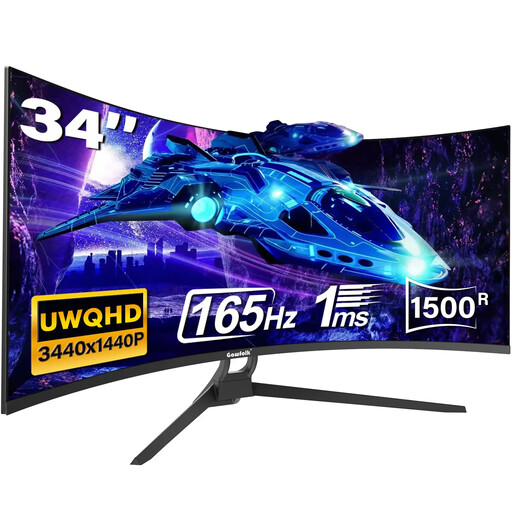
Consider the ultrawide format if you want to arrange profiling panes across one display. Its listed features include a 34-inch curved UWQHD screen, USB-C, HDMI and DisplayPort connections. Check desk fit and the exact USB-C video and charging requirements before relying on it to simplify your cables.
 No image available
Consider the 31.5-inch 4K IPS display if you want a larger single-screen layout for profiling. Its listed variant includes USB-C connectivity. Before counting on one cable to replace your charger or dock, confirm the connection’s video, data and charging functions and their compatibility with your laptop.
 No image available
Consider this QHD option if a 4K screen is not central to your profiling layout. Confirm that the supplied regional configuration has the USB hub connections you need, and check USB-C video and charging compatibility against your laptop before planning a one-cable desk.
It can serve that role when the laptop supports the required USB-C video and charging functions and the monitor supplies suitable power and peripheral connections. BenQ advises checking for DisplayPort Alt Mode and Power Delivery support rather than relying on the connector shape alone; compare charging output with your laptop’s requirements too.
Choose 4K if arranging dense traces, code and documentation on one screen is your priority and your laptop can drive the intended connection. The cited 27-inch LG 27UP850K-W is 3840 × 2160, while the cited Dell U2724DE and BenQ GW2790QT QHD models are 2560 × 1440; QHD remains an option if that workspace meets your needs.
Do not assume so: check the monitor’s cable instructions and the functions your connection needs. LG says the included USB-C cable is required for the 27UP850K-W connection to work properly.
Ask the retailer what collection or take-back arrangement applies if disposal is part of your purchase decision. GOV.UK explains that waste electrical and electronic equipment is regulated to reduce electrical waste; confirm the practical arrangement for your purchase rather than assuming a particular service is included.