What to check before choosing
Start with laptop video and charging compatibility: freeing a socket depends on both. Then choose the screen workspace and desk connections your checkout tests actually use.
| Concern |
What to check |
Who this matters to |
| One-cable display and charging |
Check USB-C video output on the laptop, its charging requirements and the monitor’s available Power Delivery. |
When sockets are scarce, I want to run the screen without plugging in a separate laptop charger. Around 36% of consumers would put that one-cable need first. |
| Checkout-testing workspace |
Compare screen size and resolution against the browser windows, developer tools and display scaling you plan to use. |
If I inspect a checkout page alongside debugging tools, I need enough room to see both comfortably; roughly 29% of consumers would prioritise workspace. |
| Dock and network connections |
List the USB accessories and wired-network connection you need, then check the monitor’s ports and laptop compatibility. |
I would rather connect my desk accessories through the monitor than keep a separate dock in the setup. About 21% of consumers would make connection consolidation their main concern. |
| Desk fit and calling equipment |
Measure the space for the screen and stand; decide whether an integrated webcam, microphone or speakers would replace separate devices. |
With little desk space, I need the display and any calling equipment to fit around my work. Approximately 14% of consumers would put physical fit or integrated calling hardware first. |
Joybuy monitors for this setup
These monitors offer different approaches to laptop-based checkout testing, from QHD and Full HD screens to a 49-inch ultra-wide display. Check your laptop’s USB-C video and charging requirements before counting on any monitor to free a plug socket.
 No image available
ASUS ProArt PA24ACRV QHD
Consider this QHD model for a checkout-testing desk where screen workspace matters but space is limited.
Check your laptop’s USB-C video and charging compatibility. If you intend to replace a dock, confirm whether the UK variant has the USB hub you need.
View on Joybuy
 No image available
Acer X Predator X49X 49-inch curved ultra-wide QD-OLED
The 32:9 ultra-wide format is worth considering if you regularly arrange several checkout-testing windows or inputs side by side.
Its 49-inch size calls for a desk-width and depth check. Confirm USB-C video and charging compatibility with your laptop before planning a one-cable setup.
View on Joybuy
 No image available
ASUS ZenScreen MB249C IPS USB-C
Consider this USB-C model when flexible screen placement matters at a space-constrained testing desk.
Check whether its charging output meets your laptop’s needs, and confirm UK-variant USB hub functionality if you plan to connect peripherals through the monitor.
View on Joybuy
 No image available
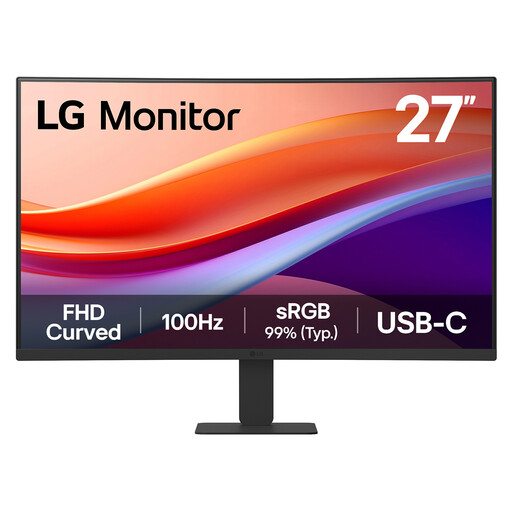
LG 27U421A 27-inch curved Full HD VA
This Full HD model may suit straightforward checkout-page work if you do not need as much pixel workspace as a QHD screen provides.
Check its USB-C charging output against your laptop before relying on it to replace the charger. The listing states that it has no USB hub, so plan another connection for desk peripherals.
View on Joybuy
Frequently asked questions
Will a USB-C monitor let me unplug my laptop charger?
It can, if the laptop supports video over the required USB-C connection and accepts the power the monitor delivers. Lenovo rates the ThinkVision P27h-30 at up to 100W for compatible devices and says available power can vary with monitor configuration and connected devices; check your laptop’s requirements rather than relying on the maximum figure alone.
Can a monitor replace a separate dock?
A monitor can replace some dock connections if it has the ports your setup needs and your laptop supports them. The cited Lenovo ThinkVision P27h-30 lists Ethernet and USB ports alongside KVM and Picture-by-Picture features, while the cited Dell P2425DE and LG 27BA850-B offer RJ45 connectivity. Check the exact model and your peripherals before removing a separate dock.
Should I choose QHD or 4K for checkout-page testing?
Choose between them based on the windows you need to see and the text size you find comfortable. The cited Dell and Lenovo QHD models have 2560 × 1440 resolution; the ASUS ProArt PA279CRV has 3840 × 2160. If finer visual inspection points you towards 4K, check how your chosen display scaling and browser zoom affect the layouts you test.
How should I dispose of an old monitor?
Use an appropriate electrical-equipment collection or retailer take-back route available where you live rather than putting the monitor in ordinary waste. GOV.UK’s waste electrical and electronic equipment guidance covers recovery, reuse and recycling of electrical equipment.


