A separate monitor is worth considering when the laptop screen limits how comfortably you view documents, spreadsheets or meetings. Before choosing a one-cable USB-C setup, confirm that the laptop and cable support video output and that the monitor’s stated charging output meets the laptop’s requirements; an HDMI or DisplayPort connection lets you keep the laptop’s own charger. Measure the desk and check screen adjustment before settling on a size.
Who benefits from a separate monitor?
A monitor adds a viewing area to an existing laptop setup, but the connection and the space it occupies matter as much as screen size.
Home workers using a laptop for everyday tasks
If you regularly switch between documents, email, spreadsheets and meetings, a separate screen may give you more room to arrange them. Which? identifies a monitor as a home-office component for getting a better view of day-to-day tasks.
People planning a one-cable desk
A USB-C monitor may suit a desk where you want the display connection and laptop charging through one cable. Check the laptop’s video-output capability, its charging requirement and the cable before relying on that arrangement.
Home workers with limited desk space
Desk depth, stand footprint and screen adjustment can narrow the choice before resolution does. The Health and Safety Executive’s home-working guidance also makes screen positioning relevant to a workstation used regularly.
What should you check before choosing?
Decide whether an extra screen would help your work, then check the laptop connection, charging plan and available desk space together.
| Priority | What to check | Your needs |
|---|
| Extra screen space |
Consider which tasks need a separate view. Check screen dimensions and resolution alongside the usable desk area. |
I want to keep the laptop for everyday work but have more room to view documents or a meeting alongside other tasks. |
| Video connection |
Check the laptop’s documented video outputs and the monitor’s inputs. For USB-C, confirm video capability and the required cable rather than relying on connector shape; check any adapter needed for HDMI or DisplayPort. |
I need the new screen to connect to my laptop without discovering afterwards that I need a different cable or adapter. |
| Laptop charging |
Compare the monitor’s stated USB-C Power Delivery output with the laptop’s charging requirement. Confirm that the laptop accepts charging through the intended port. |
A single desk cable appeals to me, but I can keep using the laptop charger if the monitor’s output is unsuitable. |
| Desk fit and position |
Measure desk width and depth, including room for the laptop and keyboard. Check the stand footprint, adjustment range and mounting compatibility if considering an arm. |
My screen needs to fit the available surface and sit at a usable position, not simply have the largest diagonal that will fit across the desk. |
Common buying mistakes
-
Assuming every USB-C port carries monitor video
USB-C describes the connector, not every function available through it. The USB Implementers Forum describes Alternate Mode capabilities through USB Power Delivery; the laptop’s port specification determines whether the intended display connection is available.
Check the laptop’s video-output specification, the monitor input and the required cable. If the laptop has a documented HDMI or DisplayPort output, that may offer a separate route for video.
A dock, adapter or different cable may be needed if the planned connection is incompatible.
-
Assuming USB-C monitors provide the same charging output
Manufacturer figures differ: Dell UK states up to 90W for the P2425E, while LG UK states up to 65W for the 27BA650 and up to 15W for the 27U631A. A working display connection does not establish that the monitor can replace a particular laptop charger.
Compare the monitor’s stated Power Delivery output with the laptop’s documented charging requirement before planning a one-cable desk.
You may need to continue using the laptop’s own power supply.
-
Choosing a screen size before measuring the desk
The stand, laptop and keyboard all need space. Which? distinguishes smaller monitors for limited spaces from larger screens suited to some home-office tasks; screen size alone does not establish desk fit.
Measure the usable surface and check the stand’s movement and footprint. If considering an arm, confirm both desk-clamp clearance and monitor-mount compatibility.
Brand models to compare
These manufacturer examples show why it is useful to compare connections, charging output and adjustment on the exact model rather than by brand alone.
Dell
Dell’s P2425E is a 24-inch USB-C hub monitor to consider for a laptop-centred desk.
- Dell UK states up to 90W USB-C Power Delivery; its P2425E specifications also describe a WUXGA display and stand adjustment.
- Check that the laptop supports USB-C video and that its charging requirement is within the monitor’s stated output.
BenQ
BenQ’s 23.8-inch GW2486TC is an example for desks where changing the screen position matters.
- BenQ UK lists tilt, pivot, swivel and height adjustment for this model.
- Its USB-C connection still needs to be checked against the laptop’s video, data and charging requirements.
LG
LG’s 27-inch models illustrate different choices between display resolution and USB-C charging output.
- LG UK states that the Full HD 27BA650 provides USB-C charging up to 65W, while the QHD 27U631A provides USB-C display connectivity and charging up to 15W.
- The 27U631A’s higher stated resolution does not mean it can replace a laptop charger that requires more power than its stated output.
Joybuy monitors for laptop work
These options include desk monitors for a separate work screen and a portable second-screen option. Match the connection to your laptop and check the space available for the particular monitor.
 No image available
ASUS ProArt PA248CRV IPS WUXGA
This external monitor offers a separate screen for laptop documents and other everyday work. Its name specifies an IPS WUXGA display; check your laptop’s video output and charging requirement before planning a USB-C setup, and confirm which cables come with this listing.
View on Joybuy
 No image available
BenQ MA270UP 27-inch 4K UHD USB-C Mac Monitor
This Mac-focused option is relevant when you want a separate 27-inch work screen and have room for its stand. The product name specifies a 4K UHD IPS display and a height-adjustable stand; check the exact laptop’s USB-C video and charging requirements before relying on a one-cable arrangement.
View on Joybuy
 No image available
ASUS ProArt PA278CV IPS WQHD
This external screen is an option when laptop work calls for a separate display. Its name specifies an IPS WQHD panel; check the laptop’s supported video connection, the monitor’s desk footprint and the USB-C functions you intend to use.
View on Joybuy
 No image available
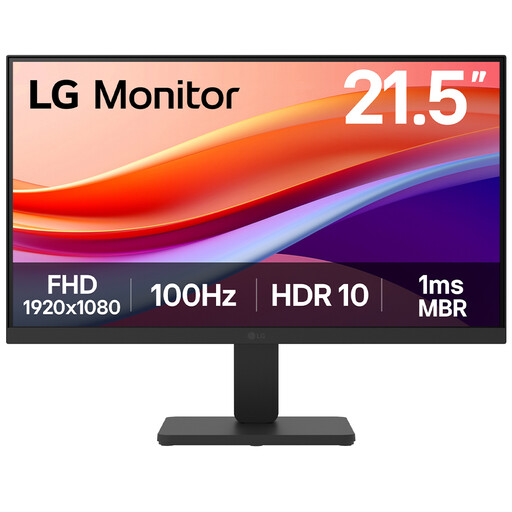
LG 22U401A-B 22-inch Full HD HDMI Monitor
This 22-inch option is worth measuring for a desk with limited surface area. Its name specifies a Full HD VA display, 100Hz and HDMI; confirm the laptop has a suitable video output or identify the adapter needed for the connection.
View on Joybuy
 No image available
ASUS ZenScreen MB166CR FHD
This portable second-screen option suits someone who moves their laptop work between locations rather than leaving a monitor on one desk. Check that the laptop supports USB-C DisplayPort Alternate Mode and that the intended cable is compatible; do not assume the screen charges the laptop.
View on Joybuy
Questions about laptop monitors
Will any USB-C laptop port work with a USB-C monitor?
No: the connector alone does not establish video-output capability. Check the laptop manufacturer’s port specification and the cable required by the monitor. If USB-C video support is unclear, check whether the laptop has a documented HDMI or DisplayPort output, or whether a compatible adapter or dock is needed.
Can a USB-C monitor replace my laptop charger?
Only when the laptop accepts charging through that connection and the monitor’s stated Power Delivery output suits its requirements. Dell UK states up to 90W for the P2425E; LG UK states up to 65W for the 27BA650 and up to 15W for the 27U631A. A monitor can provide an image without supplying enough power to replace a particular laptop’s charger.
Should I choose a 24-inch or 27-inch monitor for a home desk?
Measure the available width and depth, including the stand, laptop and keyboard, before choosing either size. Which? notes that smaller monitors can suit limited spaces, while larger ones can suit some home-office work. Also check the screen’s adjustment options and where it will sit when you use the laptop.


