Laptop workers with one spare socket
You want a larger display without keeping a separate laptop power brick at the desk. A suitable USB-C monitor can provide video and charging through one cable, but your laptop must support both functions.


A USB-C monitor with Power Delivery can free the socket used by a compatible laptop’s charger, provided the laptop supports USB-C video and accepts enough charging power; the monitor still needs its own mains socket. A conventional display makes sense if you can keep the separate charger, while built-in streaming is worth considering if you would otherwise power another device. Check compatibility and actual electricity use before counting either choice towards a savings target.
You want a larger display without keeping a separate laptop power brick at the desk. A suitable USB-C monitor can provide video and charging through one cable, but your laptop must support both functions.
You need a screen for planning work and want to distinguish a simpler desk setup from an assumed electricity saving. Think about the connections you need and how you switch equipment off when it is unused.
You want to stream directly on the monitor rather than use a separate streaming device. Built-in apps may simplify that setup, though their usefulness and power use depend on the functions you keep enabled.
Check laptop video and charging compatibility before choosing a monitor to reduce desk plugs. Screen space and running-power settings are separate decisions; smart streaming does not, by itself, establish either laptop-charging capability or an electricity saving.
| Concern | What to check | Who this matters to |
|---|---|---|
| Desk plugs and cables | Confirm USB-C video output on the laptop and sufficient Power Delivery from the monitor. Check that the cable supports the intended connection. | With one spare socket, I want the monitor to display my laptop and charge it without another power brick. Roughly 46% of consumers put fewer desk plugs and cables first. |
| Readable planning workspace | Choose a screen size and resolution that suit your desk and the documents you use; check the connected computer’s display support. | When comparing spreadsheets and planning documents, I need enough room to read them comfortably. Around 36% of consumers prioritise usable screen space. |
| Ongoing electricity use | Look at the exact model’s energy information and standby settings, and consider whether smart functions need to remain available. | If I use the screen regularly, I want to avoid leaving equipment powered unnecessarily. About 18% of consumers put controllable electricity use first. |
USB-C describes the connector, not every function available through it. BenQ UK notes that USB-C ports vary in their support for video, data and charging.
Check the laptop’s stated video-output and USB-C charging capabilities, the monitor’s Power Delivery rating and the cable needed for the connection.
A stated Power Delivery rating does not mean every laptop will charge adequately during the work you intend to do. The laptop must accept USB-C charging and its power needs must suit the monitor’s output.
Compare the monitor’s rating with the laptop’s charging requirements, and plan to keep the original charger where the USB-C connection is unsuitable.
Built-in streaming may remove the need for a separate device, but the result depends on what it replaces and how long the monitor remains on or in standby.
Check energy information for the exact monitor and use its power settings in a way that does not interrupt functions you need. Energy Saving Trust advises avoiding unnecessary standby use.
The Health and Safety Executive highlights overloaded extension cables and damaged sockets, plugs and leads as home-working hazards.
Check the condition of leads and sockets, and do not overload an extension cable. Reduce the need for a separate laptop power brick only when the monitor and laptop are compatible.
Dell has USB-C and Thunderbolt hub monitors relevant to a laptop desk with limited sockets.
LG’s 27U730A-B is a model to examine if you want a 27-inch 4K display with USB-C laptop charging.
Samsung’s Smart Monitor M8 M80F is relevant when direct streaming matters alongside computer use.
These choices include USB-C monitors to consider for a compatible laptop setup and a smart monitor for direct streaming. Compare the exact connection and charging requirements before relying on any model to free a socket.
 No image available
Consider this model if reducing laptop connections matters and your laptop supports the required USB-C video and charging functions.
The product name specifies 3840 × 2160 resolution, Type-C 65W and a USB hub. Check whether 65W is sufficient for your laptop; the monitor still needs mains power.
 No image available
The 31.5-inch display is an option for a planning workspace where you also want to assess a USB-C laptop connection.
The product name specifies 4K UHD resolution and an IPS panel. Confirm the exact USB-C charging output, laptop compatibility and cable requirements before planning to remove the laptop charger from your desk.
 No image available
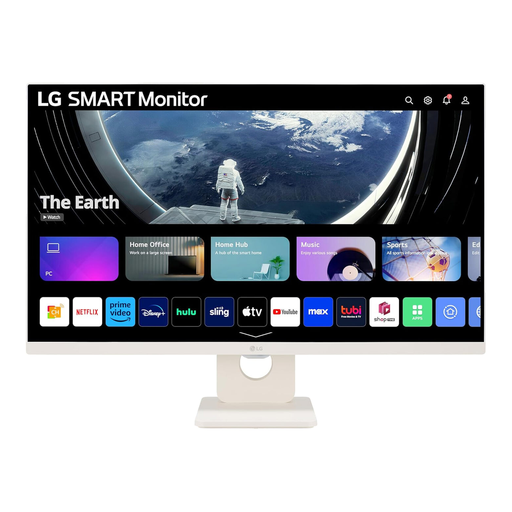
This model suits a desk where direct streaming could take the place of a separate streaming device.
Its product name specifies a 27-inch Full HD IPS display, webOS apps, built-in speakers, Wi-Fi and Bluetooth. If freeing the laptop charger’s socket is your priority, check charging capability separately; assess running costs using the exact model’s energy information and your usage.
It can free the socket used by a separate laptop charger if the laptop supports USB-C video and charging and the monitor supplies sufficient power. The monitor itself still needs a mains connection.
No: a USB-C port may support data or charging without video output. Check the laptop manufacturer’s stated display-output capability, then confirm the monitor’s charging output and the cable requirements.
An extension lead does not remove the need to check the electrical setup. The Health and Safety Executive warns home workers about overloaded extension cables and advises checking sockets, plugs and leads for damage.
Not necessarily. The outcome depends on the monitor and replaced device, hours of use and standby behaviour. Check the exact equipment’s energy information; Energy Saving Trust advises switching suitable equipment off rather than leaving it on standby when its functions are not needed.
Yes, the cable must support the video and charging functions you intend to use. Check the exact monitor package and its cable guidance rather than assuming that any USB-C cable will provide both functions.