For a fixed desk with one extra screen, a directly connected monitor and separate keyboard and mouse may be enough. Consider a USB-C hub monitor or dock when you regularly need to connect several devices at once, but check your laptop’s video support, charging requirements and display limits first. For work across locations, weigh a portable screen or hub against what you need to carry and power; ask your employer about approved accessories before buying for a managed device.
Who is this setup for?
Home workers at a fixed desk
If you use a laptop for sustained screen-based tasks at one desk, decide whether one external monitor and separate input devices meet your needs before adding a dock. The UK Health and Safety Executive advises considering the whole workstation when assessing applicable display screen equipment use.
Hybrid workers moving between locations
A repeatable connection arrangement matters when you take the same laptop between home and work. A portable screen or hub is worth considering only after checking the laptop’s video output, supported display count and power arrangement.
People using managed work laptops
Check permitted accessories with your employer or IT team before choosing connections for a managed device. Acas advises employers to address equipment provision, technical support and information-security arrangements for home working.
What should you check before choosing?
Start with the screens and devices your work requires, then match the proposed connection to your exact laptop rather than its connector shape alone.
| Priority | What to check | Your needs |
|---|
| Display connection |
Match the laptop’s video-capable output to the screen input and cable or adapter. Check the exact model’s supported display count, resolution and refresh rate; Apple Support and Microsoft Support describe these limits as model- and connection-dependent. |
I need to know whether my laptop can drive the screen I plan to use, particularly if I want more than one external display. |
| One-cable desk setup |
Check the USB-C video protocol, peripheral ports and charging delivered with the intended power supply. Lenovo states that its USB-C and Thunderbolt docks need a notebook port supporting USB-C Alt Mode or Thunderbolt for dock functions. |
Connecting a screen and peripherals through one cable would help at my regular desk, provided my laptop supports the connection and charging arrangement. |
| Screen and input layout |
Check the monitor’s inputs and stand adjustments against your desk layout. If you plan to position a laptop separately from its built-in controls, consider where a keyboard and mouse will sit; the Health and Safety Executive advises considering the whole workstation in an applicable assessment. |
For sustained desk work, I want to position the screen and input devices so they suit the tasks I actually do. |
| Moving between desks |
For a portable screen or hub, check its connection, power arrangement and what you will need at each location. Apple Support and Microsoft Support say external-display capabilities depend on the device model and connection conditions. |
I work in more than one place and would rather carry only equipment that works with my laptop at each desk. |
| Work-device approval |
Ask who approves, provides, owns and supports accessories, and whether information-security requirements apply. Acas advises employers to address these matters in homeworking arrangements. |
Before buying for an employer-managed laptop, I want to know which accessories I may use and who handles support. |
What can go wrong when buying?
-
Assuming every USB-C port can run a display
A matching connector does not establish video support or how many displays the laptop can drive. Apple Support and Microsoft Support describe external-display capability in terms of the device model and connection; Lenovo specifies USB-C Alt Mode or Thunderbolt support for its dock functions.
Identify the laptop model and video-capable port, then check the manufacturer’s display limits alongside the chosen dock, hub or adapter.
-
Reading maximum dock power as guaranteed charging
Delivered charging can depend on the power adapter and laptop. Lenovo says its USB-C Dock charges compatible notebooks up to 65W with the supplied 90W adapter, while 100W charging requires an optional 135W adapter.
Compare the laptop’s charging requirements with the dock’s delivered power under the power-supply arrangement you intend to use.
-
Buying for a managed laptop without checking work arrangements
An accessory may need approval or support from the organisation. Acas advises employers to address equipment, repairs, technical support and information security in homeworking arrangements.
Ask your employer or IT team about approved accessories, ownership and the applicable workstation-assessment process before purchasing personally.
Relevant brand references
These examples illustrate connection and input-device choices; check the specifications of the particular model you intend to use.
Dell
Dell’s Pro P2426HE is an example of a USB-C hub monitor for a fixed desk.
- Dell UK specifies a 23.8-inch Full HD screen, up to 100W power delivery and height, pivot, swivel and tilt adjustments for the P2426HE.
- Those specifications do not establish whether a particular laptop can send video through its USB-C port or use the monitor’s available charging power.
Lenovo
Lenovo’s dock documentation is useful when considering a one-cable desk connection.
- Lenovo says its USB-C and Thunderbolt docks require notebook support for USB-C Alt Mode or Thunderbolt; its named Lenovo USB-C Dock is Windows-only.
- Lenovo notes that features such as MAC address passthrough and Wake on LAN may be unavailable on certain systems, so check the exact laptop and dock pairing.
Logitech
Logitech lists wired and wireless keyboards and mice for different desk and multi-device arrangements.
- Its business range includes multi-OS wired options and models with multi-device switching, according to Logitech.
- Check the chosen model’s connection and operating-system requirements, as well as any employer rules for wireless peripherals.
Joybuy options for your workspace
These options cover external screens for fixed or changing work locations, a USB-C dock for desk connections, and a separate wired keyboard-and-mouse set. Match any choice to your laptop and workplace requirements.
 No image available
ASUS ProArt PA278CV IPS WQHD
For a fixed desk where you want a separate screen, check that its connection works with your laptop’s video output. This model is identified as an IPS WQHD monitor; confirm the connection and any charging requirement for your setup.
View on Joybuy
 No image available
iiyama ProLite XUB2792UHSU-B6 27-inch 4K UHD
This 27-inch 4K UHD monitor is an option for a fixed desk when that screen size and resolution suit your work. Check the laptop’s supported output, connection and resolution before choosing it.
View on Joybuy
 No image available
ASUS ZenScreen Go MB16AHP FHD
Consider this FHD screen if you need a second display while moving between work locations. Check how your laptop will provide video and how the screen will be powered at each desk.
View on Joybuy
 No image available
Targus USB-C Universal Dual HDMI 4K Dock with 100W Power Delivery Pass-Thru
For a desk where you intend to connect two HDMI displays, verify that your laptop and the complete connection path support the displays you want. The title specifies 100W Power Delivery pass-through, not a guaranteed charging result for every laptop; check the required power supply and package contents.
View on Joybuy
 No image available
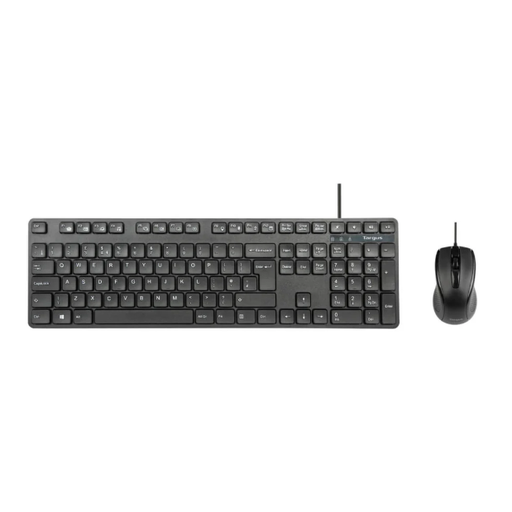
Targus Full-Size USB Wired Keyboard and Optical Mouse Combo
A separate full-size keyboard and wired optical mouse may suit a fixed desk with an external screen. Check that your work device has suitable USB connections and that wired accessories are permitted if it is employer-managed.
View on Joybuy
Common questions
Do I need a dock for one external monitor at home?
Not necessarily. If your laptop has a compatible video output, one screen can connect directly or through a suitable adapter. A dock or USB-C hub monitor becomes more relevant when you also want to connect peripherals or charge through one connection; check the laptop’s required video protocol and charging arrangement.
Will any USB-C laptop send video through a dock or monitor?
No. Lenovo states that its USB-C and Thunderbolt dock functions require a notebook port supporting USB-C Alt Mode or Thunderbolt. Apple Support and Microsoft Support also describe external-display limits that depend on the exact computer model and connection, so check both the laptop and accessory specifications.
What should I check before buying for a managed work laptop?
Ask your employer or IT team which accessories are approved and how ownership, support and information security are handled. Acas advises employers to address who provides or pays for homeworking equipment and repairs, alongside technical support and security arrangements.
When does a home-working DSE assessment matter?
In the UK, the Health and Safety Executive says employers must assess workstations for workers who use display screen equipment daily as part of normal work for continuous periods of an hour or more. Its homeworking guidance says the rules can apply to permanent or long-term home workers and people who routinely split work between home and the workplace. An assessment considers the workstation and individual work; it does not prescribe the same product for everyone.


