
24/7 Customer Support

Free returns

Same-day & Next-day Delivery

Quality Guaranteed

Unlock Your Welcome Offers: FREE Delivery | Up to 80% OFF | Free 30-day JoyPlus trial
Download the APP
As modern laptops like the MacBook Pro and Dell XPS become slimmer, they often sacrifice ports for portability. This has made the USB-C multiport adapter an essential tool for professionals, students and anyone needing to connect more than just a charger. However, the market is flooded with options, and choosing the wrong one can lead to frustration, wasted money and even potential damage to your devices.
As the Joybuy Product Recommendation Officer, my role is to help you navigate the technical jargon and marketing claims. This guide focuses on the common pitfalls to avoid and the key features that truly matter for a reliable and versatile USB-C dongle for laptop in the UK.
Before you buy, be aware of these frequent issues that many product descriptions fail to mention:
To ensure you get a device that works as expected, focus on these three non-negotiable specifications.
Power Delivery (PD) allows you to charge your laptop through the adapter itself. The key is the wattage.
laptop docking station with 100W PD is a solid choice. While it won't overcharge a 65W laptop, it provides enough headroom for more demanding machines and ensures all connected peripherals get sufficient power. This is crucial for anyone using a MacBook Pro multiport adapter.For connecting to external monitors or projectors, the details matter.
USB-C to HDMI and VGA adapter is invaluable. Having both ports means you're prepared for modern displays and older projectors without needing a second dongle.The type and number of ports determine the hub's utility.
USB-C hub with Ethernet provides a stable, wired connection up to 1Gbps.USB-C travel hub should have at least one USB 3.0 port.Based on these practical criteria, here are a few options suited for different user needs in the UK.
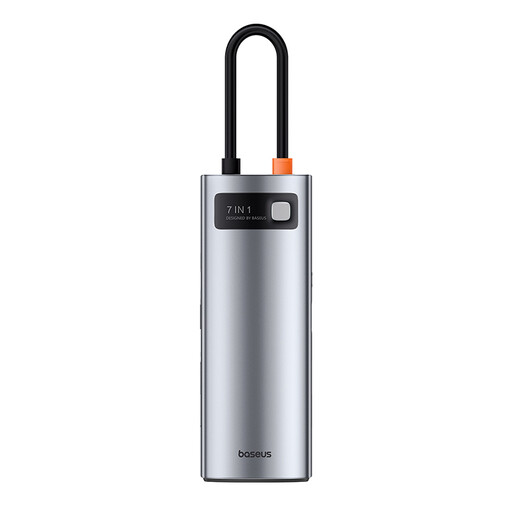
Why This Fits Their Persona: This user splits their time between the home office and commuting. They need a single, reliable hub that can drive a 4K monitor, charge their laptop at full speed and handle file transfers without fuss.
It offers 100W PD to avoid underpowering your laptop and a metal alloy casing for better heat dissipation during 4K@60Hz video output, preventing signal drops.
Excellent balance of modern ports: 4K@60Hz HDMI, three USB 3.0 ports for fast data and SD/TF card readers for creatives. It's a versatile workhorse.

Why This Fits Their Persona: This user is always on the move, presenting in different client offices and relying on hotel internet. They need maximum connectivity options, including legacy ports and a stable wired connection, in one compact device.
It includes high-grade EMI/RF shielding to prevent Wi-Fi interference and offers both HDMI and VGA, so you're never caught out by an old projector. The Gigabit Ethernet port bypasses unreliable wireless networks.
The ultimate problem-solver. It combines 4K HDMI, 1080p VGA, stable Ethernet and 100W PD charging, covering nearly every possible connectivity scenario for a business traveller.
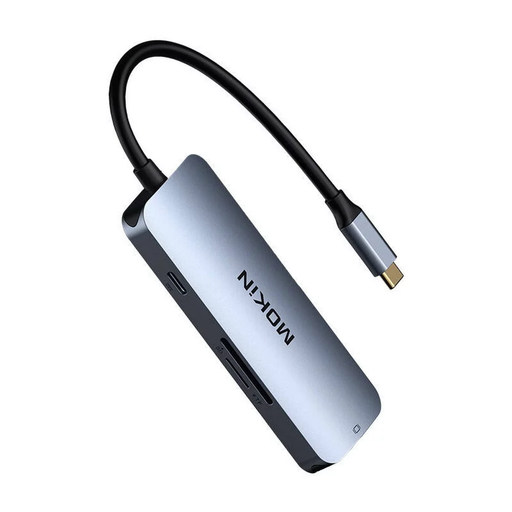
Why This Fits Their Persona: A student or casual user needs a functional, all-in-one hub for connecting to a monitor, transferring assignments from a USB stick and pulling photos from a camera's SD card, all without a premium price tag.
Unlike many basic hubs, this model includes PD passthrough charging and fast USB 3.0 ports, ensuring it's a functional workstation hub and not just a simple port expander.
It provides a comprehensive set of the most-needed ports—HDMI, multiple USB 3.0, SD/TF card readers and PD charging—offering great functionality for its likely price point.
We have compiled a complete, real-time list of products that fully satisfy these strict selection criteria and UK safety regulations.
1. Will a USB-C multiport adapter make my laptop hot? A well-made adapter, especially one with a metal casing, is designed to get warm. This is a sign that it is effectively dissipating heat away from its internal components. It should feel warm, but not uncomfortably hot to the touch. If an adapter becomes excessively hot, it may be a sign of poor design and could lead to performance issues.
2. Do I need a 100W PD hub if my laptop charger is only 65W? While not strictly necessary, it is a good idea. A hub rated for 100W PD can safely deliver the 65W your laptop requires. The benefit is that it provides future-proofing for a more powerful device later on and ensures there is enough power for the hub itself and any connected peripherals, like external hard drives, without taking away from your laptop's charge speed.
3. Why does my Wi-Fi stop working when I plug in my USB-C hub? This common issue is typically caused by electromagnetic interference (EMI) from a poorly shielded hub. The frequency from the hub's internal components can disrupt the 2.4GHz band used by many Wi-Fi routers and Bluetooth devices. To avoid this, look for adapters that specify EMI/RF shielding in their features, which is more common in models with metal casings.