As our devices have become more powerful, the humble charging cable has had to keep up. The move to USB-C has simplified connections, but it has also introduced a new layer of complexity. With terms like 'Power Delivery', '100W' and 'USB 2.0 speeds' on the packaging, choosing the right USB C to USB C cable can feel like a chore. A mismatched cable can lead to frustratingly slow charging, or it might not work at all for transferring files or powering a laptop.
This guide is designed to cut through the clutter. We will walk you through the key features to consider when buying a new Type C to Type C cable, helping you understand what matters for your specific devices. We will then share some of our top recommendations to make your decision easier.
How to Choose the Right Type C to Type C Cable
Before you add a cable to your basket, it helps to understand a few key specifications. Focusing on these three areas will ensure you get a cable that meets your needs for charging and data transfer.
1. Power Up: Understanding Wattage (W)
The most important factor for many is charging speed, which is determined by the cable's power delivery capacity, measured in watts (W).
- Up to 60W: A cable rated for 60W is a versatile choice. It's more than enough for a fast charging USB C cable for smartphones like the iPhone 15 series, as well as for tablets and smaller laptops.
- 100W and Above: If you need a USB C cable for a laptop, especially a high-performance model like a MacBook Pro or a gaming laptop, a 100W USB C cable is often required to charge the device at its maximum speed. These cables can handle more power safely.
Remember, to achieve these speeds, you also need a compatible USB-C power adapter that can supply the required wattage.
2. More Than Just Power: Data Transfer Speeds
A USB-C cable does more than just charge. If you plan to transfer files, its data speed is important. Most standard charging cables transfer data at USB 2.0 speeds (around 480 Mbps). This is perfectly adequate for syncing photos, music or documents. However, if you frequently move large video files or backups, you may want to look for a cable that specifies USB 3.1 or Thunderbolt 3/4 speeds for significantly faster transfers.
3. Built to Last: Durability and Length
A cable is only useful if it holds up to daily use. Consider the material and length that best suits your lifestyle.
- Material: Woven or braided nylon cables offer excellent resistance to fraying and tangling, making them a durable USB C cable option for those who are always on the go. Silicone cables are another great choice, offering a soft, flexible feel that also resists tangles.
- Length: A standard 1m USB C cable is ideal for portability, desktop use or charging in the car. For more flexibility at home or in the office, a 2m USB C cable can be more convenient, allowing you to use your device comfortably while it charges from a distant wall socket.
Top USB-C to C Cables
Based on features, build quality and user needs, here are a few standout options available on Joybuy.
Apple USB-C to USB-C Woven Charge Cable (1m)
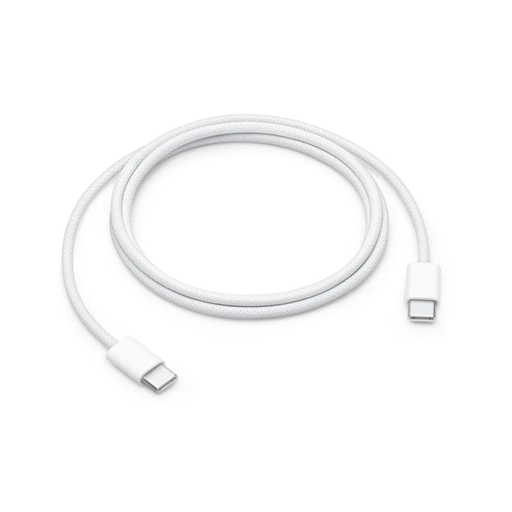
- Why It Stands Out: This official Apple cable features a high-quality woven design that is a significant improvement in durability over older plastic-coated cables. It’s designed to work seamlessly within the Apple ecosystem.
- Pros:
- Durable Woven Design: Resists tangling and everyday wear.
- 60W Charging Support: Provides fast charging for compatible iPhone, iPad and MacBook models.
- Reliable Performance: As an official Apple product, it ensures compatibility and reliable data syncing at USB 2 speeds.
- Who is it for? This is an excellent choice for Apple users seeking a reliable iPhone 15 charging cable or a primary cable for their USB-C iPad or MacBook. It's perfect for those who value ecosystem consistency and improved durability for everyday use.
ACEFAST 100W USB-C to USB-C Charging Cable (2m)
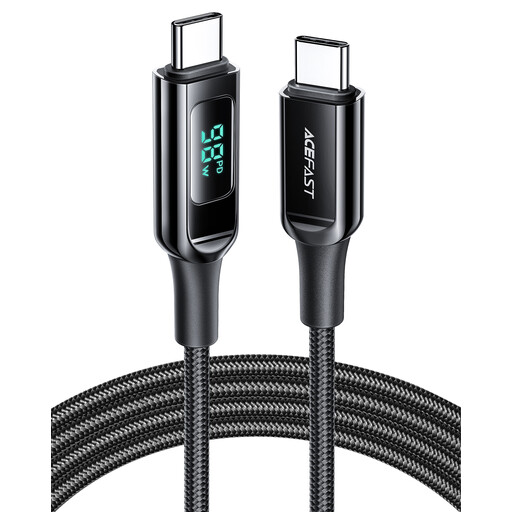
- Why It Stands Out: This cable is built for power. Its standout feature is the integrated digital display that shows you the real-time wattage, so you can see exactly how fast your device is charging. Combined with its high power rating and generous length, it’s a tech enthusiast's tool.
- Pros:
- 100W Fast Charging: Capable of powering up demanding laptops and other high-power devices at full speed.
- Digital Power Display: Provides instant feedback on charging performance.
- 2m Extended Length: Offers great flexibility for use at a desk, on the sofa or by the bedside.
- Who is it for? This cable is aimed at power users who need to charge a USB C cable for a laptop or other high-draw devices. It's also great for anyone who appreciates seeing the technical details of their gadgets at work.
HOCO X82 USB-C to USB-C 60W Charging Cable (1m)
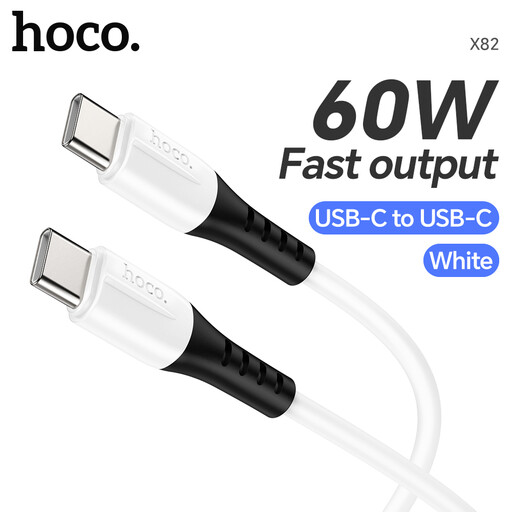
- Why It Stands Out: The HOCO X82 prioritises flexibility and a tangle-free experience with its soft silicone construction. The reinforced joints add durability where cables often fail, making it a practical and long-lasting choice for daily charging.
- Pros:
- Flexible Silicone Body: Resists tangles and is pleasant to handle.
- 60W Power Delivery: A solid fast charging USB C cable for a wide range of smartphones, tablets and laptops.
- Reinforced Joints: Designed to withstand bending and pulling at the connector ends.
- Who is it for? This is a great all-rounder for anyone who is tired of stiff, tangled cables. Its 1m USB C cable length and durable, flexible build make it an ideal companion for commuting, travel or general use at home.
Looking for More Options?
While these selections cover many common needs, you might be looking for a different length, colour or specification. For a wider selection of cables to suit every device and budget, explore our full range of USB-C to USB-C Charger cables.
Frequently Asked Questions
Are all USB C to USB C cables the same?
No, they are not. Cables can differ significantly in three key areas: power delivery (wattage), data transfer speed (e.g., USB 2.0 vs. USB 3.1) and build quality (materials like plastic, nylon or silicone). It is important to choose one that matches your device's requirements.
Do I need a 100W USB C cable for my phone?
Generally, no. Most smartphones, including the iPhone 15, cannot draw 100W of power, so a 60W cable is more than sufficient for fast charging. However, a 100W cable is backwards compatible and will work perfectly with your phone, making it a good future-proof option if you also own a powerful laptop.
Can I use any Type C to Type C cable for my laptop?
While most will connect, performance will vary. To charge your laptop effectively, especially a high-performance model, you should use a cable with a wattage rating that meets or exceeds that of your laptop's original charger. Using an underpowered cable may result in very slow charging or a "Not Charging" status. A USB C cable for a laptop should typically support at least 60W, with 100W being the preferred option for more powerful machines.


