Headphones-plus-one-device desk users
If you normally charge headphones alongside a phone, mouse or other accessory, two ports may be enough. Check whether your existing cables need USB-C, USB-A or one of each.


Choose a charger by the devices and cables that will share the socket, rather than its headline wattage alone. Two ports can suit headphones and one other device; consider three ports when more devices need to charge together, but check the connector mix and the power available from each port during simultaneous use. Your headphone maker’s cable and charging guidance still determines what works with your model.
If you normally charge headphones alongside a phone, mouse or other accessory, two ports may be enough. Check whether your existing cables need USB-C, USB-A or one of each.
When several devices need power at once, count the ports each person can actually use. Check the charger’s stated output with those ports occupied, not just its total rating.
If a USB-C laptop shares the socket with headphones, compare its charging requirements with the charger’s published multi-port allocation. A single-port maximum does not tell you what the laptop receives while other devices are connected.
Start with the devices and cable ends at the desk, then check how the charger divides power when those devices are connected together.
| Concern | What to check | Who this matters to |
|---|---|---|
| Usable ports | Count devices that charge together and match each cable to a USB-C or USB-A port. | If several people share one socket, I need a port for each device rather than another plug. Around 40% of consumers put usable port availability first. |
| Headphone and cable fit | Check the headphone or case manual for its connector, cable guidance and recommended adapter output. | If I am keeping my headphone’s existing cable, I need it to work with the charger I choose. For around 30% of consumers, that compatibility is the primary concern. |
| Socket space and safety | Check plug fit and model traceability; for Great Britain, check the applicable UKCA or CE marking information. | When the socket sits among other plugs, I want a charger that fits without overlooking mains safety. That is the leading concern for around 20% of consumers. |
| Power shared with a laptop | Compare the exact simultaneous-output allocation with the laptop’s charging requirements. | If my laptop charges beside my headphones, I need to know what power remains available to it. Around 10% of consumers make that power split their first priority. |
A charger’s total or single-port maximum may differ from the output available to each device when several ports are occupied. Anker specifies 40 W, 12 W and 12 W across the three occupied ports of its 735 Charger; Belkin specifies 45 W and 20 W when both ports of its 65 W dual-USB-C charger are used.
Read the simultaneous-output allocation for the exact ports you plan to use, particularly if a laptop will share the charger.
Connector shape alone does not establish headphone compatibility. Sony’s guidance for the WF-1000XM4 warns that charging may not succeed with cables other than the supplied USB Type-C cable, while the USB Implementers Forum notes that cables have different capabilities.
Check your headphone manual and existing cable before choosing the charger’s port mix.
If your cables use different connectors, you may need a replacement cable or a charger offering both USB-A and USB-C.
The UK Office for Product Safety and Standards reported a serious electric-shock risk for the USB Power Adapter CT-15 because of poor transformer construction. A small plug is not, by itself, a reason to overlook the model and seller.
Choose an identifiable charger from a traceable seller and check official recall information for an unfamiliar model. For equipment supplied in Great Britain, check the applicable UKCA or CE marking information; Northern Ireland has different marking rules.
These examples illustrate port layouts and published output allocations for specific models, rather than a judgement about every charger from each brand.
Anker offers a two-port mixed-connector option and a three-port option to consider for a desk that also charges a laptop.
The Nexode 65 W three-port charger is a model to consider when a shared desk uses both USB-C and USB-A cables.
Belkin’s cited dual- and three-port models suit desks where the cables to be plugged into the charger use USB-C.
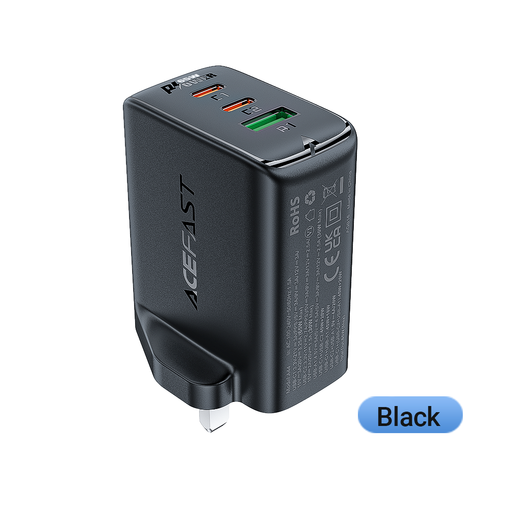
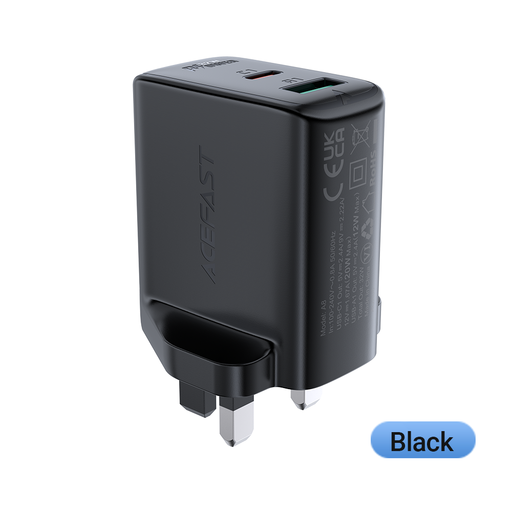
These two ACEFAST chargers offer different port counts for charging headphones at a shared socket. Check your headphone’s cable requirements for either model; if a laptop will join the charger, check the output available with the intended ports in use.
 No image available
Consider this port mix when headphones and other devices use both USB-C and USB-A cables at the shared socket.
65 W rating; two USB-C ports; one USB-A port; UK plug. Check the output available from each port during simultaneous use before pairing it with a laptop.
 No image available
Consider two ports when you charge headphones alongside one other device, provided both cable connectors fit.
32 W rating; PD; UK plug. Confirm the port types and the output available with both ports occupied.
Choose the adapter for your headphone model’s charging requirements and the other devices sharing it, rather than wattage alone. For the WH-1000XM5, Sony recommends an adapter with 5 V/2 A or 9 V/3 A output; check your own model’s manual instead of applying those figures to every headset.
Yes, if the charger’s simultaneous-output allocation meets both devices’ requirements. Anker specifies 40 W, 12 W and 12 W with three devices on its 735 Charger, while Belkin specifies 45 W and 20 W with both ports occupied on its 65 W dual-USB-C model. Compare the relevant port’s allocation with your laptop’s charging requirements.
Not necessarily: follow the cable guidance for your headphone or charging-case model. Sony warns that charging the WF-1000XM4 may not succeed with cables other than its supplied USB Type-C cable. A replacement cable’s power-capability marking does not override model-specific guidance.
For electrical equipment placed on the Great Britain market, UK government guidance recognises UKCA or CE marking routes. Marking alone is not a complete safety check: identify the charger and seller, and check official recall information if the model is unfamiliar. Northern Ireland has different marking requirements, so check the rules for the destination where the charger will be supplied.