Earbuds-only desk users
If one socket normally charges only your earbuds case, start with the plug on your existing cable. An extra port is useful only if your charging routine calls for it.


Match the charger’s USB-A or USB-C output to the plug at the charger end of your earbuds cable before choosing a UK-plug model from a reputable seller. A single-port charger makes sense if you charge earbuds alone; consider multiple ports if you regularly share the socket with other devices, and check the stated output when those ports are used together. Keep the charger and cable undamaged and the charging area uncovered and dry.
If one socket normally charges only your earbuds case, start with the plug on your existing cable. An extra port is useful only if your charging routine calls for it.
If you regularly charge earbuds alongside a phone, tablet or another USB device, consider how many ports you need and what the charger specifies for use with several devices connected.
If a charger is lost, damaged or of uncertain origin, prioritise a clearly identified model from a reputable seller. Electrical Safety First advises checking chargers for damage and keeping them ventilated during use.
Check the plug at the charger end of your earbuds cable, then decide whether another device regularly needs the same socket. Charger provenance and safe use matter whichever port arrangement you choose.
| Concern | What to check | Who this matters to |
|---|---|---|
| Cable and port match | Check whether the cable has a USB-A or USB-C plug at the charger end, and whether a suitable cable comes with the charger. | If I already have an earbuds cable, I need a wall charger it will plug into; around 39% of consumers put cable-and-port matching first. |
| Sharing one socket | Count the devices you charge together. For a multi-port model, check the port types and stated output when several ports are in use. | If my phone and earbuds share a desk socket, I would rather connect both than keep swapping chargers. Simultaneous connections are the primary concern for around 23% of consumers. |
| Provenance and safe use | Check the seller and model details, inspect the plug and cable for damage, and follow the maker’s instructions for an uncovered, dry charging position. | If I am replacing a questionable charger, I want a clearly identified model I can use safely in my room; around 38% of consumers prioritise provenance and safe use. |
Electrical Safety First has reported a replacement USB charger presenting a serious electric-shock risk. Branding or a familiar-looking case is not enough to judge a mains charger’s construction.
Choose a reputable seller, check the maker and model details, and keep your order information.
The wall charger accepts the plug at the other end of the cable, which may be USB-A or USB-C. Apple lists its 20W USB-C Power Adapter with the charging cable sold separately, while Samsung lists the EP-T2510NBEGGB without a data cable.
Inspect both ends of the cable you plan to use and check the charger’s included items before ordering.
You may need a separate compatible cable.
A charger with several ports helps when devices are connected together, but its maximum stated wattage alone does not tell you the output available from each port during shared use.
For an earbuds-only routine, consider a compatible single-port charger. If you charge other devices at the same time, check the exact multi-port model’s output information.
Electrical Safety First advises keeping USB chargers ventilated and away from heat and water, and advises against charging overnight or while out of the house.
Use an open, dry surface, check the charger and cable for damage, and disconnect them after charging.
Apple offers a USB-C adapter that may suit a setup already using a compatible USB-C charging cable.
Belkin’s BoostCharge USB-C Wall Charger 25W is a single-port option for a compatible USB-C cable.
Anker’s Nano A2337 is a USB-C wall charger to consider if the same adapter will also serve other compatible devices.
Samsung’s EP-T2510NBEGGB is a UK-plug USB-C option for a compatible cable.
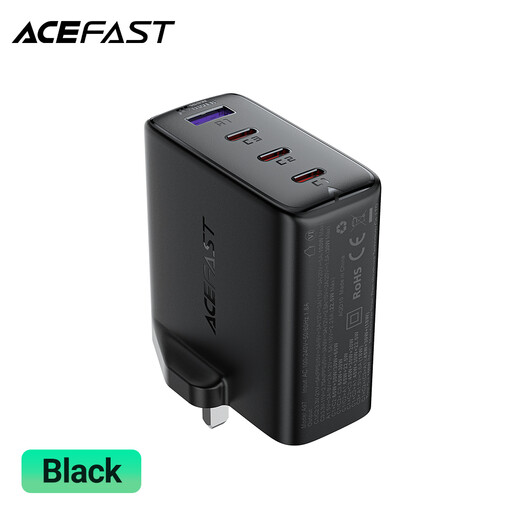
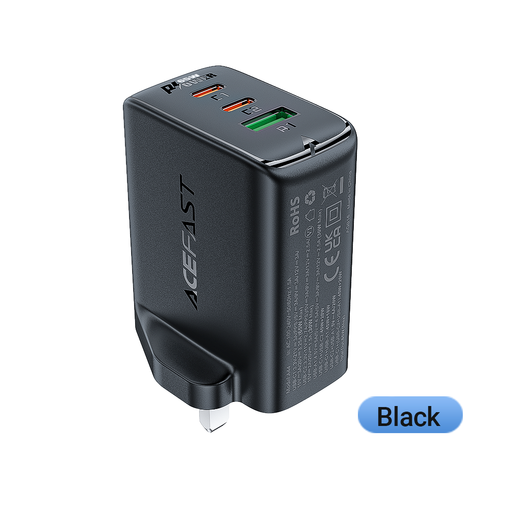
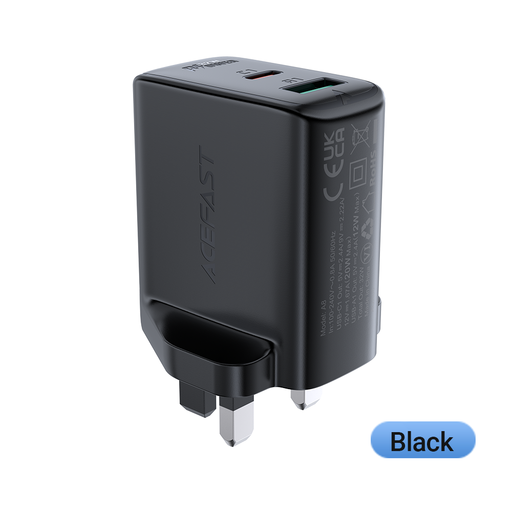
These UK-plug ACEFAST chargers are multi-port options to consider if you regularly want to connect earbuds and another device at one socket. Match a port to your cable, and check the exact model’s shared-output details if you will use several ports together.
 No image available
Consider this if you regularly connect several devices at one socket and need both USB-C and USB-A ports.
The listed configuration has three USB-C ports, one USB-A port and a PD100W rating. Check which port fits your earbuds cable and the model’s output information for ports used together.
 No image available
Consider this if your shared-socket routine calls for three connections and a choice of USB-C or USB-A at the charger.
The title lists two USB-C ports, one USB-A port and a 65 W rating. Check whether a suitable cable comes with the charger and what output is specified when devices are connected together.
 No image available
Consider this if two connections would suit your socket-sharing routine.
The title specifies a dual-port UK-plug charger rated at PD 32 W. Before choosing it for an existing earbuds cable, check the port types, whether a cable comes with it and the stated output when both ports are used.
Do not choose extra wattage solely for an earbuds case; start with the case maker’s charging instructions and a charger that fits your cable. The USB Implementers Forum explains that USB Power Delivery allows a device to request the power it requires, but a charger’s maximum rating alone does not establish how a particular case will charge.
Buy a charger with a port that matches the plug at the charger end of your cable. Electrical Safety First describes USB-A as the rectangular connector and USB-C as the smaller reversible connector; a USB-A-to-USB-C cable needs a USB-A charger port, while a USB-C-to-USB-C cable needs a USB-C port.
Electrical Safety First advises against using USB chargers overnight or while out of the house. Keep the charger uncovered and ventilated, away from water and heat, and disconnect it after charging.
A cable included with the charger is useful if you do not already have one with the right plug at the charger end. Check the contents of the particular offer: Apple says the cable for its 20W USB-C Power Adapter is sold separately, and Samsung lists the EP-T2510NBEGGB without a data cable.