Choose a genuine replacement that follows the device maker’s instructions when a device needs a particular charger or charging arrangement; London Fire Brigade advises using the supplied charger or a genuine replacement from a trusted supplier. A third-party USB charger is an option when its connector, charging standard, output and cable suit the device. For several devices, check the power available with your planned ports in use together, rather than choosing by the largest wattage figure alone.
Who is choosing a charger?
Single-device replacement buyers
Replacing a lost or damaged charger for a phone, tablet or similar device, with compatibility taking priority over extra ports. London Fire Brigade advises using the supplied charger or a genuine replacement from a trusted supplier.
Mixed-device households
Charging several personal electronics in one place and needing to match USB-C and USB-A connections while checking how a charger shares power between ports.
UK mains-suitability checkers
Choosing a mains-powered charger for a UK socket and checking its plug arrangement, identifiable model, instructions and condition before use.
What should you check first?
Start with the device maker’s charging requirements. If you plan to connect several devices, check the charger’s port-by-port output for that combination as well.
| Concern |
What to check |
Who this matters to |
| Device compatibility |
Check the maker’s specified connector, charging method and required input; note any instruction to use a particular charger or cable. |
When replacing one charger, I need to know the new unit suits that device before extra ports matter. About 31% of consumers put an exact device-to-charger match first. |
| Simultaneous capacity |
Compare the port types and the maker’s output table for the devices you intend to connect at the same time. |
If several household devices charge together, I need the priority ones to work with the power available in that arrangement. For about 25% of consumers, simultaneous capacity is the main concern. |
| Mains suitability and safety |
Check the seller and model identity, instructions, UK plug suitability and any damage to the charger or cable. |
After an old plug has become unusually hot or damaged, I want a traceable replacement suited to my socket. Roughly 25% of consumers make mains suitability and safety their primary concern. |
| Cable and charging fit |
Match the cable and port connectors; check the supported charging standard and applicable port output if charging speed matters. |
When reusing a cable, I need its connection and charging capability to suit both the device and the new plug. Cable and charging fit comes first for about 19% of consumers. |
Common charging mistakes
-
Assuming a USB-C connector guarantees the intended charging speed
Connector shape alone does not establish that the device, charger port and cable support the same charging method.
Check the device maker’s charging requirements against the charger’s port specification and the cable you will use.
-
Choosing a multi-port unit by its largest wattage figure
The USB Implementers Forum notes that a port’s power contract can change when another device is connected. A single-port maximum therefore does not describe every simultaneous-use arrangement.
Read the maker’s allocation table for the exact ports and number of devices you plan to use together.
-
Replacing the plug but overlooking the cable
A new adapter does not resolve a damaged cable or a connector that does not fit the device’s charging arrangement.
Inspect the cable and connector, then check the full charger–cable–device combination against the device maker’s instructions.
-
Buying a charger whose model and seller are hard to identify
Unclear product identity makes it harder to follow the right instructions or identify the model if a safety notice is issued.
Choose a traceable product from a reputable seller, keep its model details and check safety information for the exact item.
Brands to consider by product line
Apple
Apple’s original-equipment adapters are relevant when replacing a charger for a compatible Apple device.
- Apple lists its 20W USB-C Power Adapter for compatible iPhone charging.
- Check the particular device and cable; that Apple-specific guidance does not establish compatibility with other devices.
Anker
The Prime A2688 is a compact three-port option to examine for a mix of USB-C and USB-A devices.
- The model listing identifies two USB-C ports and one USB-A port.
- Check the A2688’s allocation for your planned device combination; its model rating alone does not settle per-port output during shared use.
Belkin
The BoostCharge Pro WCH015 is a desktop option for several compatible USB-C devices.
- Belkin describes this model as having four USB-C ports and power sharing.
- It has no USB-A port, so check the household’s existing cables and the output available to priority devices together.
UGREEN
UGREEN offers wall-charger and multi-port configurations to assess against a household’s devices.
- UGREEN describes charging-standard support across its range, including Power Delivery.
- Check the exact model for its ports, plug, cable inclusion and simultaneous-use output rather than applying range-wide descriptions to one product.
Models in separate use-case groupings
This composite selection places one documented model in each of three different use-case groupings: Apple replacement, mixed-port charging and four-device USB-C charging. Each position belongs to its own grouping, not to a cross-brand performance or safety ranking.
| Rank |
SKU name |
Main specifications |
Reason |
Platform |
| 1, Apple replacement |
Apple 20W USB-C Power Adapter |
20W; USB-C adapter. |
Apple identifies compatible iPhone use for this original-equipment adapter. Check the exact device and cable before replacing its charger. |
Apple UK |
| 1, mixed-port charging |
Anker Prime A2688, 100W, 3 ports |
Two USB-C ports and one USB-A port; 100W model rating. |
The Joybuy listing identifies a mixed-port arrangement. Compare its shared-use allocation with the devices you intend to connect. |
Joybuy |
| 1, four-device USB-C |
Belkin BoostCharge Pro WCH015, 200W, 4 USB-C ports |
Four USB-C ports; 200W total maximum output, according to Belkin. |
Belkin identifies this model for four-device USB-C charging. Its port arrangement does not directly accommodate a USB-A cable. |
Belkin UK |
A Joybuy option for single-device replacement
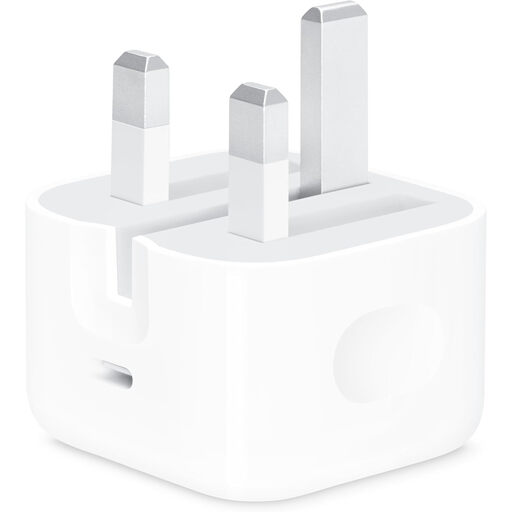
This Apple adapter is an option to assess when replacing a charger for a compatible iPhone or iPad. Check the exact device’s charging instructions and the cable you intend to use before ordering.
 No image available
Apple 20W USB-C Power Adapter
For replacing an adapter used with a compatible Apple device. This is a 20W USB-C power adapter; verify your device’s requirements and check that you have a suitable charging cable.
View on Joybuy
Frequently asked questions
Can I use any USB charger as a replacement?
No: check the device maker’s connector, charging method and any specified charger or cable before choosing a substitute. London Fire Brigade advises using the supplied charger or a genuine replacement from a trusted supplier.
Does a higher wattage rating help when charging several devices?
The rating alone cannot tell you what each connected device will receive. Check the manufacturer’s allocation table for the ports in use; the USB Implementers Forum notes that adding a device can change another port’s power contract.
What should I check on a mains-powered charger for use in the UK?
Check that its plug arrangement and instructions suit your intended use, and that the seller and exact model are identifiable. Follow the device maker’s charging requirements as well as the charger maker’s instructions.
What if a charger or cable is damaged or unusually hot?
Stop using a damaged item and do not try to repair the charger or cable yourself. Check the device and charging equipment for visible damage; London Fire Brigade advises stopping charging and seeking manufacturer or qualified advice if a battery is swelling.


