Single-radio kitchen users
If you mainly charge one USB radio and occasionally a phone, check the radio’s connector and stated input before choosing how many ports you need. A charger at a convenient wall socket can leave more worktop clear.


Check the radio’s charging input and cable before choosing a station: a USB port or high total wattage alone does not establish compatibility. If a suitable wall socket is nearby, a compact multi-port charger keeps the charging hardware off the counter. Choose a corded desktop station when several devices need accessible ports, provided you can place it away from splashes and heat.
If you mainly charge one USB radio and occasionally a phone, check the radio’s connector and stated input before choosing how many ports you need. A charger at a convenient wall socket can leave more worktop clear.
If the radio shares a charging point with several USB devices, consider the mix of USB-A and USB-C ports and whether the ports need to be closer than the wall socket. Keep any station and its lead away from splashes and heat.
If you also charge a laptop, tablet or several phones, compare total output and the stated output when multiple ports are in use. Belkin’s cited desktop charger illustrates a higher-output format, but its capacity does not establish what an individual radio can accept.
Start with the radio’s labelled input and a dry, ventilated charging position. Then decide whether the other devices you charge justify more ports, a longer lead or higher total output.
Choose when: The radio is the main device and a suitable wall socket is conveniently placed.
Trade-off: The ports stay at the socket rather than moving closer to the radio.
Choose when: A shared charging point needs reachable USB ports and mains outlets; the UGREEN model cited here is one example of this format.
Trade-off: The station, lead and outlets all need a suitable position away from kitchen moisture and heat.
Choose when: A laptop, tablet or several other USB devices will regularly charge alongside the radio.
Trade-off: Higher total output does not, by itself, make the radio charge faster.
| Concern | What to check | Who this matters to |
|---|---|---|
| Radio compatibility | Read the radio’s charging-input label or manual; match its connector, stated input and charging cable to the station. | If my radio has an older lead, I need to know that the cable and output suit its charging input. Around 34% of consumers put radio compatibility first. |
| Kitchen placement | Choose a position away from liquids and heat, with room for ventilation; inspect the plug and cable for damage. | I want a charging point I can keep clear of splashes, hot appliances and covered surfaces. Kitchen placement is the primary concern for around 33% of consumers. |
| Other devices | Count devices charged together; compare the USB-A and USB-C mix and stated output when several ports are active. | When phones or a laptop share the charger with my radio, I need enough suitable ports for simultaneous use. Around 20% of consumers prioritise shared-device capacity. |
| Counter space | Check the distance from socket to charging spot and whether a wall plug or corded station fits that space. | I would rather keep the worktop clear and avoid a lead across the working area. For around 13% of consumers, space and cable routing come first. |
A radio’s USB port may have another purpose, and the words “USB radio” do not identify its charging connector or input. A radio manual, for example, specifies a micro-USB lead and a DC 5V, 1000mA adaptor for that particular model.
Check your radio’s manual, input label and supplied cable before selecting a station or a replacement lead.
A different port type may mean you need an additional compatible cable.
Electrical Safety First advises keeping USB chargers away from liquids and heat. A long lead or extra outlets do not make a spot beside a sink, kettle or hob suitable for charging.
Place the station in a dry, ventilated area, leave it uncovered and stop using equipment with a damaged plug or cable.
A charger’s total output is different from the output available to each device when several ports are in use. The DC 5V, 1000mA requirement in the cited radio manual cannot be replaced with an assumption based on a station’s headline wattage.
Check the radio’s stated input first; compare multi-port output if tablets, laptops or other devices will charge at the same time.
A conformity mark alone does not identify the manufacturer or rule out a product recall. Electrical Safety First has published a recall notice for a multi-USB charger presenting an electric-shock risk.
Choose a product with a clear manufacturer and model number from a reputable retailer, and check recall information before use.
Anker’s Zolo Charger A121E illustrates a multi-port wall-plug option for a radio and other USB devices.
UGREEN’s cited 65W desktop station represents a corded shared-counter format with USB ports and AC outlets.
Belkin’s BoostCharge Pro WCH010myBK illustrates a higher-output desktop charger for a radio sharing space with other USB devices.
These wall-plug multi-port chargers are options to consider when a suitable socket is near the radio’s safe charging position. Match your radio’s charging input and cable before choosing one; higher stated output is chiefly relevant if other devices will share the charger.
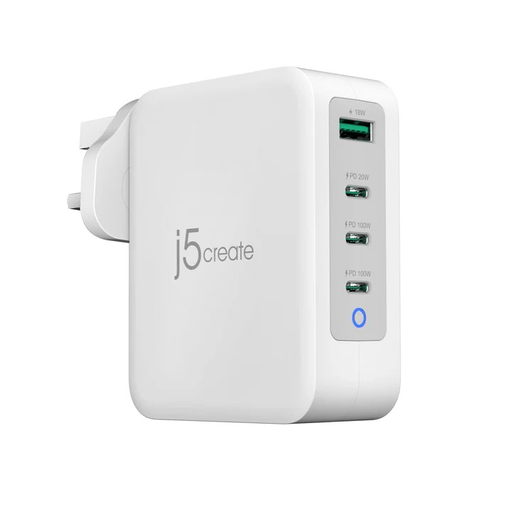 No image available
Consider this UK charger if the radio will share a nearby socket with other USB devices. Its title specifies four ports and 130W; check the radio’s input and cable, and confirm the port arrangement needed for your other devices. Keep the charger uncovered and away from liquids and heat.
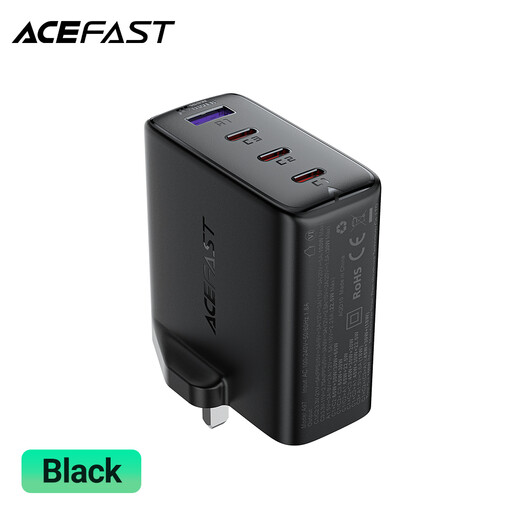 No image available
Consider this wall-plug format if the radio and other devices need a mix of USB-A and USB-C ports. Its title specifies three USB-C ports, one USB-A port and 100W; match the radio’s cable and stated input, and check the output available when several ports are used. Leave the charger uncovered and clear of liquids and heat.
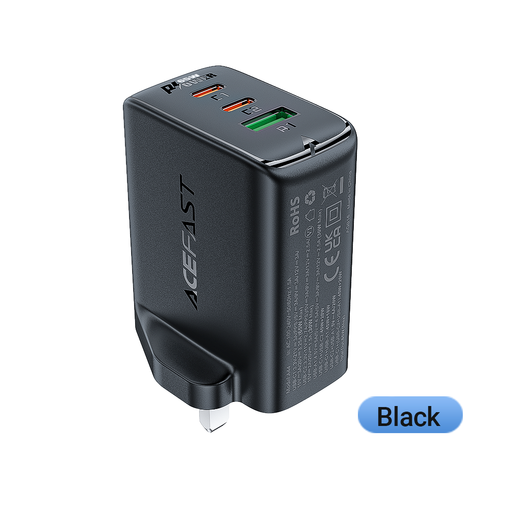 No image available
Consider this three-port wall charger when the radio may share a nearby socket with up to two other USB devices. Its title specifies two USB-C ports, one USB-A port and 65 W; check cable fit, the radio’s input and output during simultaneous use. Keep it uncovered and away from liquids and heat.
No: suitability depends on your radio’s charging connector, stated input and cable. For example, a radio manual specifies a micro-USB lead and a DC 5V, 1000mA adaptor for one model; check your own radio rather than applying that requirement to every USB radio.
Choose total capacity for all the devices you intend to charge together, not on the assumption that a higher-wattage station will charge the radio faster. Compare the radio’s labelled input with the station’s suitable output, then check multi-port output if other devices will share it.
Use a dry, ventilated spot away from water, steam and heat, and leave the charger uncovered. Electrical Safety First advises keeping USB chargers away from liquids and heat sources; inspect the plug and cable for damage before use.
Check the radio’s input and cable, then choose a charger with a clear manufacturer and model number from a reputable retailer. A conformity mark does not replace those checks; look up recall information for the product as well.