What should you check before choosing?
Start with where people charge and which devices must charge together; then check shared power, cables and the mains hardware for the route you choose.
| Priority | What to check | Your needs |
|---|
| Charging location |
Choose between a fixed multi-port station, chargers used in different rooms, or a power strip with existing chargers. Check where sockets and cables will sit. |
Everyone tends to charge at one spot, so a shared station could keep the setup together. If chargers travel around the home, I would rather keep them separate. |
| Power shared across ports |
Compare total output in watts, each port’s limit and the output table for the exact combination of occupied ports. A single-port maximum is not the simultaneous output of every port. |
A laptop may charge alongside phones and tablets. I need to know what each connected device can receive at the same time, not just how many ports are available. |
| Ports and cables |
Match USB-C and USB-A ports to the devices and check the required USB Power Delivery support. The USB Implementers Forum notes that cables differ in capability; check a USB-C cable’s stated power rating too. |
Some of our devices use different cables. I want a setup that fits the ones we actually use without assuming every USB-C cable has the same capability. |
| Hub or charger |
For a USB-C hub, check its required separate charger and the power available to the host computer after hub use. Belkin states that its cited 100W multimedia hub reserves 8W for operation. |
If my laptop needs display or peripheral connections, a hub may serve that desk. For independently charging several household devices, I need to assess a charger instead. |
| Mains connection and product identity |
Identify the exact supplied plug or lead, model and responsible seller. For Great Britain, check the applicable product information and UKCA or CE marking, then search Office for Product Safety and Standards alerts; a mark alone is not proof of safety. |
I want to know which mains hardware will arrive and whether the exact product appears in a safety alert before it becomes our regular charging point. |
Which brand ranges are relevant?
These manufacturer ranges illustrate different charging formats; the stated specifications apply to the cited products, not every product from each brand.
Anker
Anker UK presents its A2683 Prime desktop charger as a fixed-location, six-port option with 200W stated total output.
- Anker states that each USB-C port can provide up to 100W and that two USB-C ports can each do so simultaneously under its stated conditions.
- Check the allocation for your other port combinations, device compatibility and the exact mains hardware supplied.
UGREEN
UGREEN UK lists both a Nexode desktop charging station and a separate four-port wall charger.
- Its cited desktop station lists four USB-C and two USB-A ports sharing a stated 100W total output.
- Confirm the detailed output table and exact variant before relying on simultaneous-charging claims.
Belkin
Belkin UK offers a three-port mains charger and a multimedia USB-C hub for different laptop-related needs.
- Belkin describes its 100W three-port GaN wall charger for a laptop and two additional devices.
- Its cited 100W multimedia hub needs a separate charger and reserves 8W for its own operation; it is not a stand-alone household charging station.
Joybuy options for a shared charging area
These options include three multi-port mains chargers and a socket cube with USB ports. They serve different ways of adding charging access to one area, rather than representing interchangeable desktop stations; check the exact mains connection and simultaneous-use output for the devices you plan to connect.
 No image available
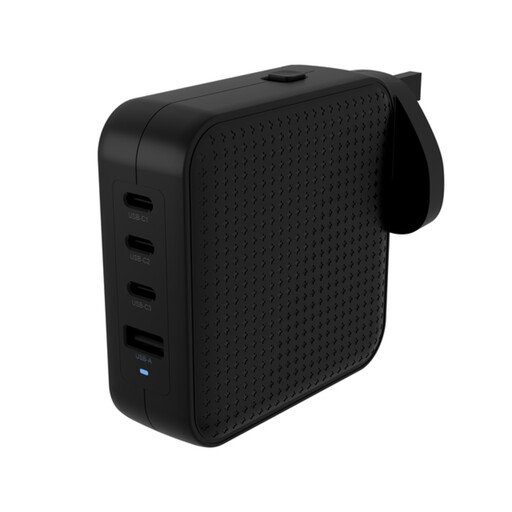
Hyper® HyperJuice 100W USB-C GaN Travel Charger (3C+1A), Black
This multi-port travel charger is an option when several devices need access to one charging area. Check the power allocation for the devices you will connect together, whether a C8 power cord is included for desktop use, and the exact UK mains hardware supplied.
View on Joybuy
 No image available
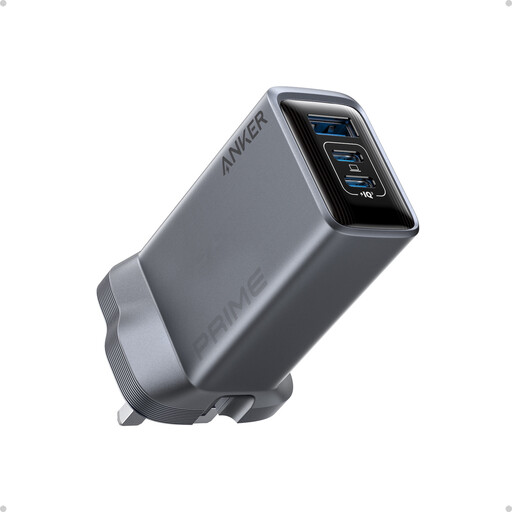
Anker Prime 100W USB-C 3-Port GaN Charger, Black
The three-port format may suit a shared spot with fewer devices than a larger station. Compare the output available with all intended ports occupied, and confirm the plug or adapter supplied with this exact item before choosing it for UK mains use.
View on Joybuy
 No image available
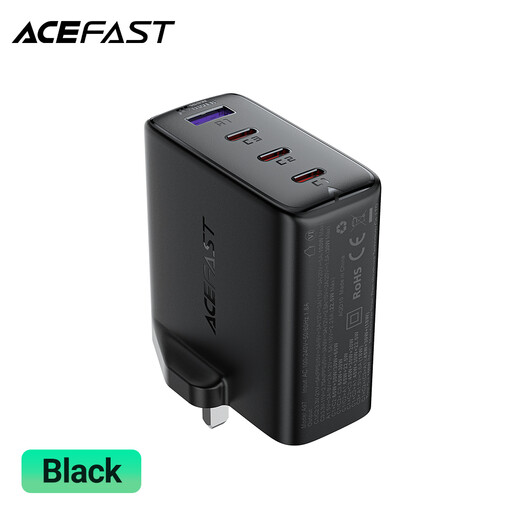
ACEFAST A97 PD100W GaN UK Charger (3 USB-C + USB-A)
Its stated port mix offers connections for USB-C and USB-A devices at a shared charging point. Check how output is divided when the four ports are in use, as well as the exact product information and relevant UK safety alerts.
View on Joybuy
 No image available
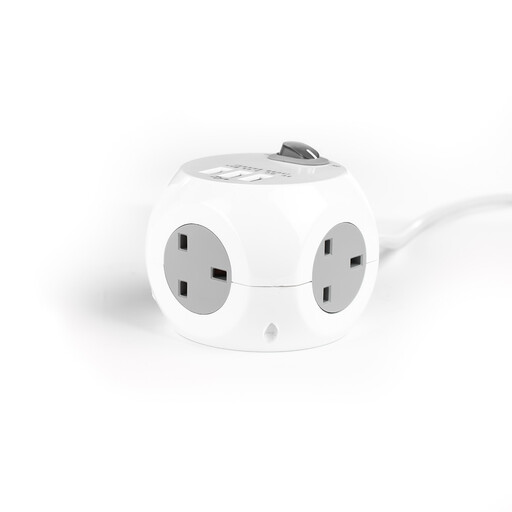
STATUS 3 Way Cube Socket with 3 USB Ports, 1.4M, White
This socket cube is an alternative when a shared area needs sockets alongside USB charging. Check the USB output against your devices rather than assuming it offers the same charging arrangement as a USB-C station; follow the product’s indoor-use guidance and do not connect it to another extension lead.
View on Joybuy
Common questions
Which product markings should I check in Great Britain?
Check the marking applicable to the exact mains-powered product, alongside its model, manufacturer or importer information and supplied plug or lead. Department for Business and Trade guidance says Great Britain continues to recognise CE marking alongside or instead of UKCA for many products, but a mark indicates the manufacturer’s belief that requirements are met; it is not stand-alone proof of safety. Northern Ireland has different market arrangements, so do not assume the same marking route applies there.
How do I check a station’s plug and mains lead?
Confirm what the exact listing supplies rather than relying on a generic photograph, then identify the model and search Office for Product Safety and Standards alerts. Its reports have identified specific USB charging products with inadequate earthing or plugs that did not meet BS 1363 dimensional requirements; those findings do not apply to every station.
Will a 100W station give every connected device 100W?
No: a stated total output and a single-port maximum do not mean every port can deliver that figure at once. Check the maker’s output table for your combination of occupied ports and the devices’ charging requirements. UGREEN UK, for example, describes its cited six-port Nexode station as sharing 100W total output.
Can a USB-C hub replace a household charging station?
A USB-C hub is primarily for connecting a host computer to peripherals while passing through power from a separate compatible charger, rather than independently charging several household devices. Belkin UK states that its cited 100W multimedia hub reserves 8W for operation, so check what remains available to the computer.
What matters when choosing USB-C cables for shared charging?
Match the cable’s stated power capability to the charger and the device; the connector shape alone does not establish what it can carry. The USB Implementers Forum says USB-C cables differ in capability and identifies 60W and 240W markings for certified USB-C to USB-C cable categories. Higher-power USB Power Delivery also requires compatible equipment and the appropriate cable.


