Creators delivering large artwork folders
Layered source files, high-resolution exports and other large assets make usable capacity and stated write speed worth checking against the complete delivery folder.


Choose a USB flash drive with enough usable capacity for the complete artwork folder, then match its connector and stated write speed to the devices involved. A dual USB-A/USB-C drive helps when the client’s port is uncertain; confidential material calls for an agreed encryption and credential-sharing approach. Keep a separate archive copy and check the transferred files before treating the handover as complete.
Layered source files, high-resolution exports and other large assets make usable capacity and stated write speed worth checking against the complete delivery folder.
When the recipient’s port is uncertain, a drive with both USB-A and USB-C connectors can reduce dependence on an adapter. Confirm the file format with the client as well.
Personal data or sensitive client material makes access control important if the drive is lost. The Information Commissioner’s Office identifies encryption as a way to protect personal information stored on USB media.
Start with the full folder size and a separately retained copy. Then check the client’s port and file-format needs, the time available to copy large files, and whether the contents require protected access.
| Concern | What to check | Who this matters to |
|---|---|---|
| A recoverable archive | Keep the master and a separate backup; check that the delivery files open after copying. | If the client’s drive is lost or damaged, I still need the artwork I delivered. Around 33% of consumers put retained copies first. |
| Large-file transfers | Measure the full folder, allow capacity headroom and compare stated write speed with the source computer’s connection. | When my package contains large source files and exports, copying it needs to fit the handover schedule. For around 25% of consumers, transfer capacity and speed are the primary concern. |
| Client compatibility | Confirm USB-A or USB-C ports and a file format the recipient can use. | I need the client to open the files without first finding an adapter or reformatting the drive. Device compatibility comes first for around 25% of consumers. |
| Confidential access | Check the project’s protection requirements and agree how credentials will be shared and recovered. | If the package contains sensitive material, I need to limit access should the drive go missing. Around 17% of consumers prioritise that protection. |
A drive sent to a client is no longer a dependable retained copy. The National Cyber Security Centre describes a backup as a copy kept in a separate safe location; the Library of Congress also advises keeping copies on different media in separate locations.
Keep the master and a separate backup, copy rather than move the delivery files, and check the USB copy before deleting anything.
The delivered folder can include source files, exports and supporting documents, while formatted capacity is lower than the figure on the label.
Measure the complete folder and leave headroom before selecting a capacity.
Writing the artwork to the drive is part of preparing the handover. Manufacturer maximum speeds depend on the host computer, connection and usage.
Compare the exact model’s stated write speed and check the source computer’s USB connection rather than treating a maximum figure as a transfer-time promise.
A slower outgoing transfer can add time to the production handover.
The Information Commissioner’s Office notes that encryption can protect personal information stored on USB media against unauthorised access. An encrypted drive also needs a workable credential process for the recipient.
Assess the contents and client requirements before dispatch; agree how to share and recover the password or PIN, keeping it separate from the drive.
Its DataTraveler Max and IronKey lines address different handover needs: large-file transfer and controlled access.
Its dual-connector drives are relevant when artwork may move between USB-A and USB-C devices.
The JetFlash 920 is relevant to a USB-A handover workflow involving repeated file copying.
These USB-A/USB-C drives offer capacity choices for delivering artwork when the recipient’s port may vary. Match the usable capacity to the folder, and settle any confidentiality or file-format requirements before choosing a drive.
 No image available
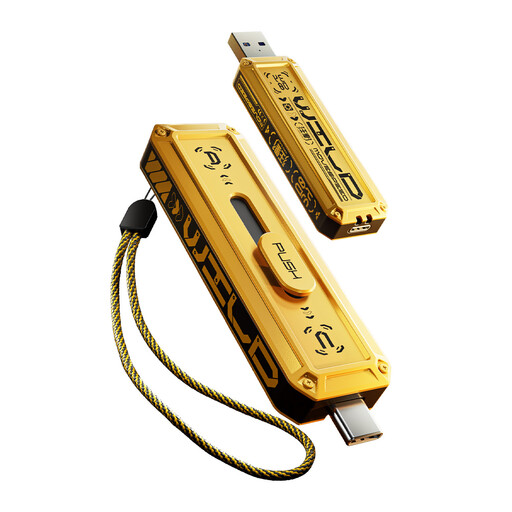
Consider this dual-connector drive if the complete handover fits within its usable capacity and fingerprint access suits the agreed client workflow.
The product title specifies USB-A and USB-C, USB 3.2 Gen 1, and up to 550MB/s read and 500MB/s write. Confirm how its encryption and credential recovery work before relying on it for confidential files.
 No image available
This capacity may suit a larger artwork folder when the recipient could need either USB-A or USB-C.
Check the exact interface and achievable write performance with the source computer before planning the transfer around an advertised maximum. Check the file format and any access-control requirement with the client.
 No image available
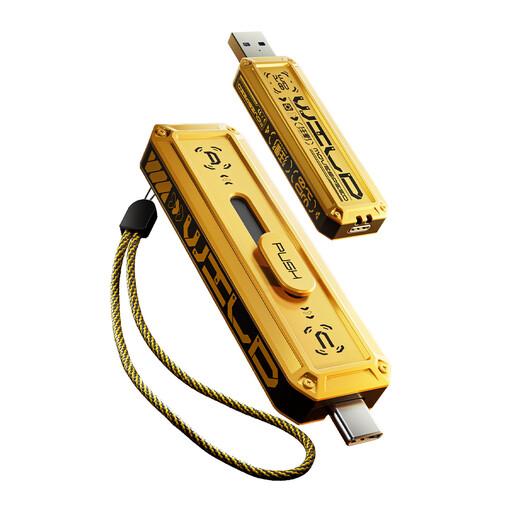
Consider this variant when the artwork folder leaves enough usable space at 256GB and the handover may involve USB-A or USB-C.
Confirm its interface and achievable write performance with the source computer. Agree the file format and any protection needed for the delivered files.
 No image available
The 1TB variant is worth considering for a substantial handover folder, provided its usable capacity gives the project enough headroom.
It is a USB-A/USB-C model. Check its interface and achievable write performance before scheduling a large transfer, and confirm any file-format or confidentiality requirements separately.
 No image available
This smaller-capacity option may suit a compact artwork package if the full folder fits with headroom and the client needs a choice of ports.
The product title specifies USB-A and USB-C and a read speed of 500MB/s. Confirm the file format and the protection required for the handover.
No: keep a separate retained copy rather than making the delivery drive your only archive. The National Cyber Security Centre defines a backup as a copy stored in a separate safe location, and the Library of Congress advises keeping copies on different media in separate physical locations.
Copy the files and keep the original while you check the transfer. SanDisk’s support guidance notes that moving files to an external drive is not a backup unless another copy remains elsewhere; open representative delivered files before completing the handover.
ExFAT can be a practical format when both devices support it. Apple identifies it as Windows-compatible and recommends it for Windows volumes over 32GB; confirm the client’s device and workflow before formatting the drive, particularly if specialist equipment is involved.
Consider encryption when the folder contains personal information or confidential client material and loss of the drive would expose it. The Information Commissioner’s Office identifies encryption as protection for personal information on USB media; agree the client’s access and credential-recovery process before sending the drive.