Choose an access-controlled drive if studio spreadsheets contain personal or confidential information, a dual USB-A and USB-C drive if backups must move between different ports, or a USB-A drive for routine copies on known USB-A computers. Prioritise write speed when backups also contain large files or take place frequently. Whichever drive you choose, keep the copy separate from the working computer and test that files can be restored.
Who needs which type of drive?
Custodians of sensitive records
If you maintain backups that may contain personal or confidential information, decide how the drive will be protected, who can unlock it and how access can be recovered. Storage capacity alone does not settle those questions.
Teams using mixed USB ports
If backups move between USB-A desktops and USB-C laptops, check both the computers that create the copy and those that may need to restore it. A dual-connector drive can avoid reliance on an adapter.
Teams making routine document copies
If the studio uses known USB-A computers, a straightforward drive may meet its connector needs. Check the size of the backup folder and retained versions; write speed matters more when larger associated files are copied regularly.
What matters when choosing?
Classify the spreadsheets and check the studio computers’ ports before comparing capacity or speed. The drive then needs to fit a backup routine that keeps the copy separate and tests recovery.
| Concern | What to check | Who this matters to |
|---|
| Protection of sensitive records |
Classify the data; if encryption is needed, check access controls and the PIN or account-recovery process. |
If I am responsible for portable copies of personal or confidential records, I need to control who can open them if a drive is lost. Around 36% of consumers would put protection first. |
| Connector compatibility |
Check the ports on every computer used to create or restore a backup; consider both USB-A and USB-C where needed. |
Moving backups between computers with different ports makes a mismatched connector a practical obstacle. For around 29% of consumers, direct compatibility would be the primary need. |
| Recoverable routine copies |
Measure the backup folder and retained versions; plan separate storage and periodic test restores. |
I need an ordinary spreadsheet copy that I can find and open when the working files are unavailable. Around 21% of consumers would prioritise that recovery routine. |
| Transfer time |
Compare stated write speed for the exact model and capacity, alongside the computer’s USB capability. |
When a backup includes larger associated files or is repeated often, waiting for files to write becomes more noticeable. It would be the primary concern for around 14% of consumers. |
Mistakes to avoid
-
Leaving the only backup beside the working computer
A drive that stays connected or beside the computer may be affected by the same loss or incident as the working files. The National Cyber Security Centre describes a backup as a copy stored in a separate safe location.
Store the drive separately when it is not being updated, and periodically restore a spreadsheet to check that it opens.
-
Using an unprotected drive without classifying the records
Portable media can be lost or accessed by others. For personal information on removable media, the Information Commissioner’s Office advises encryption; the appropriate controls also depend on the records and the studio’s risk assessment.
Identify what the spreadsheets contain, then follow the studio’s policy for encryption, access, recovery and retiring the drive.
-
Choosing by capacity or USB version alone
Capacity does not establish whether the connector fits the studio’s computers, while a stated read speed does not tell you how quickly a backup will be written.
Check the required ports and backup-folder size, then compare write specifications for the exact drive variant.
Relevant brands for reference
Kingston
Two different product lines address different studio needs: IronKey Keypad 200 for managed access to sensitive copies, and DataTraveler Duo for movement between USB-A and USB-C ports.
- Kingston specifies XTS-AES 256-bit hardware encryption and keypad PIN access for IronKey Keypad 200; DataTraveler Duo has both connector types.
- IronKey access needs a planned PIN and recovery process. Kingston specifies DataTraveler Duo in 128GB and 256GB capacities.
Samsung
BAR Plus is a USB-A option for routine portable copies on computers with a matching port.
- Samsung lists 64GB–512GB capacities, up to 400MB/s sequential read speed on selected capacities, and resistance to water, shock, magnets, temperature changes and X-rays under its stated conditions.
- Its USB-A connector does not directly fit a USB-C-only port; durability claims do not replace access controls for sensitive records.
SanDisk
The Extreme PRO Flash Drive with USB-A is relevant when frequent backups also include larger associated files.
- SanDisk states maximum speeds of up to 1,000MB/s read and 900MB/s write for this USB-A model; actual transfer conditions matter.
- The USB-A connector does not directly fit USB-C-only computers, and maximum speeds should not be assumed for every backup.
Joybuy product choices
These drives cover access-controlled copies, mixed USB-A/USB-C connections and routine USB-A backups. Match each one to the studio’s data policy, computer ports and backup-folder size before choosing.
 No image available
MOVESPEED YSUYC-256GSN 256GB USB flash drive, silver
Consider this for a studio needing both USB-A and USB-C connectors and a proposed fingerprint-access workflow. The listing describes AES-256 encryption, fingerprint access and a 256GB capacity; confirm how protection, supported systems and access recovery work before relying on it for sensitive records. Check that the capacity and file system fit the backup routine.
View on Joybuy
 No image available
Kingston IronKey Keypad 200 16GB USB flash drive
This USB-A model is relevant when the studio needs managed access to a portable copy. Kingston specifies XTS-AES 256-bit hardware encryption and keypad PIN access for the IronKey Keypad 200 series. Check that 16GB accommodates the backup and retained versions, and agree who manages PINs and recovery. The product listing describes FIPS 140-3 Level 3 status as pending, not completed.
View on Joybuy
 No image available
DigiEra LUS320 128GB dual-connector USB flash drive
Consider this when backups need to move between USB-A and USB-C computers. The listing specifies a 128GB capacity, both connectors, a swivel casing and exFAT; check file-system support across the studio’s computers and space for retained versions. Classify the records and follow the studio’s protection policy before using a drive for sensitive information.
View on Joybuy
 No image available
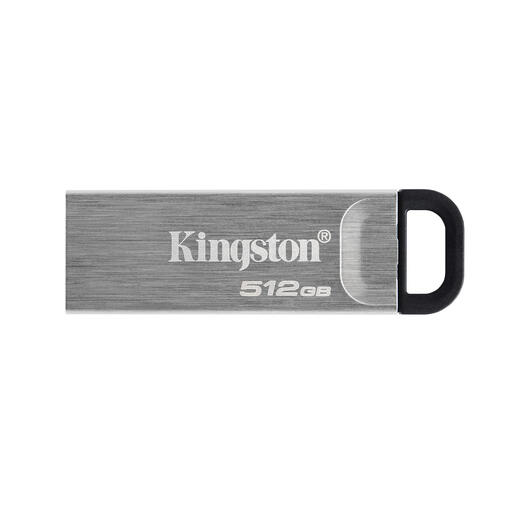
Kingston DataTraveler Kyson 512GB USB flash drive
This is a routine-copy option where the studio computers have USB-A ports. The listing specifies 512GB, USB 3.2 Gen 1 and a capless metal design. Check whether that capacity suits the backup folder, whether the file system works across the intended computers and what protection the records require.
View on Joybuy
 No image available
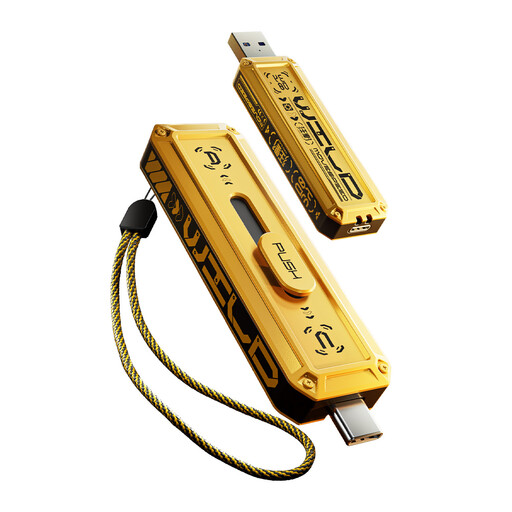
MOVESPEED YSUWD10-512GSY 512GB USB flash drive, yellow
This 512GB drive is an option for moving copies between USB-A and USB-C computers. Its listing also gives a Type-C 5Gbps interface and a write-speed claim that do not align; confirm the exact interface and write performance rather than choosing it for the advertised speed. Check file-system compatibility, required capacity and the studio’s rules for protecting sensitive records.
View on Joybuy
Frequently asked questions
Can a USB drive be the studio’s only backup?
Do not rely on a single USB copy as the whole recovery plan for important records. The National Cyber Security Centre describes a backup as a copy kept in a separate safe location; store the drive away from the working computer, test a restore and consider another independent copy.
Does a UK studio have to encrypt every spreadsheet backup?
No blanket encryption requirement applies to every spreadsheet. The Information Commissioner’s Office says UK GDPR does not specifically require all personal information to be encrypted, but security must be appropriate to risk and it advises encryption for personal information on removable media. Check what the spreadsheets contain and follow the studio’s risk assessment and policies.
Should the studio choose USB-A, USB-C or both?
Choose connectors that fit the computers used both to make and to restore the backup. If those computers have a mix of USB-A and USB-C ports, a dual-connector drive can avoid depending on adapters; also check that the intended systems can use the drive’s file system.
Is advertised read speed enough to judge backup speed?
No: copying a backup onto the drive is a write operation. Compare the exact model and capacity’s stated write performance and the computer’s USB capability, treating manufacturers’ maximum speeds as conditional rather than expected results for every transfer.


