What matters when choosing?
Start with how often you move large files, then check the capacity and connections required by every device in the journey.
USB flash drive
Choose when: A pocket-sized, cable-free carrier suits occasional transfers.
Trade-off: Write performance varies by model; Kingston lists different speeds and connectors across its DataTraveler range.
Portable SSD
Choose when: You repeatedly transfer large folders and want to compare models with high stated transfer speeds or specific travel-protection features.
Trade-off: A manufacturer's rated speed is not the speed promised for every computer, cable and file workload.
Portable HDD
Choose when: Carrying a large file collection takes priority over seeking the fastest transfer route.
Trade-off: Check the cable before committing: Seagate specifies a Micro-B-to-USB-A cable for its One Touch HDD.
| Concern |
What to check |
Who this matters to |
| Large transfers and travel |
Compare the exact model's stated write speed, the computer's port and any model-specific drop or ingress rating. |
If I carry large project folders between sites regularly, copying time and travel protection matter to me; around 33% of consumers put this need first. |
| Compact carrying |
Check capacity, connector type and stated write speed rather than judging a USB stick by its size alone. |
When I move documents or photos only occasionally, I would rather carry one small device than a drive and cable. Around 27% of consumers prioritise that convenience. |
| Device compatibility |
Match USB-A or USB-C connections and confirm read-and-write format support; for iPad storage, check the single-partition requirement. |
If files must pass between my computers and tablet, I need each device to open and save them. Around 20% of consumers make cross-device access their primary concern. |
| Carrying a large collection |
Check capacity against your files and confirm the supplied cable works with each computer. |
For a substantial photo or media collection, I would focus on carrying the files together rather than seeking the smallest device. Around 20% of consumers put capacity first. |
Joybuy product choices
These choices cover USB flash drives, portable SSDs and a portable HDD for carrying files between compatible devices. Compare the particular connections and capacities you need rather than assuming one type suits every journey.
 No image available
Samsung MU-PE1T0S 1TB portable SSD, black
Consider this USB-C SSD for frequent large-file transfers if your devices support the required connection.
The model name specifies USB 3.2 Gen 2. For Samsung's T7 Shield MU-PE1T0S, Samsung states up to 1,050 MB/s read and 1,000 MB/s write, plus IP65 protection under its stated conditions; actual transfer speed depends on the setup, and IP65 does not mean the drive can be submerged.
Joybuy
 No image available
MOVESPEED YSUSP05-512GSR 512GB USB-A/USB-C flash drive, silver
The two connector types may suit transfers between USB-A and USB-C devices, provided each device supports the drive and its file format.
The product name specifies USB 3.2 Gen 1, a zinc-alloy housing and up to 570 MB/s read speed. Check write performance if you frequently copy large files onto it.
Joybuy
 No image available
DigiEra LPS2000M-3 1TB magnetic portable SSD, pink
Consider this SSD for carrying large files between USB-C devices after checking support for its interface and file format.
Its product name specifies USB 3.2 Gen 2x2 and advertises transfer speeds up to 2,000 MB/s; that figure is not an expected speed on every host. Check the exact phone model before relying on the magnetic feature.
Joybuy
 No image available
Western Digital Elements 4TB portable HDD, black
This is a capacity-focused option for carrying a large file collection between computers.
The product name specifies USB 3.0. Confirm the cable connection and file format for each destination device, particularly if you need to write files from both Windows and Mac computers.
Joybuy
 No image available
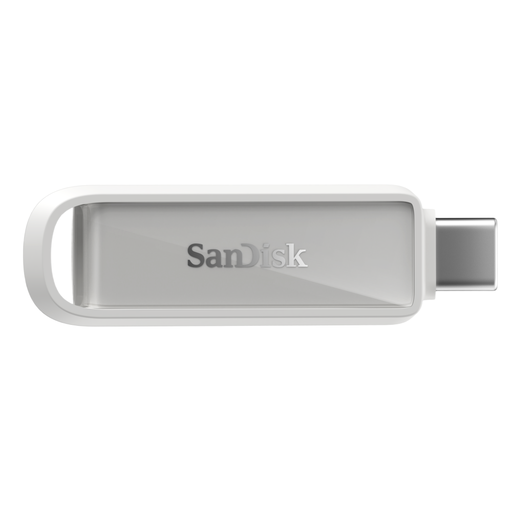
SanDisk Phone Drive with USB-C 128GB, Arctic White
This compact USB-C drive may suit occasional file carrying where the intended devices support its connector and file format.
If you also use a USB-A-only computer, check the adapter required. Confirm write performance before choosing it for regular large-file transfers.
Joybuy
Frequently asked questions
Should I use exFAT to move files between Windows and Mac?
exFAT is a format to consider for that workflow: Apple lists it as Windows-compatible and provides instructions for formatting a disk for both Windows and Mac. Confirm read-and-write support on every intended device, and copy existing files elsewhere before reformatting because it can erase them.
Can I connect a portable drive to an iPad?
Yes, if the particular iPad and connection support it and the drive meets Apple's storage requirements. Apple specifies a single data partition and a supported format, including exFAT or FAT32; check whether your setup also needs an adapter or reader.
Why are file transfers slower than the drive's quoted speed?
The connection may limit the transfer: Seagate says its One Touch drive operates at slower USB rates through a USB 2.0 port or hub than through USB 3.0 or higher. Check the computer port, cable and any hub, and treat manufacturer speed figures as conditional rather than guaranteed copy rates.
Do files on a work USB drive need encryption?
Follow your organisation's rules before putting work or client files on portable storage. For organisations processing personal information, the Information Commissioner's Office describes encryption as an example of a security measure whose appropriateness depends on the processing risks; that is not a blanket requirement for every household drive.
Can the drive I carry between computers be my only copy?
Keep another copy of important files rather than relying solely on the drive you carry. Choose a separate backup arrangement suited to the files and the consequences of losing the transport drive.


