What matters when choosing a drive?
Check school permission and the type of data first, then work through device connections, backup size and copying frequency. The National Cyber Security Centre notes that removable media can help with backups but also introduces data-loss and theft risks.
| Concern |
What to check |
Who this matters to |
| Personal data and school policy |
Check the backup for identifiable information and ask whether your school permits removable media. For approved sensitive files, assess encryption, access control and PIN management. |
If my teaching folders may identify pupils or staff, I need permission and a way to protect the copy if it is lost. Around 38% of consumers put that security-and-policy decision first. |
| Device connections |
List the USB-A and USB-C ports on devices that must use the backup; check whether adapters or personal drives are permitted. |
Moving the same resources between classroom and home devices makes an unusable connector a practical obstacle. For around 31% of consumers, compatibility is the primary concern. |
| Capacity and file format |
Measure the full folder and largest file, allowing room for revisions. PCMag UK notes that FAT32 cannot store an individual file over 4GB; confirm format support on every device that must write to the drive. |
When my backup includes large lesson videos, I need both enough space and a format that accepts each file. Around 23% of consumers prioritise capacity and file format. |
| Copying time |
Compare stated write speeds for the exact models and check the computer's port; a USB generation label alone does not establish transfer speed. |
Repeatedly copying large media folders can make the time spent on each backup important. Speed comes first for around 8% of consumers. |
Joybuy drives for offline backups
These choices include a USB-A keypad-encrypted drive and drives with both USB-A and USB-C connectors. Match a drive to your backup contents, device ports and school rules rather than treating a connector or encryption claim alone as approval for school data.
 No image available
Kingston Technology IronKey Keypad 200 16GB
Consider this keypad drive if an approved backup needs access control and your devices use USB-A.
The product name specifies 16GB and AES-256 encryption. It describes FIPS 140-3 Level 3 status as pending, not completed; confirm any required status, school acceptance and whether the full backup fits.
View on Joybuy
 No image available
DigiEra LUS320 128GB USB-A/USB-C drive
The two connectors suit non-personal resources that need to move between permitted USB-A and USB-C devices.
The product name specifies 128GB and USB 3.2. Check that your complete backup fits and that the drive's format works with every device that must write to it; do not assume it is suitable for personal school data.
View on Joybuy
 No image available
MOVESPEED YSUYC-256GSN 256GB, Silver
This dual-connector model is an option when the same offline backup must be used with USB-A and USB-C devices.
The product name specifies 256GB, USB 3.2 Gen 1, fingerprint access and stated speeds of 550MB/s read and 500MB/s write. Check how its claimed encryption works and whether your school approves it before storing personal data; stated speeds are not guaranteed transfer results.
View on Joybuy
 No image available
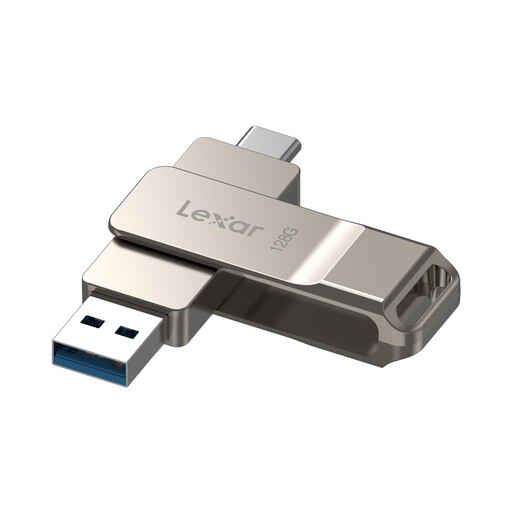
Lexar D40E LJDD40E128G-BNSNG 128GB
Consider this drive when you need to carry resources between USB-A and USB-C devices that permit removable storage.
The product name specifies 128GB and USB 3.2 Gen 1 Type-C. If personal information is involved, confirm the school's requirements and the software-encryption workflow described for this model rather than assuming whole-drive hardware protection.
View on Joybuy
 No image available
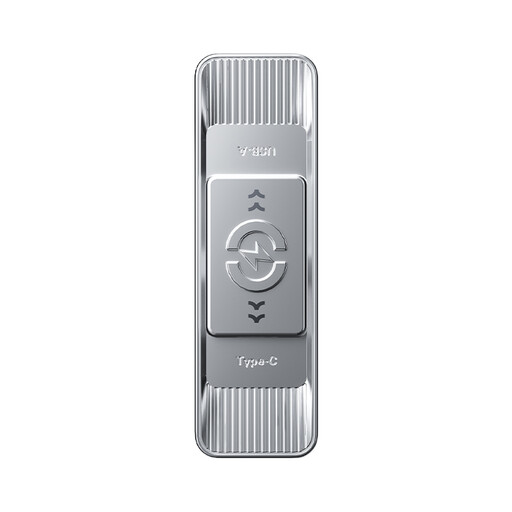
MOVESPEED YSUSP05-128GSR 128GB, Silver
This USB-A and USB-C drive is a choice to assess for moving non-personal lesson resources between permitted devices.
The product name specifies 128GB, USB 3.2 Gen 1 and a stated read speed of 570MB/s. Compare capacity with your full folder and check file-format compatibility; a read-speed claim does not establish how long writing a backup will take.
View on Joybuy
Frequently asked questions
Do teaching-resource backups always need an encrypted drive?
Not every folder presents the same data risk. If a backup contains personal information, the Information Commissioner's Office identifies encryption as a protective measure for USB and backup media; follow your school's procedures and ask a line manager or data protection officer when unsure, as the Department for Education advises.
Can I use my own USB drive on a school computer?
Check the school's removable-media and personal-device rules before connecting it. The National Cyber Security Centre notes that organisations may restrict peripheral access to manage its risks, so a suitable connector does not mean the drive is permitted.
Will FAT32 hold a large lesson video?
FAT32 will not hold an individual file over 4GB, as PCMag UK explains. Check the video's size, then confirm that every device needing the backup can read and write the format you choose.
How much capacity do I need?
Choose capacity against the size of your complete resource folder, with room for revisions or added media. Check the largest individual file as well: total free space alone does not overcome a file-system limit.
Is encryption enough to protect a school backup?
No. Encryption can help protect stored personal information if a drive is lost, but the National Cyber Security Centre also identifies data-loss and other risks from removable media. Use a drive only within your school's approved process and protect any access PIN.


