Choose a standard USB-A drive if the group uses USB-A computers, or a dual USB-A/USB-C drive if authorised volunteers need both connectors. If receipt scans contain personal information, assess whether a managed encrypted drive is appropriate. Whichever drive you choose, keep another separate copy of the records and disconnect the USB backup when it is not in use.
Who needs which approach?
Volunteers handling sensitive receipts
Scans showing names, addresses or bank details call for controlled access and a plan for a lost drive. The Information Commissioner’s Office identifies encryption as a measure to consider for personal information stored on USB media; the group must also decide who manages access credentials.
Groups sharing files across mixed devices
When authorised volunteers use both USB-A computers and USB-C devices, a drive with both connectors can make transfers more straightforward. Kingston Technology lists both connectors on its DataTraveler Duo; connector choice does not replace access controls.
Occasional receipt archivists
A group scanning on one regular computer may prefer a straightforward, labelled drive kept securely as a removable backup. The National Cyber Security Centre advises disconnecting a backup device when it is not in use.
What to check before buying
Decide how the group will protect and restore its receipt scans before choosing connectors or handling features. The percentages below describe consumers according to the need they put first.
| Concern | What to check | Who this matters to |
|---|
| Personal information |
Check what appears in the scans and whether an encrypted drive or a managed encryption process suits the group. Decide who controls credentials. |
If receipts show personal details and the drive could leave the group’s control, I need to limit access if it is lost. Around 31% of consumers put that protection first. |
| Backup continuity |
Allow room for planned scans, keep a separately stored copy and check that older files can be opened. |
If the computer or USB drive fails, I still need the group’s records. Keeping a recoverable copy is the first concern for around 25% of consumers. |
| Device compatibility |
List the ports on devices authorised to handle the files; choose USB-A alone or both USB-A and USB-C accordingly. |
When volunteers use different port types, I need to move files between authorised devices without relying on an unplanned adapter. Around 25% of consumers prioritise compatibility. |
| Routine handling |
Consider how a cap, cover or loop fits secure storage and any sign-out routine. |
For occasional scanning, I want a drive the group can label, store and find when needed. Practical handling comes first for around 19% of consumers. |
Mistakes to avoid
-
Keeping the only receipt copy on a USB drive
A removable drive can be lost or damaged, and a connected backup can be affected by malware. The National Cyber Security Centre advises keeping backups secure and disconnecting storage devices when they are not in use.
Keep another copy in a separate safe location and periodically check that saved scans open.
-
Choosing storage before checking the scans
Receipts can contain personal information. The Information Commissioner’s Office advises organisations to consider encryption in light of the information and the risks involved.
Review what the files contain and how the drive will be carried or shared, then set an access and credential-management process that fits the risk.
-
Treating maximum read speed as copying speed
Samsung’s stated BAR Plus read speed is a maximum; it does not establish how quickly a particular computer will write a batch of receipt scans.
Check connector fit, secure storage and backup arrangements before making a read-speed figure the deciding factor.
-
Using a tough casing as a security plan
Physical-resistance features address different risks from unauthorised access or having no second copy.
Treat casing features as a handling consideration, while assessing encryption and backups separately.
Relevant brands for reference
Kingston
Kingston Technology offers separate USB-A, dual-connector and IronKey encrypted drive lines.
- DataTraveler Duo has USB-A and USB-C connectors; IronKey Keypad 200 uses PIN access and hardware encryption.
- Those features belong to different lines. Check the exact model rather than assuming every Kingston drive offers both.
Samsung
BAR Plus is a USB-A line with a metal design and a stated maximum sequential read speed.
- Samsung states up to 400 MB/s sequential reads for BAR Plus models of 128GB and above, subject to device and usage conditions.
- That read figure does not establish sustained writing speed for receipt batches or provide encryption.
SanDisk
Ultra Flair is a conventional USB-A line for file storage and transfer.
- SanDisk describes a metal casing and password-protection support for Ultra Flair.
- Confirm software compatibility and the exact model before relying on password protection for group files.
Verbatim
Store 'n' Go Secure Pro is a hardware-encrypted drive line for password-protected storage.
- Verbatim describes the referenced Secure Pro model as using 256-bit AES hardware encryption.
- Check the specification and seller terms for the exact model offered in the UK.
Joybuy product choices
These drives cover different approaches to storing and moving receipt scans: PIN-controlled hardware encryption, dual-connector transfer and USB-A storage. Choose according to the group’s devices, the contents of its scans and its backup process.
 No image available
MOVESPEED YSUYC-256GSN 256GB dual-connector USB drive, silver
For groups needing USB-A and USB-C connections alongside access features: the listing describes fingerprint access and AES-256 encryption. Confirm how encryption is implemented and how access and recovery would be managed before storing sensitive scans.
View on Joybuy
 No image available
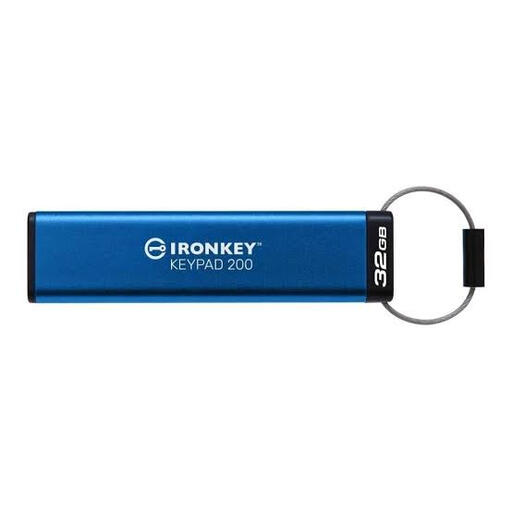
Kingston IronKey Keypad 200 32GB
For a group considering PIN-controlled storage, the listing describes XTS-AES 256-bit hardware encryption and separate administrator and user PIN options. Check whether 32GB meets the retention plan, whether required devices have USB-A ports, and how credentials will be managed. Do not treat the listing’s pending FIPS certification as completed.
View on Joybuy
 No image available
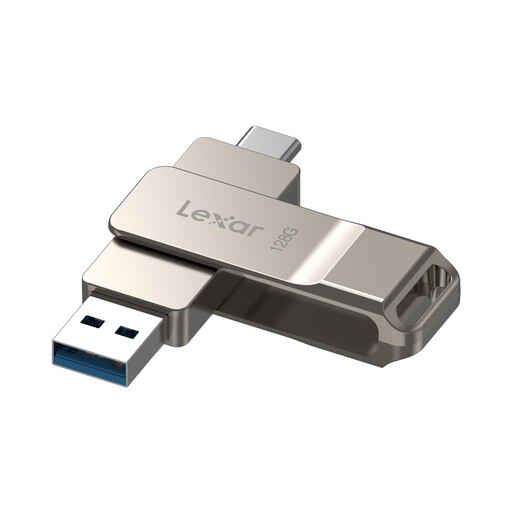
Lexar D40E 128GB dual USB drive (LJDD40E128G-BNSNG)
For moving scans between USB-A and USB-C devices, this model lists both connectors. Its described encrypted partition requires Lexar security software: check current software support before relying on it. Android use requires USB OTG support.
View on Joybuy
 No image available
SanDisk Ultra 128GB USB 3.0 flash drive
For a USB-A computer workflow, this 128GB model offers a retractable connector. The listing describes password protection through SecureAccess software rather than hardware encryption; check support for the group’s devices and decide who will manage the password.
View on Joybuy
 No image available
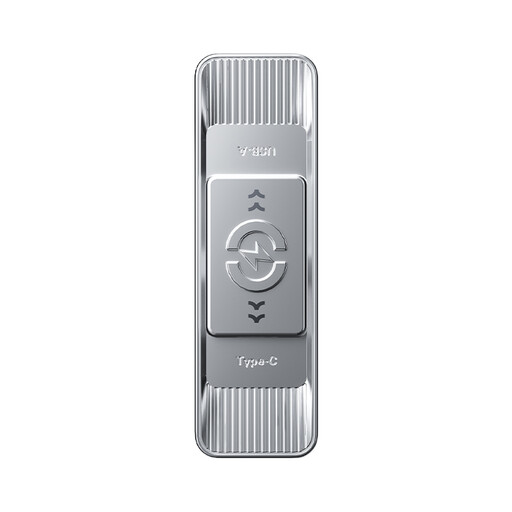
MOVESPEED YSUSP05-128GSR 128GB dual-connector USB drive, silver
For transferring scans between USB-A and USB-C devices, this model lists both connectors and a sliding design. If scans contain personal information, confirm what protection is available and how the group will control access before using it for those files.
View on Joybuy
Common questions
Does a group need an encrypted USB drive for receipt scans?
Not automatically: the choice depends on what the scans contain and how the drive is used. The Information Commissioner’s Office says organisations must use appropriate security measures for personal information and identifies encryption as a measure to consider for USB storage. Assess the risk of loss, access by volunteers and how credentials would be managed.
Can a USB drive be the group’s only receipt archive?
No: keep another copy in a separate safe location so one lost or unreadable drive does not remove access to the records. The National Cyber Security Centre also advises disconnecting backup storage when it is not in use, because connected devices can be affected by malware.
How long should the group keep scanned receipts?
Set the retention period according to the rules that apply to the group and the records, rather than assuming one period covers every receipt. HM Revenue & Customs says VAT invoices should be retained for six years from issue and that a record needed for more than one tax purpose should be kept for the longer applicable period. Check the group’s tax, charity and funder requirements before deleting scans.
What should happen to an old USB drive before it leaves the group?
Use an appropriate sanitisation or destruction process before giving away or disposing of a drive that held receipt scans; do not rely on ordinary file deletion. The National Cyber Security Centre includes USB drives in its guidance on reducing the chance that data can be retrieved from storage media.


