Choose a drive that connects to the devices you will use: USB-A suits a USB-A computer, while a dual USB-A/USB-C drive helps when the letters must move between both port types. Size it from your scan folder, then keep the drive as one separately stored copy rather than the only archive.
Who needs which approach?
Move-day document protectors
If the letters cannot easily be replaced, your priority is a portable copy stored away from the computer and removal boxes containing the originals. The National Cyber Security Centre advises keeping removable backups secure and disconnected when they are not in use.
Mixed-port household users
If you will scan on one computer and open the files on a device with a different USB port, check both connections before choosing a drive. Kingston Technology describes its DataTraveler Duo as having both USB-A and USB-C connectors.
Simple desktop archive makers
If the devices used to scan and read the letters have USB-A ports, a single-connector drive may cover the transfer. Kingston Technology describes DataTraveler Exodia as a capped USB-A drive; you still need to choose capacity from your own scans.
What matters when choosing a drive?
Work out where the backup will be kept, check the ports on both devices, then estimate the space your scans will need. A metal body or connector cover may matter when carrying the drive, but neither replaces another copy of the letters.
| Concern |
What to check |
Who this matters to |
| Keeping a separate copy |
Choose another destination for the files, check that copied letters open, and store the drive away from the computer and originals. |
When irreplaceable letters are being packed, I want a copy I can still reach if a box or device goes missing. Around 50% of consumers put backup separation first. |
| Connecting to your devices |
Identify the USB-A or USB-C ports on the scanning and receiving devices, and check that each accepts external USB storage. |
If I need to open the archive on devices with different ports, I want to transfer it without an extra adapter. For around 30% of consumers, direct connection is the primary need. |
| Capacity and carrying |
Measure a representative batch of scans to project the folder size; compare the resulting capacity need and any cap or keyring loop. |
Once I know how I will back up and connect the drive, I need enough space for the remaining letters and a design I can keep track of. Capacity and carrying come first for around 20% of consumers. |
Mistakes to avoid during the move
-
Using one flash drive as the only archive
A removable drive can be lost, damaged or unavailable just when the letters are needed. The National Cyber Security Centre describes USB storage as a backup option, not a reason to rely on one copy.
Keep an additional copy in a separate place or service. Open a selection of the copied letters to check the transfer before packing the originals.
-
Leaving the backup connected
A drive left attached to the computer remains exposed to problems affecting connected storage. The National Cyber Security Centre advises against keeping a backup device permanently connected.
After copying and checking the archive, safely eject the drive and put it somewhere separate until you need it.
-
Choosing by advertised read speed alone
A read-speed figure does not establish write speed, available capacity or whether the connector fits the device on which you need to open the letters.
Check the ports first and estimate capacity from a representative scan batch. Choose a dual-connector drive when transferring directly between USB-A and USB-C devices is part of your plan.
Brands and product lines to consider
SanDisk
The Ultra Luxe line is a USB-A option for someone considering a metal-bodied drive and a wider range of capacities.
- SanDisk describes Ultra Luxe as an all-metal USB 3.2 Gen 1 line with capacities up to 1TB.
- Its stated speed of up to 400MB/s is a maximum sequential-read figure, not a write-speed result. Choose capacity from the projected scan folder.
Samsung
The USB-A BAR Plus line is relevant if you expect to carry the drive with your keys or other essentials during the move.
- Samsung describes BAR Plus as having a metal body and keyring loop, and states resistance to water, shock, magnets, temperature fluctuations and X-rays.
- Those claims do not make a single drive a complete backup. Samsung says maximum read speed varies by capacity, while actual speed depends on the device and conditions.
Kingston
Kingston Technology offers two distinct routes here: the capped USB-A DataTraveler Exodia and the dual USB-A/USB-C DataTraveler Duo.
- Kingston describes Exodia as having a protective cap and keyring loop, while Duo has moving caps over its two connector types.
- The examined Duo line runs to 256GB. Compare the capacity of the particular variant with your projected archive, especially if it will also hold other files.
Joybuy drives for different ports
These drives cover dual USB-A/USB-C, USB-C and USB-A connections. Pick a connector that fits your devices, then compare each stated capacity with the space your letters will need; keep another archive copy separately.
 No image available
DigiEra LUS320 128GB dual USB-A/USB-C drive
Consider this if the archive must move between compatible USB-A and USB-C devices. The stated 128GB capacity, USB 3.2 interface and 360° swivel casing distinguish this variant; check the space your scans will need.
View on Joybuy
 No image available
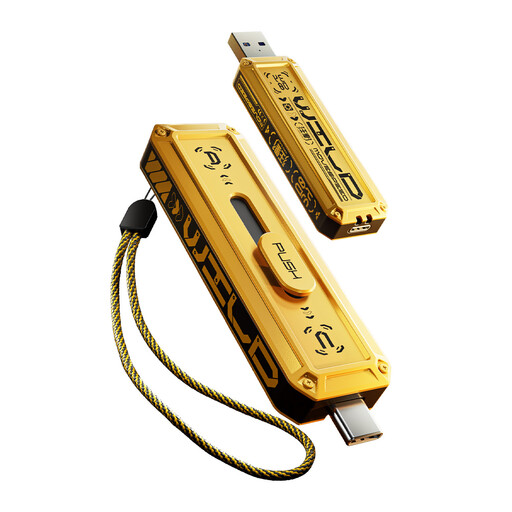
MOVESPEED YSUWD10-512GSY 512GB dual USB-A/USB-C drive
The dual connectors suit transfers between compatible USB-A and USB-C devices. This yellow variant has a stated 512GB capacity, sliding connector mechanism and keychain hole; compare the capacity with your projected folder size.
View on Joybuy
 No image available
MOVESPEED YSUWD10-1TSY 1TB dual USB-A/USB-C drive
This variant offers the same stated USB-A and USB-C connection options for a projected archive that calls for its 1TB capacity. It has a sliding connector mechanism and keychain hole; measure your scans before deciding how much space to buy.
View on Joybuy
 No image available
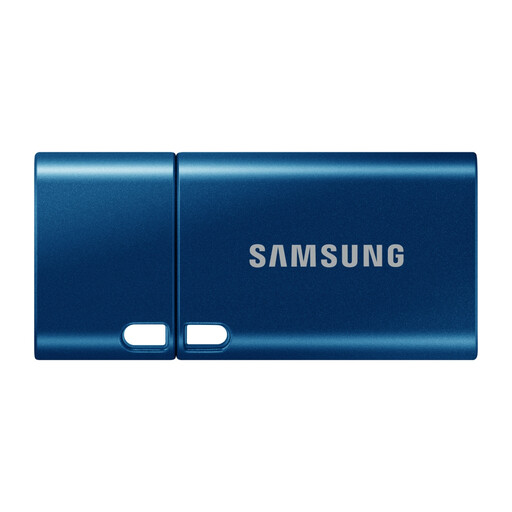
Samsung MUF-512DA 512GB USB-C drive, blue
Consider this single-connector option if the devices used to scan and read the letters accept USB-C storage. Its stated capacity is 512GB and it has a metal body; the listed connector does not provide a direct USB-A connection.
View on Joybuy
 No image available
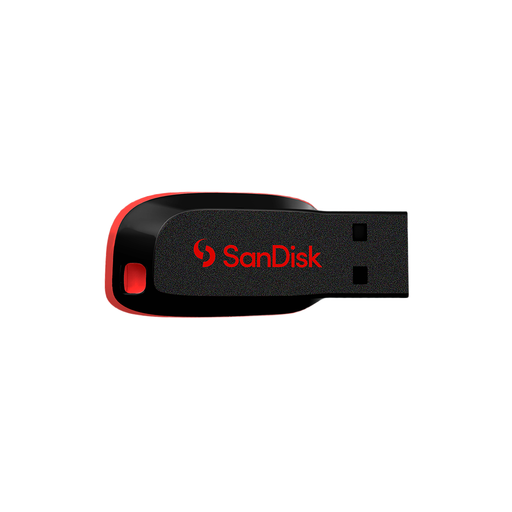
SanDisk Cruzer Blade 64GB USB drive
This USB-A option suits a plan centred on devices with compatible USB-A ports. Its stated capacity is 64GB and its interface is USB 2.0; measure a batch of scans before deciding whether that capacity fits the archive.
View on Joybuy
Questions about storing scanned letters
How much USB capacity do I need for scanned letters?
Choose capacity from the files you will make, rather than from a fixed figure for letters. Scan a representative batch using your intended resolution, colour mode and file format, measure its folder size, then project the space needed for the remaining letters and allow room for re-scans or additions.
Is one USB stick enough during a house move?
No: use the stick as one copy, not the only archive of irreplaceable letters. The National Cyber Security Centre advises storing removable backups securely and disconnecting them when not in use; keep another copy in a separate location or service and check that your copied files open.
Should I buy USB-A, USB-C or a dual-connector drive?
Match the drive to the devices that will scan and read the letters. USB-A works for a USB-A-only plan; a dual USB-A/USB-C drive is useful when you need direct transfers between both port types. Also check that each device accepts external USB storage.


