Choose a USB drive by the archive’s access risk and the ports people use, rather than capacity alone. If misplaced notes could expose sensitive material, consider controlled access and an encryption approach suited to the studio’s risk; if collaborators use both USB-C and USB-A devices, check for both connectors. Whatever the drive, keep a separate recent backup rather than making it the only archive copy.
Who is this for?
Studios handling sensitive or unpublished notes
If a portable drive goes missing, access to personal, confidential or unpublished research may matter more than transfer speed. The Information Commissioner’s Office advises security measures appropriate to the risk, including encryption where appropriate; the studio also needs a workable process for authorised access.
Mixed-device collaborators
If archive folders move between USB-C laptops or tablets and USB-A desktops, check the connectors on every device that needs the files. A drive with both connectors can serve that workflow without assuming that one port type fits everyone.
Studios building an offline archive copy
A portable drive can hold a copy of notes and supporting files, but it should not be the only recoverable copy. The National Cyber Security Centre advises keeping a recent offline backup of important data.
What matters when choosing?
Start with who may access the notes and which devices need to open them. Then size the drive for the files and versions you intend to keep, while planning a separate backup.
| Concern |
What to check |
Who this matters to |
| Access to sensitive notes |
Check the authentication and encryption method, plus how authorised users will retain or recover access. |
If misplaced notes could expose personal or confidential material, I need to control who can open the drive. Around 25% of consumers put that access-control need first. |
| Sharing between devices |
List the ports on the devices that will use the archive; check for both USB-C and USB-A if needed. |
When collaborators use different ports, I want to move folders without relying on an adapter. For around 31% of consumers, cross-device access is the primary need. |
| Keeping a recoverable copy |
Plan a separate recent backup and a clear way to identify archive versions. |
I need the notes to remain recoverable if the portable drive is lost or its files are deleted. That is the first concern for around 19% of consumers. |
| Large research-media folders |
Allow capacity for supporting files and versions; compare stated read and write figures for the exact variant. |
If notes travel with scans, recordings or other large files, I care about fitting and copying the whole folder. Around 25% of consumers prioritise that capacity-and-transfer need. |
Mistakes to avoid
-
Treating one flash drive as the whole archive
One portable item can be lost or damaged, and files on it can be deleted. The National Cyber Security Centre advises keeping a recent offline backup of important data.
Keep another separate, current copy and make it clear which version of the archive each copy holds.
-
Using an unprotected drive for sensitive shared material
A misplaced drive can expose information to someone who should not read it. The Information Commissioner’s Office identifies encryption as a security measure to consider where appropriate to the risk.
Assess what the archive contains, then choose access controls and an authorised-user process the studio can maintain.
-
Assuming USB-A connects to every studio device
A USB-A-only drive will not plug directly into a USB-C-only port. Samsung BAR Plus and Kingston DataTraveler Kyson use USB-A, while SanDisk specifies both connector types for its Ultra Dual Drive Go.
Check the ports on all intended devices before choosing between a USB-A drive and a dual-connector model.
A USB-A-only choice may require adapters or an extra transfer step in a mixed-port studio.
-
Choosing by the largest read-speed figure
Creating an archive involves writing files as well as reading them. Manufacturer speed claims can depend on the capacity variant, host device and conditions of use.
Compare the exact variant’s stated read and write figures, and try a representative archive folder before adopting a drive for the studio workflow.
Brands to consider for these drive types
iStorage
Its datAshur PRO² line is relevant when a studio wants PIN-controlled access to a portable archive.
- iStorage specifies PIN authentication and AES-XTS 256-bit hardware encryption for datAshur PRO².
- The studio still needs to manage authorised PIN access and maintain a separate backup.
SanDisk
Its USB range includes dual-connector drives for mixed ports and models with higher stated maximum speeds for larger folders.
- SanDisk specifies USB-C and USB-A connectors for Ultra Dual Drive Go.
- Check the chosen model’s capacity, connectors and the conditions attached to its manufacturer speed claims.
Samsung
BAR Plus is a USB-A option for an archive workflow centred on Type-A ports.
- Samsung specifies a metal body and a five-year limited warranty for the BAR Plus line.
- A USB-C-only device needs another connection method to use its USB-A connector.
Kingston
DataTraveler Kyson is a conventional USB-A option for notes and moderate media folders.
- Kingston specifies a metal housing, capacities up to 512GB and a five-year warranty for the DataTraveler Kyson line.
- Its USB-A connector does not directly serve USB-C-only devices.
Joybuy product choices for shared-studio archives
These drives cover mixed USB-A and USB-C workflows as well as a USB-A keypad-access option. Choose among them by the archive’s contents, the ports in use and the capacity needed; a connector choice alone does not settle access control.
 No image available
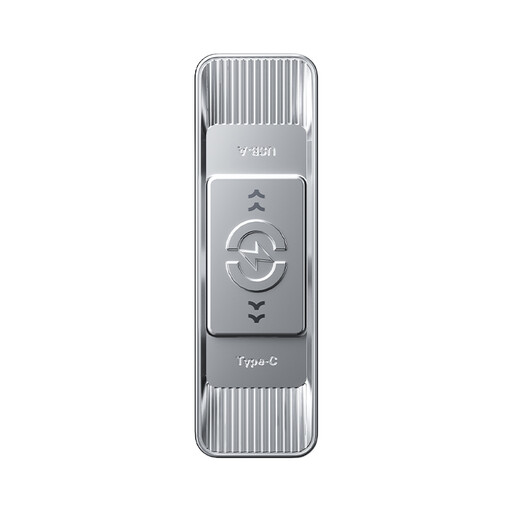
MOVESPEED YSUYC-256GSN 256GB, silver
Consider this drive when both connector types and controlled access are priorities. Its listing specifies USB-A and USB-C, fingerprint authentication, AES-256 encryption and a 256GB capacity.
Confirm how authorised colleagues enrol fingerprints, retain access and recover it before using the drive for a shared archive. The listed transfer speeds are maximum claims, not measured speeds on studio devices.
View on Joybuy
 No image available
DigiEra LUS320 128GB dual-connector drive
This 128GB drive suits a workflow that needs to connect to both USB-A and USB-C ports. The listing also specifies a swivel metal body and a maximum read speed of 500MB/s.
If the archive contains sensitive material, check its access-control and encryption features before choosing it for that purpose. Actual transfer speed depends on the devices and files used.
View on Joybuy
 No image available
MOVESPEED YSUSP05-512GSR 512GB, silver
Its 512GB capacity and stated USB-A and USB-C connectors make this a candidate when collaborators move larger folders between different ports. The listing claims maximum read and write speeds of 570MB/s and 520MB/s respectively.
Check access-control features separately if the files are sensitive. The stated speeds do not establish the transfer time for a particular studio computer.
View on Joybuy
 No image available
Kingston Technology IronKey Keypad 200 16GB
Consider this USB-A drive when keypad PIN access is important and 16GB accommodates the intended archive. Its listing specifies XTS-AES 256-bit hardware encryption and separate administrator and user PINs.
Check the studio’s ports and how PIN responsibilities will be handed over. The listing describes FIPS 140-3 Level 3 certification as pending; confirm its current status if that certification is required.
View on Joybuy
 No image available
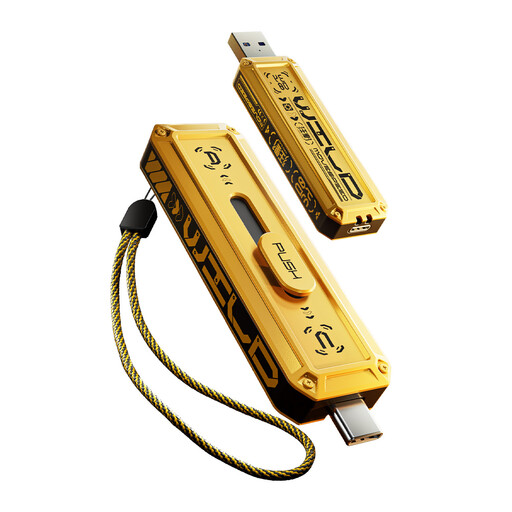
MOVESPEED YSUWD10-512GSY 512GB, yellow
This 512GB drive is listed with USB-A and USB-C connectors for mixed-port file transfers. It has a sliding zinc-alloy housing.
Confirm the exact interface and expected transfer performance before choosing it for frequent large-folder copying: the listing’s interface and speed descriptions are inconsistent. Check access controls separately if the archive is sensitive.
View on Joybuy
Frequently asked questions
Does every shared-studio USB drive need hardware encryption?
Not automatically. The Information Commissioner’s Office advises security measures appropriate to the circumstances and risk, and identifies encryption as a measure to consider where appropriate. Assess what the archive contains and who needs access before deciding on the drive and its access process.
Can a USB drive be the studio’s only research archive?
No: use a USB drive as one copy, not the only recoverable location for the notes. The National Cyber Security Centre advises maintaining a recent offline backup of important data.
Should the studio choose USB-A, USB-C or both?
Choose both connectors if the people using the archive need access through USB-A and USB-C ports; a USB-A-only drive suits a workflow where the intended devices have USB-A. Check the actual ports before purchase rather than assuming an adapter or a second transfer device will be available.
What should happen to an old archive drive?
Choose a sanitisation or disposal process appropriate to the data it held before reusing, passing on or discarding the drive. The National Cyber Security Centre includes USB drives in its guidance on sanitising storage media to reduce the likelihood that stored information can be recovered.


