For an archive of mainly text-based theatre scripts, choose a USB drive that connects directly to your home computer, then select capacity after checking the size of your files and expected growth. A dual USB-A and USB-C drive makes more sense if you also move scripts between devices with different ports; consider an encrypted drive when the archive contains personal or confidential material. Keep the drive as a disconnected copy alongside another backup, not as the only archive.
Who this is for
Home-workstation script archivists
If you keep drafts, final scripts and related documents on one computer, the USB drive can provide a removable copy. The National Cyber Security Centre advises storing backup devices securely and disconnecting them when they are not in use.
Cross-device theatre collaborators
If scripts move between a home computer and USB-C equipment, check the ports on every device that needs a direct connection. Kingston's DataTraveler microDuo 3C, for example, has both USB-A and USB-C connectors.
Confidential-production custodians
If the archive also contains cast or crew contact details, contracts or confidential production notes, consider how you would protect a lost drive and recover the files. The Information Commissioner's Office identifies encryption as a possible safeguard for personal information on removable media; it does not replace another protected copy.
What matters when choosing
Start with a backup routine you can maintain, then check the archive size and the ports you will use. Assess access protection separately if the files contain personal or confidential information.
| Concern |
What to check |
Who this matters to |
| Recoverable offline copy |
Plan another backup location; make, disconnect and occasionally open a copy from the USB drive. |
If a computer fails or files are damaged, I need a copy I can still open; around 37% of consumers put recoverable offline storage first. |
| Room for versions |
Measure the archive folder, including retained drafts and media, then allow for growth in the exact capacity variant. |
I want to retain script revisions and related files without running out of room; around 27% of consumers make archive capacity their primary concern. |
| Direct device connection |
Check whether each device needs USB-A, USB-C or both without an adapter. |
When scripts move between my home computer and another device, I need a connector that fits both; around 18% of consumers prioritise direct port compatibility. |
| Confidential files |
Assess whether access protection is needed, and check credential and recovery procedures for the exact drive. |
If the drive holds personal details or confidential production material, I need to consider access if it is lost; around 18% of consumers put confidentiality first. |
Archiving mistakes to avoid
-
Keeping the only archive on one USB drive
A lost or failed drive could take script versions and production files with it. The National Cyber Security Centre describes removable storage as one backup option, not a replacement for other protected copies.
Keep another copy in a separate location or service, update both on a workable routine and occasionally check that the files open.
-
Leaving the archive drive connected
A connected backup can be affected during a workstation compromise. The National Cyber Security Centre advises against leaving backup storage connected when it is not in use.
Connect the drive to copy or check files, then safely disconnect it and store it securely.
-
Relying on an untraceable drive without testing it
If a device is counterfeit or fails, resolving the purchase problem will not restore a missing archive.
Buy from an identifiable seller, retain the order and model details, and try copying and opening non-critical files before relying on the drive.
-
Choosing encryption without a credential plan
On Kingston's IronKey Keypad 200, repeated incorrect PIN entries can lock access or trigger crypto-erase. Protection against unauthorised access also makes credential management important.
Check the exact model's recovery procedure, store credentials securely apart from the drive and retain another protected copy.
Brands to consider for script archives
Kingston
Kingston offers USB-A DataTraveler models, the dual-connector DataTraveler microDuo 3C and hardware-encrypted IronKey models.
- Kingston specifies both USB-A and USB-C connectors for the microDuo 3C, which may suit transfers between differently equipped devices.
- The IronKey Keypad 200's PIN lockout and crypto-erase behaviour make a separate protected copy and a credential plan important.
SanDisk
SanDisk's Extreme PRO USB-A range is relevant if the archive includes substantial media files or frequent large-folder transfers.
- SanDisk lists Extreme PRO USB-A capacities from 256GB to 2TB.
- Its stated speeds of up to 1,000MB/s read and 900MB/s write are model maximums, not the copy time to expect for every computer or collection of files.
Verbatim
Verbatim has everyday USB storage as well as the password-protected Store 'n' Go Secure Pro line.
- Verbatim specifies hardware-based 256-bit AES encryption for Store 'n' Go Secure Pro.
- Check the exact model's connection, compatibility and password procedure against the devices and files in your archive.
USB drives on Joybuy
These drives cover document copies on a home computer, transfers between USB-A and USB-C devices, and options with access-protection features. Match the connector and capacity to your archive, and check the protection method before storing confidential files.
 No image available
MOVESPEED YSUYC-256GSN 256GB USB drive (Silver)
Consider this model if you move scripts between USB-A and USB-C devices. Its title specifies a dual interface, fingerprint access and 256GB capacity; check the encryption and recovery procedure before using it for confidential material.
View on Joybuy
 No image available
Kingston IronKey Keypad 200 16GB
Consider this model if PIN-controlled access matters for confidential production files and 16GB accommodates your archive. The product title states AES-256 encryption but marks FIPS 140-3 Level 3 as pending, not completed; check PIN recovery procedures and keep another protected copy.
View on Joybuy
 No image available
SanDisk Ultra 128GB USB 3.0 Flash Drive
This 128GB drive is an option for keeping a removable script copy. If you intend to use its password-protected encrypted folder, check whether the required SecureAccess software works with your computer and meets your access-protection needs.
View on Joybuy
 No image available
DigiEra LUS320 128GB USB-A and USB-C Drive
The USB-A and USB-C connectors suit a script-copying routine that uses both port types. Check that 128GB leaves enough room for retained versions and any related media.
View on Joybuy
 No image available
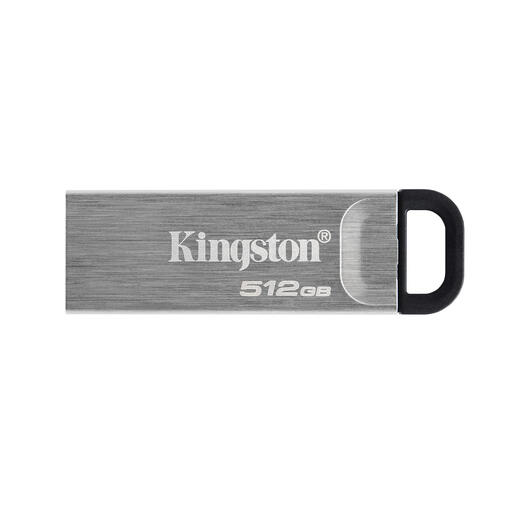
Kingston DataTraveler Kyson 512GB USB Drive
This 512GB model may suit an archive that also retains substantial related files. Measure the folder before choosing that capacity, and check that its connector fits the home computer.
View on Joybuy
Common questions
Can a USB drive be my only theatre-script archive?
No: use it as one copy, with another copy kept separately. The National Cyber Security Centre advises storing backup devices safely and disconnecting them when they are not in use; occasionally open files from your copies to check that you can retrieve them.
How much USB storage do scripts need?
Choose capacity after measuring the entire archive folder, not just the final script files. Include retained drafts, PDFs, scans and any audio or video you plan to keep, then allow room for future versions.
Do I need USB-A, USB-C or both?
Choose connectors according to the ports on devices that must use the drive directly. If your home computer uses USB-A and another device uses USB-C, a dual-connector drive can serve both; Kingston specifies those two connectors on its DataTraveler microDuo 3C.
What if I forget the PIN on an encrypted drive?
Recovery depends on the exact model, so check its procedure before placing important files on it. Kingston states that the IronKey Keypad 200 locks the user PIN after 10 failed attempts and triggers crypto-erase after 10 consecutive incorrect administrator PIN entries; keep credentials secure and another protected copy available.


