What matters when choosing?
Check the workstation’s port and the size of your invoice folder, then decide how you will protect the files and recover them if a copy is lost. A compact drive or an encrypted drive still needs the same separate-backup routine.
| Concern |
What to check |
Who this matters to |
| Recoverable copies |
Plan a separate additional copy, a safe place for the USB drive and a way to check that saved files open. |
If I need my invoices after the workstation or USB drive fails, I cannot rely on one device or leave it connected indefinitely; around 45% of consumers put recoverability and offline handling first. |
| Confidentiality |
Consider encryption for a drive that may be lost or stolen, and check how access can be recovered if a password or PIN is forgotten. |
When I carry records containing personal or financial details, I want to limit access if the drive goes missing; protecting those files is the primary concern for around 33% of consumers. |
| Fit and capacity |
Match USB-A or USB-C to the workstation and allow room beyond the current folder for planned dated copies. |
I want to plug in the drive and keep older invoice copies without running out of space; around 22% of consumers chiefly prioritise a straightforward fit and enough capacity. |
Joybuy USB drive choices
These removable-drive options include keypad-protected, fingerprint-access and standard USB flash drives for invoice copies. Compare their stated connector and capacity with your workstation and archive, and keep a second copy regardless of which drive you choose.
 No image available
Kingston Technology IronKey Keypad 200 16GB
Consider this keypad-access drive if invoice files need protection while portable; plan how you will retain access to the files.
The product name states 16GB and AES-256 encryption. Check that your workstation has a suitable port and that 16GB accommodates your archive and planned dated copies. The stated FIPS 140-3 Level 3 status is pending, not a confirmed certification.
View on Joybuy
 No image available
MOVESPEED YSUYC-256GSN 256GB Fingerprint USB Drive, Silver
Consider this drive if sensitive invoice files may travel and you need to assess its fingerprint-access and recovery process before relying on it.
The product name states a USB 3.2 Gen 1 and Type-C dual interface, 256GB capacity and a silver variant. Check the connectors against your workstation and allow room for dated copies.
View on Joybuy
 No image available
SanDisk Ultra 64GB USB 3.0 Flash Drive
For periodic invoice copies, check that this drive fits your workstation and that its capacity covers the existing archive plus older dated copies.
The product name states 64GB and USB 3.0. If you intend to protect sensitive files using the described SecureAccess software, check its setup and recovery process rather than treating it as hardware encryption.
View on Joybuy
 No image available
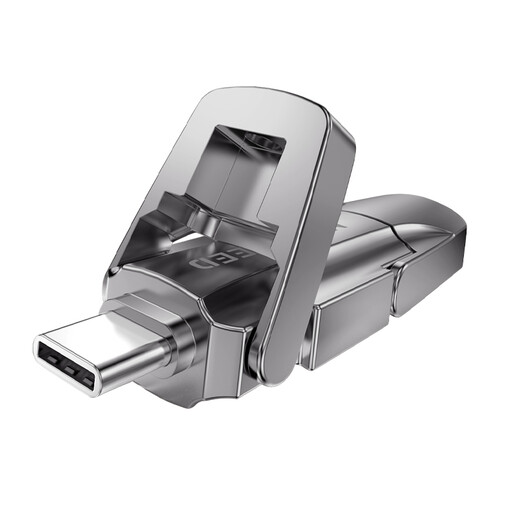
DigiEra LUS320 128GB USB-A/Type-C Flash Drive
This dual-connector option may suit an invoice-copy routine involving USB-A and Type-C ports; check the ports you actually use.
The product name states 128GB, USB 3.2, a swivel design and a metal body. Compare the capacity with your archive and planned copies, and arrange suitable protection if sensitive files will leave home.
View on Joybuy
 No image available
MOVESPEED YSUYVP10-256GSR 256GB USB Flash Drive
If you want a removable invoice copy for use with more than one connector type, check this drive’s connectors and file-system compatibility with your devices.
The product name states 256GB, a USB 3.2 Gen 1 and Type-C dual interface, and a flip-cover design. Check the space needed for dated copies and choose a protection method if the files are sensitive.
View on Joybuy
Questions about invoice backups
Can a USB flash drive be my only invoice backup?
No: one flash drive is a vulnerable single copy. The National Cyber Security Centre recommends keeping important data backed up in a separate safe location and warns that connected backup devices can be affected by malware. Keep another separate copy and disconnect the USB drive between sessions.
When should I consider an encrypted USB drive?
Consider encryption when sensitive invoice records are on a drive that could be lost or stolen. The National Cyber Security Centre advises disk encryption where removable media faces a physical-theft risk; also make sure you can manage and recover access to the encrypted files.
How long must I keep invoices supporting a Self Assessment return?
HM Revenue & Customs says self-employed people must keep relevant records for at least five years after the 31 January submission deadline for the tax year concerned, and lists sales invoices among the types of proof to retain. Check the applicable rule if your tax status or business structure differs.
Does copying files to a USB drive meet VAT digital-record requirements?
A USB copy alone does not establish compliance. HM Revenue & Customs says records forming part of a VAT-registered business’s electronic account must be kept digitally in functional compatible software; use the drive as a backup and check the requirements applying to your records.
How do I check that an invoice backup is usable?
Periodically open a selection of saved invoices and accounting exports to check that the copies are readable, then store the drive safely away from the workstation. The National Cyber Security Centre advises against leaving external backup storage connected when it is not in use.


