What matters when choosing?
Check the recording’s confidentiality and the devices’ ports before comparing capacity or speed. A faster conventional drive is still a conventional drive: published transfer figures do not add access control.
| Concern | What to check | Who this matters to |
|---|
| Protecting recordings |
Check whether files contain personal data and what security process applies. If considering a PIN-protected drive, plan credential management and a separate backup. |
If I carry identifiable interviews, I need to limit access if the drive is lost without risking my only copy through a lockout. Around 50% of consumers put protection of the recordings first. |
| Connecting both devices |
Inspect the recorder and computer ports; if an adapter is needed, confirm that the exact model includes one suitable for data transfer. |
Moving files between USB-A and USB-C equipment is difficult if the drive cannot connect when I need it. For around 30% of consumers, a workable connection is the primary need. |
| Capacity and transfers |
Use the recorder’s file sizes and expected retention period to plan free space. Check speed claims for the exact capacity and the host conditions. |
When I retain several sessions or copy batches often, I need enough room between transfers and realistic expectations about copy times. That is the main concern for around 20% of consumers. |
Joybuy product choices
These drives cover conventional removable storage, dual-connector options and keypad-protected storage for interview files. Compare the exact connector, protection method and capacity against your recorder, computer and handling process.
 No image available
MOVESPEED YSUYC-256GSN 256GB USB drive, silver
Consider this model if transfers involve both USB-A and USB-C ports and fingerprint access fits your security process.
The product name specifies dual interfaces, fingerprint encryption and a zinc-alloy body. Its stated maximums of 550MB/s read and 500MB/s write are product claims, not guaranteed transfer times; confirm how fingerprint access works with your devices and keep a separate backup.
Joybuy
 No image available
Kingston IronKey Keypad 200 16GB
This keypad-protected option is relevant when a USB-A transfer workflow calls for controlled access to portable interview files.
Kingston specifies XTS-AES 256-bit hardware encryption for the Keypad 200 range. Check whether 16GB accommodates your recordings; Kingston also warns that repeated incorrect administrator PIN attempts can crypto-erase the drive, so plan PIN management and a separate backup. If certification is a requirement, confirm the status of this exact variant before purchase.
Joybuy
 No image available
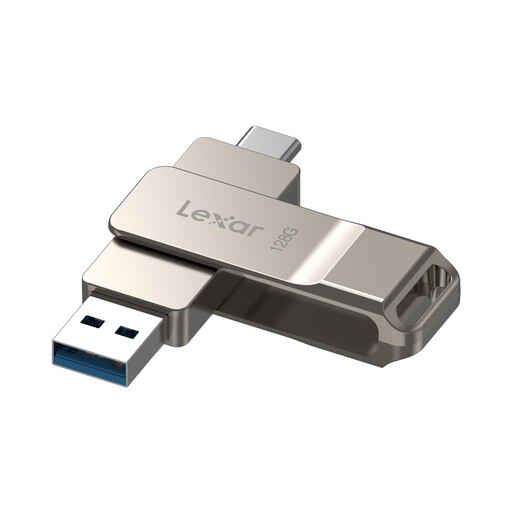
Lexar D40E 128GB dual USB drive, LJDD40E128G-BNSNG
Consider this dual-connector drive when recording transfers cross devices with different ports.
The product name specifies USB-C and a swivel metal housing. If you intend to protect files with Lexar’s software-based encryption, confirm that the software works on every computer that needs to open them; check the exact connectors against your recorder and computer.
Joybuy
 No image available
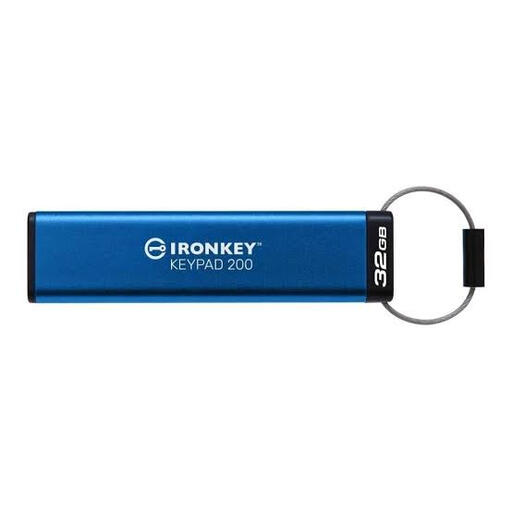
Kingston IronKey Keypad 200 32GB
This 32GB Keypad 200 is another option for a workflow requiring PIN-controlled access to portable recordings.
Kingston specifies XTS-AES 256-bit hardware encryption for the range. Confirm the connector on this exact variant before buying; manage administrator PINs and maintain a separate backup because repeated incorrect administrator PIN attempts can crypto-erase a Keypad 200 drive. Confirm variant-specific certification status if it matters to your organisation.
Joybuy
 No image available
SanDisk Ultra 128GB USB 3.0 flash drive
This conventional removable drive suits a recording-transfer process where its connector and the chosen file-protection method meet your needs.
It has a stated 128GB capacity. If you plan to use the described password-protected folder, confirm that the required software works on the computers used to store and retrieve interviews; check the recorder and computer ports as well.
Joybuy
Questions about storing interview recordings
Do interview recordings need an encrypted USB drive in the UK?
Not automatically in every case. Where recordings contain personal data, the Information Commissioner’s Office says security measures under UK GDPR should be appropriate to the circumstances and risk, with encryption considered where appropriate. Assess what the recordings contain, where the drive travels and who can access it, alongside your organisation’s policy.
Should I choose USB-A or USB-C for transferring interviews?
Choose a connector that works with the recorder and the computer used for transfer. If they have different ports, check the exact drive’s connectors or whether it includes a suitable data-capable adapter; iStorage specifies a USB-C-to-USB-A adapter for datAshur PRO+C.
How much drive capacity do interview recordings need?
Base capacity on the recorder’s actual file sizes, expected interview lengths and how long files remain on the drive, then leave free space for extra sessions. Labelled capacity is not wholly available for files, so a capacity choice cannot be made from interview count alone.
Can a USB drive be the only archive for interview recordings?
Do not rely on the flash drive as the only copy. The Information Commissioner’s Office advises measures that support restoring access after an incident, including an appropriate backup process. Copy recordings to approved primary storage and check that the copies open before deleting the originals or reformatting the drive.


